IT Operations: AI Tool Access Provisioning and Deprovisioning Workflow
How IT operations and IAM engineers should design AI tool access lifecycle management, covering provisioning requests, role scoping, role-change triggers, and a...
AI tool access does not naturally expire. Without a designed lifecycle, access granted for a project persists indefinitely, access granted to a role follows the user even after the role changes, and access granted by a business team bypassing IT is never formally recorded. The result is an access sprawl problem specific to AI tools, with higher data exposure than most conventional software because AI tools often aggregate access across multiple underlying systems.
This article defines the provisioning and deprovisioning workflow for enterprise AI tool access, designed to prevent access from persisting past its justified need.
Why AI tool access lifecycle needs explicit design
Most IT organizations have provisioning and deprovisioning workflows for core systems (email, identity, HR systems, finance tools). AI tools often fall outside these workflows because they are procured by business teams, adopted through self-service SaaS models, or treated as productivity tools rather than business applications.
The access lifecycle risk is higher for AI tools than for point applications for three reasons:
Data aggregation. An AI assistant granted access to email, documents, and calendar can read and summarize information across all three simultaneously. This is a broader data exposure than a single-purpose business application.
OAuth grants persist. Many AI tools use OAuth grants to access underlying data. The grant persists until explicitly revoked. When a user changes roles or leaves the organization, the OAuth grant does not automatically expire with their account status change.
Shared workspaces. AI tools configured at the workspace or team level may grant access to all workspace members, including users who joined after the AI tool was set up and whose access was never individually reviewed.
Provisioning workflow
A provisioning workflow for AI tools should include six stages:
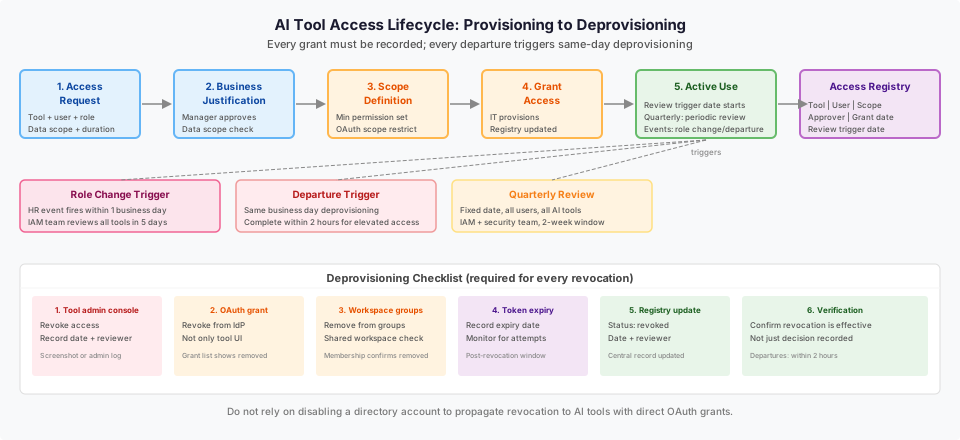
Stage 1: Access request. The user or manager submits a request naming the AI tool, the requesting user, the business role or task requiring access, the data sources the AI tool will access, and the expected duration of need. Duration is a key field. Many access requests do not have a defined end date; requiring one forces a review trigger.
Stage 2: Business justification review. A named approver (typically the user's manager or a data owner for the data sources involved) confirms the business need. This review should consider: Does the user's role require this AI tool? Is the requested data scope consistent with the user's data access rights in the underlying systems?
Stage 3: Scope definition. IT or the IAM team translates the approved business need into the minimum access scope the AI tool requires. For OAuth-based tools, this means identifying the minimum permission set. For tools with configurable data source access, this means restricting the connected data sources to those the user genuinely needs.
Stage 4: Provisioning. IT grants access with the defined scope and records the grant in the AI tool access registry with: tool name, user, access scope, business justification, approver, grant date, and review trigger date.
Stage 5: User confirmation. The user confirms the access is working and the scope matches what was requested. This step catches both provisioning errors and cases where the user discovers they need a different scope than they requested.
Stage 6: Registry update. The access registry is updated to reflect the confirmed granted state. The review trigger date starts the clock for the periodic access review.
Role-change trigger
Role changes are the most common source of persistent access that should have been revoked. The role-change trigger is an event in the HR system (role or department change, manager change, or departure) that initiates an access review for all AI tools the user holds.
The trigger should:
- Fire within one business day of the HR event being recorded.
- Generate a review task assigned to the IAM team, not the user's former manager.
- Cover all AI tools in the access registry for that user, not only the tools most recently used.
- Require a disposition decision (retain, reduce, revoke) for each tool within five business days of the trigger.
For departures, the deprovisioning should complete on the same business day.
Deprovisioning checklist
When access is to be revoked (departure, role change with no current need, or periodic review decision):
| Step | Action | Verification |
|---|---|---|
| 1 | Revoke access in the AI tool's admin console | Screenshot or admin log of revocation |
| 2 | Revoke OAuth grant(s) from the identity provider | OAuth grant list shows no active grant for this user and tool |
| 3 | Remove user from any AI tool workspace groups | Group membership shows user removed |
| 4 | Check for cached tokens (note expiry, monitor for use) | Token expiry date recorded |
| 5 | Update the AI tool access registry | Registry shows revoked status, revocation date, and reviewer |
| 6 | Confirm with the business owner (for departures) | Confirmation that no data exports are needed from the tool |
| 7 | For regulated data: confirm data retention or deletion per applicable policy | Compliance confirmation recorded |
Worked example: onboarding and offboarding across five AI tools
An enterprise runs five AI tools in production: a generative coding assistant, a Slack-integrated AI, a document processor, a sales CRM AI, and a meeting summary tool.
Onboarding - new software engineer, enterprise sales team member:
| Employee role | AI tools provisioned | Scope restrictions applied |
|---|---|---|
| Software engineer | Coding assistant (full scope), Meeting summary (personal calendar only) | Slack AI - not provisioned (no current need); Document processor - not provisioned; Sales CRM AI - not provisioned |
| Enterprise sales rep | Sales CRM AI (own accounts only), Slack AI (team workspace), Meeting summary (full) | Coding assistant - not provisioned; Document processor - not provisioned |
The scope restrictions prevent both employees from holding access to tools they have no current business need for.
Role change - software engineer moves to data team:
Trigger fires within one business day. Review covers coding assistant (retained - data team uses same tool) and meeting summary (retained - no scope change). Slack AI review is initiated - data team workspace has different access scope than engineering; scope is updated within five business days.
Offboarding - sales rep departs:
Deprovisioning initiated on departure date. Sales CRM AI access revoked in admin console and Salesforce OAuth grant revoked within two hours. Slack AI workspace access removed. Meeting summary access revoked. Access registry updated to revoked state across all five tools. Business owner confirms no pending data exports. All five tools confirmed deprovisioned by end of business day.
Diagram: access lifecycle flowchart
See the accompanying diagram (it-ops-ai-tool-access-provisioning-deprovisioning-desktop.svg) showing the provisioning request through approval, active use, role-change trigger, and deprovisioning stages with decision gates and registry update points.
Failure modes
No AI tool access registry. If access is not centrally recorded, deprovisioning is a guesswork exercise. The IAM team must discover what tools to revoke from the user's own recollection or ticket history. A registry is not optional.
Deprovisioning only the directory account. Disabling a user's SSO account does not automatically revoke OAuth grants issued to AI tools before SSO was enforced. Tools that issued tokens directly will remain accessible until explicitly revoked.
Role-change triggers that only fire for manager changes. A promotion within the same team, a move from individual contributor to management, or a project reassignment may not trigger a manager change but may change the user's data access needs significantly. Configure triggers broadly.
Assuming self-service provisioning is recorded. Users who self-provision through a tool's public SaaS interface may not appear in IT's access registry. Run an AI tool admin console audit periodically to find provisioning that bypassed the formal workflow.
What to do next
The next useful step is auditing all currently active AI tool access across the organization before designing the lifecycle workflow. The audit will reveal which tools exist, who has access, and whether the current scope is consistent with current roles. That inventory is the starting point for a managed lifecycle, not a gap to fill after the workflow is designed.
For the security perspective on periodic access review (beyond the lifecycle workflow), see the AI access privilege review resource. For IAM user lifecycle management in AWS, see the AWS IAM user management documentation.
The Custom AI Workforce service page describes how Ampity designs AI workforce deployments with access lifecycle governance built into the operating model.
Primary references
- AWS IAM user management documentation, source checked 2026-11-05
- AWS IAM Access Analyzer documentation, source checked 2026-11-05
Related resources
What Access Your AI Employee Needs in Slack, Teams and Zoho CRM
Plan least-privilege access for AI employees in Slack, Teams and Zoho CRM. Compare identities, permission boundaries, revocation and practical launch tests.
Workload Identity Still Needs a Narrow Trust Policy
Review who can assume a cloud deployment role, not just whether credentials are short-lived. Separate token identity, workflow protections and resource permissions, then test the access that should be denied.
Security Team: AI Access Privilege Review Cadence and Rotation
How CISOs and security engineers should design an access review schedule, review criteria checklist, and revocation procedure for enterprise AI tool access, with a worked example for a five-tool enterprise environment.