Security Team: AI Access Privilege Review Cadence and Rotation
How CISOs and security engineers should design an access review schedule, review criteria checklist, and revocation procedure for enterprise AI tool access, with a...
AI tool access persists longer than most security teams expect. A developer is granted access to a generative AI coding assistant during a sprint. The sprint ends. The developer moves to a different team. The access remains. Six months later, an audit finds the developer has access to an AI tool that can read proprietary code from a repository they no longer work on.
This pattern is not unique to AI tools, but AI tool access carries specific risks that make periodic review more important than for conventional software. AI tools with broad data access can retrieve, summarize, and surface sensitive information across a much larger surface area than a point application. Access that persists past need is not a theoretical risk; it is an exploitable privilege.
Why AI tool access needs its own review cadence
Conventional access review frameworks cover identity systems, cloud resources, and application roles. AI tools often fall outside these frameworks for three reasons:
They are provisioned outside IT-managed processes. Many AI tools are adopted by individual teams or through department-level procurement, without routing through the standard identity provisioning workflow. Access records may exist only in the AI tool vendor's admin console, not in the organization's identity directory.
Their scope is broader than expected. An AI tool granted access to "read Slack messages" or "read Google Drive" may have access to a large corpus of sensitive communications and documents. The scope implied by the OAuth permission string is much larger than the access typically granted to a business application.
Access at the AI layer can aggregate access from multiple underlying systems. An AI assistant connected to email, calendar, Slack, and a code repository has visibility across all four simultaneously. Revoking access in one integration may not remove the aggregated capability.
Review schedule design
A quarterly review cadence is appropriate for AI tools with access to sensitive data. For AI tools with access to regulated data (health records, financial data, PII governed by applicable law), consider a monthly review cadence.
The review schedule should specify:
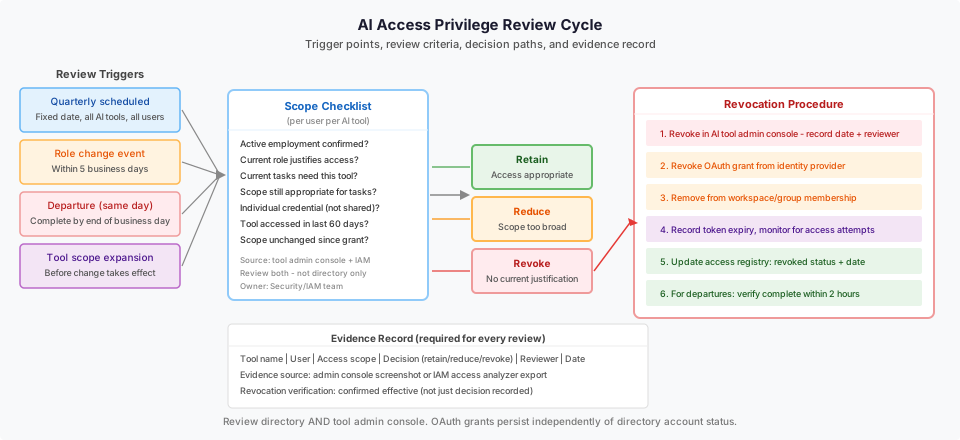
Review trigger events. Periodic reviews happen on a fixed schedule. Event-triggered reviews happen when a user changes role, leaves the organization, or when a tool's access scope changes. Event triggers should not wait for the next scheduled review; they should initiate an ad hoc access check immediately.
Review owner. A named role is responsible for each tool's access review. This is not the tool's business owner (who approves access) but the security or IAM team member who performs the review against access criteria.
Evidence requirements. The review must produce a record, not just a decision. Record who was reviewed, what access they held, what the review found, and what action was taken (retain, reduce, or revoke).
| Event type | Review timing | Owner |
|---|---|---|
| Role change (same org) | Within 5 business days | IAM team |
| Departure | Same business day | IAM + manager |
| New AI tool deployment | Before go-live | Security team |
| Quarterly scheduled | Fixed quarterly date | Security team |
| Tool scope expansion | Before scope change takes effect | Security team |
Review criteria checklist
For each user and AI tool combination in the review, check:
Active employment and role. Is the user still employed and in the role that justified the original access grant? If not, revoke.
Current need. Does the user still perform the work that requires access to this AI tool? Role continuity is not the same as task continuity. An employee who changed projects may still be in the same department but no longer needs access to a specific AI tool.
Scope justification. Is the scope of access the user holds still appropriate for their current tasks? A user granted broad read access to multiple data sources may now need only access to a subset.
Shared credential or service account check. Is the access granted to an individual or a shared credential? Shared credentials for AI tools create accountability gaps and should be identified and replaced with individual access.
Unused access. Has the user accessed the AI tool within the review period? Many AI tool vendor consoles provide last-login or last-access timestamps. Access not used within 60 days is a candidate for suspension pending user confirmation of need.
Scope changes since last grant. Has the AI tool's permission scope changed since access was granted? Tool updates sometimes quietly expand OAuth scope. Confirm current scope matches the originally approved scope.
Revocation procedure
When a review determines that access should be revoked:
- Revoke access in the AI tool's admin console. Record the revocation date and reviewer.
- Check whether the tool uses an OAuth grant to an identity provider or a separately stored credential. If separately stored, confirm the credential is invalidated, not just the user's access in the tool UI.
- For tools integrated with an SSO or identity provider, disable the application assignment in the directory. Do not rely on the tool's own revocation to propagate to the identity layer.
- If the tool has cached tokens (common in browser-based tools and mobile apps), note the token expiry and monitor for access attempts after revocation.
- Record the revocation in the access review log with tool name, user, revocation date, and reviewer.
- For immediate security events (departure of a user with elevated AI tool access), verify revocation is effective within two hours, not at next-business-day processing.
Worked example: five-tool enterprise quarterly review
An enterprise has five AI tools in production: a generative AI coding assistant, a conversational AI connected to Slack and email, an AI document processing tool, a sales AI connected to the CRM, and an AI meeting summary tool.
The quarterly review covers all five tools across 240 users. The security team conducts the review over a two-week window using the following template:
| AI tool | Users reviewed | Revocations | Scope reductions | Unused access suspended |
|---|---|---|---|---|
| Coding assistant | 85 | 7 (departed or role change) | 12 (reduced to read-only) | 9 |
| Slack/email AI | 110 | 11 | 6 | 18 |
| Document processor | 44 | 4 | 8 | 5 |
| Sales AI (CRM) | 60 | 5 | 3 | 7 |
| Meeting summary | 95 | 8 | 0 | 14 |
| Total | 240 (across tools) | 35 | 29 | 53 |
The review identifies 35 access grants to revoke (primarily from role changes and departures that did not trigger the event-based review), 29 scope reductions (users holding broader access than their current role requires), and 53 unused access suspensions pending user confirmation.
The 35 revocations represent 14.6 percent of reviewed users holding at least one AI tool access that should not exist. This is a typical finding in organizations that do not run event-triggered reviews consistently.
Diagram: access review cycle
See the accompanying diagram (security-ai-access-privilege-review-cadence-desktop.svg) showing the review trigger points (scheduled and event-based), scope checklist evaluation, decision paths (retain, reduce, revoke), and evidence record format.
Failure modes
Reviewing only the directory, not the tool console. Many AI tools maintain their own access records separate from the enterprise directory. A user might be in the directory access group but have been granted additional scopes directly in the tool console. Review both sources.
Treating role-based access groups as equivalent to individual review. Access groups simplify provisioning but make it easy for access to persist when a user changes role within the same group boundary. Group membership review is not a substitute for individual need review.
Skipping event triggers because the quarterly review is coming up. A departed user's AI tool access in the weeks before the quarterly review represents an open risk. Event triggers must run independently of the scheduled cycle.
No revocation verification. Recording a revocation decision is not the same as confirming it is effective. Verify that access is actually removed, not just marked for removal in a ticketing system.
What to do next
The next useful step is auditing which AI tools are in production use across the organization before designing the review schedule. Many tools will be in use through department-level procurement that the security team has not inventoried. The access review cannot be complete if the tool inventory is incomplete.
For credential management alongside access review, see the CI credentials retirement proof resource. For the IAM Access Analyzer capability that can help identify over-permissive access, see the AWS IAM Access Analyzer documentation.
The Custom AI Workforce service page describes how Ampity designs AI workforce deployments with access governance as a built-in design requirement.
Primary references
- AWS IAM Access Analyzer access preview documentation, source checked 2026-11-05
- AWS Bedrock Responsible AI, source checked 2026-11-05
Related resources
Revoked Access and Cached AI Answers
A previously authorized RAG answer is not permanently safe to reuse. Review permission changes across retrieval, answer caches, history and in-flight requests.
How Do You Prove an Old CI Cloud Credential Is Retired?
Close a CI credential migration with evidence of the replacement identity, disabled legacy access, resolved consumers and existing-session handling. Separate a quiet key from a retired access path.
Workload Identity Still Needs a Narrow Trust Policy
Review who can assume a cloud deployment role, not just whether credentials are short-lived. Separate token identity, workflow protections and resource permissions, then test the access that should be denied.