What Access Your AI Employee Needs in Slack, Teams and Zoho CRM
Plan least-privilege access for AI employees in Slack, Teams and Zoho CRM. Compare identities, permission boundaries, revocation and practical launch tests.
Start with the action, then choose the identity
An AI employee should receive the access required for its agreed job, not the permissions of the person it helps. Define the sources it may read, the destinations it may write to and the actions it must escalate. Then choose an identity and grant that can enforce the boundary. A prompt saying "only use this channel" is not an access control.
Consider a delivery coordinator that reads approved account records and project updates, posts an internal progress brief and asks a named owner about missing commitments. It does not need authority to delete opportunities, change contract terms or send messages as the account director. Posting its scheduled brief can be a permitted routine action. Changing a commercial commitment can remain a protected decision. The distinction is the action and its consequences, not whether AI is involved.
Slack, Microsoft Teams and Zoho CRM do not share one service-identity model. This article uses a Slack bot, considers Teams bot/application permissions, and uses delegated OAuth through a dedicated Zoho CRM user. It does not promise universal limits for every app or token. The workflow-versus-agent guide covers architecture choice; this guide covers the permissions needed to operate the chosen role.
A platform grant and a role policy answer different questions
A platform grant establishes what an integration can technically request. A role policy narrows what this particular employee may do with that capability. Both need to allow the action before it is dispatched.
For example, a messaging scope may allow posting to several destinations. The role can still be restricted to an approved channel ID and a defined message type. Enforce that restriction in the connector or action gateway, outside free-form model instructions. Treat text retrieved from records and messages as input, not as authority to change the policy.
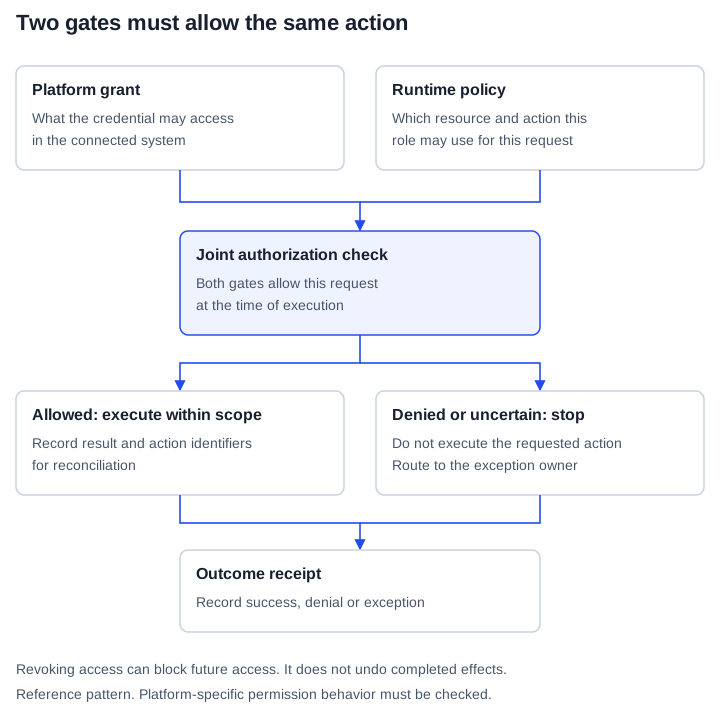
Reference pattern: a platform grant is not a substitute for the role's runtime policy. Revoking access does not reverse effects from actions that already completed. This is a proposed control pattern, not a claim that every vendor enforces the additional role policy.
The receipt should identify the action, source and destination IDs, policy decision and execution result without copying unnecessary sensitive content. A technical denial, a request awaiting approval and a successful action must remain different states. Otherwise an operator cannot tell whether the employee finished its work or merely attempted it.
Slack: keep the bot recognizable and narrow its destinations
Slack distinguishes bot and user tokens in its OAuth flow. Choose the bot pattern deliberately rather than requesting a user token for convenience. Who can install or approve an app depends on workspace app-approval policy; do not assume every installation requires the same administrator. Record the actual workspace and installed grants after authorization. Slack documents both identity types and additive grants in its OAuth installation guide.
For the example coordinator, review the following capabilities separately:
| Capability | Relevant permission | Boundary to check |
|---|---|---|
| Read public-channel history | channels:history | For a bot token, channel membership matters; permit only approved source channel IDs in the role policy. |
| Read private-channel history | groups:history | Private-channel access needs the appropriate membership. Do not request it when public project updates are sufficient. |
| Post a routine update | chat:write | Check token identity and destination. This permission is available to bot and user tokens. |
| Join public channels | channels:join | Exclude it unless joining channels is an agreed responsibility. |
| Post broadly to public channels | chat:write.public | Exclude it from a role restricted to selected joined channels. |
| Customize apparent author | chat:write.customize | Exclude it from a role that should always look like its own bot. |
The scope catalogue documents individual permissions. In particular, channels:join allows joining public channels. Therefore, "the bot can only reach channels someone explicitly invited it to" is not a universal restriction. Review membership and the complete scope set together.
Message identity also needs an explicit decision. Slack documents that an app granted chat:write.customize can customize the displayed username and avatar. Its posting documentation describes messages appearing to come from a user, with additional permission and user-action conditions. Do not call human-looking authorship impossible. For a managed employee, the safer default is recognizable bot authorship without that scope.
Direct messages are a separate destination policy. im:write supports starting conversations, including through conversations.open. Sending uses a posting method such as chat.postMessage. Opening a channel first is not the only route: Slack also documents posting with a user ID in supported contexts. A role that should only post in its project channel must not treat the existence of a messaging scope as permission to contact arbitrary colleagues.
Teams: bot installation, RSC and Graph are not interchangeable
Adding a bot to a team does not by itself give it every channel message. By default, channel and group-chat bot conversations are driven by direct mentions. Resource-specific consent can enable broader message access. Microsoft explains this distinction in its channel and group-chat guidance. Test the actual conversation type, including private and shared channels, rather than extrapolating from a standard channel demonstration.
RSC scopes access to a resource, such as a particular team, chat or meeting. It supports application and delegated modes. ChannelMessage.Read.Group is an application-context permission for reading a team's channel messages; ChatMessage.Read.Chat concerns the specified chat. These are not interchangeable. Who can grant consent depends on resource type, access mode, authorization to install and relevant tenant controls. It is not always simply "the team owner." Use Microsoft's RSC reference to verify the precise combination requested.
Microsoft Graph also offers delegated permissions, exercised on behalf of a signed-in user, and application permissions that operate without that user's presence. Check the endpoint's supported permission types and least-privileged option in the Graph permissions reference. A requirement to summarize one team's updates is not, on its own, justification for tenant-wide application access.
Admin-consent authority is permission-specific. Microsoft's consent prerequisites exclude Microsoft Graph application roles from the general consent authority of Cloud Application Administrators and Application Administrators. Route the request to an authorized role for the requested permissions instead of asking someone to escalate themselves or assuming a familiar admin title is sufficient.
For the coordinator, ask the implementation team to show the installed app, relevant resource IDs, manifest permissions, separate Entra grants and an allowed read test. Then test a resource outside the role's policy. If the platform grant technically reaches more than the role needs, the action gateway must deny that request before calling Graph. A team-scoped permission can still be broader than a single-channel job.
Zoho CRM: a dedicated user still means delegated access
Zoho CRM's API OAuth model gives a client delegated access to a user's protected resources. A dedicated integration user helps separate ownership from an individual's daily account, but it does not turn the connection into the same app-only identity used in a Teams application-permission flow. The OAuth overview describes the delegation and token lifecycle.
Select the required modules and operations first. For account briefing, examples include ZohoCRM.modules.accounts.READ and, only if necessary, ZohoCRM.modules.contacts.READ. These grant read capability for those modules, not a right to create, update or delete records. Avoid the broader ZohoCRM.modules.ALL grant for a read-only job. Zoho's scope documentation distinguishes module-specific and group permissions.
The associated CRM user's permissions, sharing and field access remain relevant. Zoho documents user access through profiles and field visibility through field metadata. Also constrain the connector's permitted records and returned fields. Choosing a fields parameter reduces requested data; it is not a replacement for user permissions or server-side role policy. Test with an authorized record and a record the role must not use. Zoho's Get Records documentation describes module scopes, field selection and permission errors.
Notes need special care. That same Get Records page states that fetching records from the Notes module is restricted to administrators. Adding ZohoCRM.modules.notes.READ does not remove that endpoint restriction. Do not make a briefing user an administrator merely to make a Notes request succeed. Instead, have the CRM owner evaluate a separately documented, permitted related-record route or an approved source that supplies only the needed information. Verify its endpoint and permissions before adding it to the design.
Finally, record the organization's data center and returned API domain. Zoho's multi-data-center guidance distinguishes Accounts and API domains. Use the matching Accounts server for token operations and the corresponding API domain for CRM requests; do not hard-code a US endpoint for every customer. Keep tokens in the server-side secret store, never in the website, browser bundle or role's working documents.
A reusable access record for one role
Complete this record before granting production access. It is Ampity's proposed review artifact, not a vendor certification.
| Field | Example for the delivery coordinator |
|---|---|
| Business action | Prepare and post the internal delivery brief. |
| Identity | Named Slack bot or Teams app; separate dedicated Zoho CRM user and OAuth client. |
| Allowed sources | Approved project channel and selected CRM account records, identified by stable IDs. |
| Allowed writes | Publish the brief to the agreed internal channel. No CRM mutation. |
| Protected decisions | External recipient changes, commercial commitments and authority expansion. |
| Evidence before launch | Allowed read/post, denied destination, stale-input handling and stop/revocation checks. |
| Operating owner | Named person or team that receives exceptions and can pause dispatch. |
| Grant inventory | Workspace/tenant/CRM organization, actual grants, token owner and revocation procedure. |
Keep customer accounts and authorization under the customer's control. In an Ampity-managed workforce, Ampity designs and operates the role within the agreed grant and policy. That arrangement does not require sharing a person's password or automatically expanding access whenever the employee encounters an unfamiliar task.
Revocation limitations: stopping is not undoing
A stop procedure should pause new dispatch, identify in-flight work, withdraw relevant access and reconcile effects already completed. If a message was posted or a CRM field changed, revocation alone does not reverse it. Record whether each action was denied, completed, uncertain or needs compensation. An uncertain result should not be retried blindly.
The platform steps differ. Slack's auth.revoke documentation distinguishes revoking a token from uninstalling an app, with separate considerations for organization-wide apps. Inventory all credentials and installations rather than treating one token as the entire integration.
In Teams, review resource consent and Entra permissions separately. Microsoft's emergency revocation guidance explains that access loss can depend on token and session behavior. Do not publish an across-the-board promise of instantaneous shutdown. Test the relevant identity and operation after the documented withdrawal steps.
Zoho's refresh-token revocation guide requires the domain-specific Accounts URL and says revocation is specific to a CRM organization. A token revoked for one organization does not revoke another organization's connection. Check the actual grant, existing access and any remaining credentials rather than assuming one successful revoke response stopped every path.
Before launch, rehearse the stop procedure in an isolated environment. Confirm that the scheduler stops, prohibited operations are rejected and the exception owner can find pending actions. Keep copied data and summaries under their own retention/deletion rules; removing source access does not itself delete material already retrieved.
What to request from an implementation partner
Ask for the completed access record, evidence of both allowed and denied behavior, and a demonstrated stop-and-reconcile procedure. Ask which boundaries the platform enforces and which the implementation must enforce. These questions expose more than a connector list or a screenshot showing a successful login.
Routine work can then proceed without unnecessary approval prompts, while protected decisions retain an accountable owner. Use the AI employee onboarding playbook to turn that boundary into acceptance tests, and the planning guide to prepare the first job and its source owners.
Primary documentation checked 16 October 2026. The linked pages support the specific vendor behaviors described, not a claim that a customer integration has been tested or deployed. Recheck applicable endpoints, permission modes and tenant policies before implementation.
Related resources
AI Agents vs Workflow Automation: How to Choose
Compare workflows, copilots and agents using a worked support example, tool permissions, approval gates, failure recovery and an evaluation checklist.
Prepare Your Company for an AI Workforce in 2027
Prepare your first AI workforce role for 2027: define its job, data access, accepted results, exception ownership, test evidence and operating costs.
Onboard an AI Employee: Role Pack, Tests and Safe Operations
Onboard an AI employee with a reusable role pack, scoped access, isolated tests, acceptance evidence, routine authority and owned recovery procedures.