AWS Multi-Account Structure for AI Workloads: Account Separation, SCPs, Cost Tagging
A step-by-step setup runbook for cloud architects designing an AWS account structure for AI development and production workloads, covering account separation, SCP...
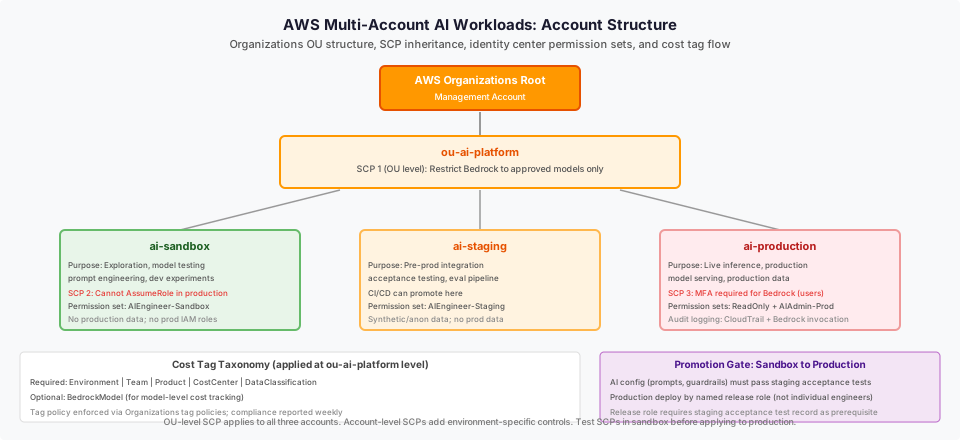
Overview
An AI platform initiative on AWS needs a different account structure design than a conventional application workload. The risks specific to AI workloads, model access control, training data isolation, inference cost tracking by team, and preventing sandbox experiments from sharing production data, require deliberate account boundaries and SCP guardrails that conventional workload account structures typically do not address.
This playbook walks a cloud architect through designing and setting up a three-environment account structure for an AI platform, including SCP configuration for Bedrock access, cost tag taxonomy, and sandbox-to-production promotion controls.
Prerequisites:
- AWS Organizations is enabled with management account access.
- Named cloud architect and AWS account owner with Organizations and IAM permissions.
- Decision on which AWS regions will be used for AI workloads (Bedrock availability is region-specific).
- Budget allocation for each environment has been agreed.
- Identity source confirmed (AWS IAM Identity Center or existing SSO/SAML federation).
Inputs:
- AI platform requirements document naming: team structure, data classification levels, regional requirements, compliance constraints.
- Existing AWS Organizations structure (if any).
Outputs:
- Three AI workload accounts created under a dedicated organizational unit (OU).
- SCPs applied to the AI OU restricting Bedrock model access to approved models.
- Cost tag policy applied and enforced.
- Identity Center permission sets configured for each environment.
- Account structure document as a reference artifact.
Time to complete: One to two days for account setup; allow additional time for SCP and tag policy design review.
Step 1: Design the account structure
Who acts: Cloud architect. Output: Account structure design document approved before account creation.
Do not create accounts before designing the structure. The structure should be designed to match the AI platform's isolation requirements, then built.
Recommended three-environment structure for an AI platform
| Account | Purpose | Isolation requirement |
|---|---|---|
| AI Sandbox | Exploration, model testing, prompt engineering, developer experiments | Isolated from production data. No production IAM roles. No access to production data stores. |
| AI Staging | Pre-production integration, evaluation pipeline, regression testing | Access to synthetic/anonymized test data. CI/CD can promote here. No production data. |
| AI Production | Live inference, production model serving, production data processing | Isolated from sandbox and staging. Principle of least privilege. Audit logging enabled. |
Place all three accounts under a dedicated OU in AWS Organizations: for example, ou-ai-platform. Apply a common SCP set at the OU level for all three accounts, plus environment-specific SCPs at the account level.
Organizational unit structure
Root
  |-- Management Account
  |-- ou-ai-platform
        |-- ai-sandbox (account)
        |-- ai-staging (account)
        |-- ai-production (account)
If the organization already has an ou-workloads or equivalent OU, the ou-ai-platform OU should sit within it, not at root level.
Done when: The structure design document is reviewed by the platform owner and security team before proceeding to Step 2.
Step 2: Create the organizational unit and accounts
Who acts: Cloud architect with Organizations admin permissions. Output: Three accounts created under ou-ai-platform.
- In AWS Organizations console, create the
ou-ai-platformOU under the appropriate parent OU. - Create three member accounts:
ai-sandbox,ai-staging,ai-production. Use a naming convention consistent with the organization's existing account naming standard. - Assign the accounts to the
ou-ai-platformOU. - Record the account IDs for all three accounts in the account structure document. Account IDs are required for SCP conditions and cross-account trust policies.
Note on account email addresses: Each AWS account requires a unique email address. Use a distribution list or alias format that can receive AWS notifications and be managed as the account contact after the initial architect is no longer the owner.
Done when: All three accounts appear in AWS Organizations under ou-ai-platform. Account IDs recorded.
Step 3: Configure Service Control Policies for Bedrock access
Who acts: Cloud architect + security team reviewer. Output: SCPs applied to the AI OU and account-level SCPs applied.
SCPs restrict what can be done in an account regardless of IAM permissions within that account. For AI workloads, SCPs serve two purposes: preventing use of non-approved Bedrock models, and preventing Bedrock invocation from accounts or principals that should not have it.
SCP 1: Restrict Bedrock model access to approved models (applied at OU level)
This SCP allows Bedrock invocation only for approved model ARNs. The AWS-documented approach for restricting Bedrock model access is Resource ARN targeting on the invoke actions, not a condition key. As of source-checked date, bedrock:ModelId is not a documented IAM condition key in the Bedrock Service Authorization Reference; condition key availability should be verified against the Bedrock Service Authorization Reference before any production use.
The illustrative SCP below uses a Deny-with-NotResource pattern, which denies invocation of any model ARN not on the approved list. Replace the example model ARNs with the full ARNs for your approved models and inference profiles.
{
  "Version": "2012-10-17",
  "Statement": [
    {
      "Sid": "DenyNonApprovedBedrockModels",
      "Effect": "Deny",
      "Action": [
        "bedrock:InvokeModel",
        "bedrock:InvokeModelWithResponseStream"
      ],
      "NotResource": [
        "arn:aws:bedrock:*::foundation-model/anthropic.claude-3-haiku-20240307-v1:0",
        "arn:aws:bedrock:*::foundation-model/anthropic.claude-3-sonnet-20240229-v1:0",
        "arn:aws:bedrock:*::foundation-model/amazon.titan-text-express-v1"
      ]
    }
  ]
}
Important notes on this pattern:
- Replace each
arn:aws:bedrock:*::foundation-model/...ARN with the exact model ARNs your organization has approved. Full model ARNs are listed in the AWS Bedrock console under Model access. - This SCP does not apply to the management account. SCPs never restrict actions in the management (root) account of an AWS Organization, regardless of where the SCP is attached.
- If your accounts use cross-region inference profiles, add the inference profile ARNs (
arn:aws:bedrock:REGION:ACCOUNT:inference-profile/...) to the NotResource list alongside the foundation model ARNs. - This is an illustrative policy pattern. Review this SCP with a qualified AWS security engineer before applying to any account. Test the SCP effect in the sandbox account before attaching to staging and production.
For the authoritative list of Bedrock IAM actions and any supported condition keys, consult the Bedrock security and IAM documentation and the Service Authorization Reference at the time of implementation, as new condition keys may be added after this playbook was written.
SCP 2: Prevent production data access from sandbox account (applied at sandbox account level)
This SCP prevents any IAM entity in the sandbox account from assuming roles in the production account. Adjust the account ID to match the production account.
{
  "Version": "2012-10-17",
  "Statement": [
    {
      "Sid": "DenyProductionRoleAssumption",
      "Effect": "Deny",
      "Action": "sts:AssumeRole",
      "Resource": "arn:aws:iam::<PRODUCTION-ACCOUNT-ID>:role/*"
    }
  ]
}
SCP 3: Require MFA for Bedrock invocation in production (applied at production account level)
{
  "Version": "2012-10-17",
  "Statement": [
    {
      "Sid": "RequireMFAForBedrockConsoleAccess",
      "Effect": "Deny",
      "Action": "bedrock:*",
      "Resource": "*",
      "Condition": {
        "BoolIfExists": {
          "aws:MultiFactorAuthPresent": "false"
        },
        "StringEquals": {
          "aws:PrincipalType": "User"
        }
      }
    }
  ]
}
This SCP applies to console access by IAM users. Service roles using instance profiles or Identity Center sessions are not affected by this condition. Adjust the scope if your production Bedrock access is exclusively service-to-service.
Done when: SCPs applied to the OU and both account-level SCPs applied. SCP test results recorded (attempted Bedrock invocation of a non-approved model in sandbox - confirmed denied; sandbox attempt to assume production role - confirmed denied).
Step 4: Design and apply cost tag taxonomy
Who acts: Cloud architect + FinOps or finance team. Output: Tag policy applied to AI OU. Tag enforcement configured.
Tags are the mechanism for attributing AI workload costs to teams, products, and environments. Without mandatory tags, Bedrock inference costs are visible in total but not attributable to the team or feature that generated them.
Recommended cost tag taxonomy for AI workloads
| Tag key | Required/Optional | Example values | Purpose |
|---|---|---|---|
Environment | Required | sandbox, staging, production | Environment attribution |
Team | Required | ai-platform, product-team-alpha | Team cost allocation |
Product | Required | customer-search, contract-ai, internal-ops | Product or use case attribution |
CostCenter | Required | Finance-provided cost center code | Finance reporting alignment |
DataClassification | Required | public, internal, confidential | Data governance alignment |
BedrockModel | Optional | claude-3-haiku, titan-embed | Model-level cost tracking |
Applying tag policy in AWS Organizations
Tag policies in AWS Organizations can require that specific tag keys are present and enforce allowed values. For example:
{
  "tags": {
    "Environment": {
      "tag_key": {
        "@@assign": "Environment"
      },
      "tag_value": {
        "@@assign": [
          "sandbox",
          "staging",
          "production"
        ]
      },
      "enforced_for": {
        "@@assign": [
          "bedrock:*",
          "sagemaker:*"
        ]
      }
    }
  }
}
Apply tag policies at the ou-ai-platform OU level. Tag policies in AWS Organizations report on compliance but do not block non-compliant resources; enforcement at the resource level requires SCPs or IAM conditions that require tags on create operations.
Done when: Tag policy applied to ou-ai-platform OU. Tag policy compliance report reviewed. IAM conditions requiring mandatory tags on Bedrock and SageMaker resources documented (or tracked as a next step if not implemented in this iteration).
Step 5: Configure IAM Identity Center permission sets
Who acts: Cloud architect + identity team. Output: Permission sets configured for each environment with least-privilege scope.
Create named permission sets for the three accounts. Do not grant broad AdministratorAccess to AI workload accounts.
| Permission set name | Target account | Allowed actions |
|---|---|---|
AIEngineer-Sandbox | ai-sandbox | Bedrock invoke (approved models), S3 read/write in sandbox prefix, CloudWatch read, SageMaker for ML experiments |
AIEngineer-Staging | ai-staging | Bedrock invoke (approved models), S3 read in staging data prefix, CloudWatch read |
AIEngineer-Production-ReadOnly | ai-production | CloudWatch read, Cost Explorer read, Bedrock inference logs read |
AIAdmin-Production | ai-production | Bedrock invoke (approved models), restricted S3, CloudWatch write for dashboards |
PlatformAdmin | All three | Organizations and IAM read, Cost Explorer, CloudTrail - no Bedrock invocation |
Assign permission sets to users or groups via IAM Identity Center. Do not issue long-term access keys for AI workload accounts. Require Identity Center session-based access for human users.
Done when: Permission sets created and assignments verified by test login from at least one AI engineer in each environment.
Step 6: Enable audit logging for AI workloads
Who acts: Cloud architect. Output: CloudTrail and Bedrock model invocation logging enabled in all three accounts.
CloudTrail: Enable an organization-wide CloudTrail trail from the management account that covers all three AI accounts. This provides a central audit record for all AWS API calls including Bedrock invocations.
Bedrock model invocation logging: Enable Bedrock model invocation logging in the production account. Invocation logs record the model ID, input token count, output token count, and latency. They do not log the prompt or response content by default; full payload logging requires explicit configuration and appropriate data handling controls.
See the Amazon Bedrock monitoring documentation for invocation log configuration details.
Done when: CloudTrail is capturing Bedrock events in all three accounts. Bedrock invocation logging is enabled in production. A test Bedrock invocation from the production account generates a log entry visible in CloudWatch Logs.
Step 7: Sandbox-to-production promotion controls
Who acts: Cloud architect + delivery lead. Output: Documented promotion gate from sandbox to production.
A well-designed account structure prevents unreviewd code, prompts, or model configurations from being deployed directly to production. Establish a promotion gate:
- AI configurations (prompts, model selection, guardrail settings) promoted from sandbox to staging must pass a documented review in staging before production.
- The staging account serves as the integration test environment. Acceptance tests (see the AI Integration Acceptance Testing playbook) run in staging, not production.
- Production deployments are made by a named release role, not individual engineers. The release role requires a promotion record showing staging acceptance test results.
- Direct human access to the production Bedrock endpoint is restricted to
AIAdmin-Productionpermission set holders. Standard AI engineers have read-only production access.
Document the promotion gate in the account structure document as a governance control, not only as a CI/CD pipeline step.
Done when: Promotion gate procedure documented and reviewed by platform owner.
Step 8: Verify account structure
Who acts: Cloud architect + security reviewer. Output: Account structure verification checklist completed.
| Verification item | Method | Expected result |
|---|---|---|
| Sandbox cannot assume production role | Attempt sts:AssumeRole targeting production from sandbox account | Denied by SCP |
| Non-approved model blocked in production | Attempt Bedrock invoke with non-approved model ID | Denied by SCP |
| Required tags enforced on new resources | Create a test S3 bucket in AI-staging without required tags | Tag compliance report flags the resource |
| Audit log captures production Bedrock invocation | Make a test invocation in production | Log entry appears in CloudWatch Logs |
| Identity Center access works for each permission set | Test login with each permission set | Access confirmed at the expected scope |
Record verification results with dates and reviewer names.
Done when: All verification items pass. Any failures are documented as defects with remediation timeline.
Reusable artifacts
Account structure diagram: See aws-multi-account-ai-workloads-structure-desktop.svg showing the AWS Organizations tree with the AI OU, three accounts, SCP inheritance, and cost tag flow.
SCP template for Bedrock access: The SCP JSON blocks in Step 3 are reusable starting points. Review each SCP with your security team before applying; the model ID allowlist and account ID references must be updated to match your environment.
Cost tag taxonomy table: The tag table in Step 4 is a reusable template. Extend with additional tag keys required by your organization's FinOps or finance team.
Failure modes and rollback
SCP too restrictive - blocks legitimate access: If an SCP blocks a Bedrock model that the team needs, update the allowlist in the OU-level SCP. Test the updated SCP in sandbox before promoting to staging and production. The recovery path is to detach the SCP from the OU temporarily in sandbox, update the allowlist, re-attach, and re-verify the targeted block still works before promoting.
Tag policy non-compliance discovered: If the tag compliance report shows untagged resources, trace each to the creating IAM entity and add remediation steps (tag existing resources, add IAM conditions to enforce tagging on create for future resources).
Identity Center permission set too broad: If a permission set allows actions beyond the intended scope, update the policy and verify the reduced permissions do not break existing workloads. This is a failure mode that requires testing each affected permission set holder to confirm access is still functional at the reduced scope.
Account in wrong OU: If an account is in the wrong OU, it may be under incorrect SCPs. Move the account to the correct OU in Organizations. SCP inheritance adjusts on move; verify the new SCP set applies correctly. Document the rollback procedure: if the move causes unexpected access denials, move the account back to its original OU and diagnose the OU policy before retrying.
Stop condition for account structure setup: If verification in Step 8 reveals that the sandbox account can reach production resources or that the production MFA SCP is not enforced, stop promotion to production use. Do not proceed with AI platform workloads until the isolation failure is diagnosed and confirmed resolved.
Done when
The playbook is complete when:
- Three accounts exist under
ou-ai-platformwith account IDs recorded. - All three SCPs (OU-level model restriction, sandbox-to-production role assumption denial, production MFA requirement) are applied and verified.
- Tag policy is applied to the AI OU and compliance report reviewed.
- Permission sets are created and test logins verified.
- Audit logging is enabled in all three accounts.
- Promotion gate is documented.
- Verification checklist is completed with no open critical items.
- Account structure document is stored as a governance artifact.
Primary references
- AWS Organizations SCPs documentation, source checked 2026-11-05
- Amazon Bedrock security and IAM documentation, source checked 2026-11-05
- AWS IAM Identity Center documentation, source checked 2026-11-05
- Amazon Bedrock monitoring documentation, source checked 2026-11-05
Related resources
AWS Multi-Account Control Assurance: Define What a Green Result Covers
Separate Control Tower configuration, analyzer coverage and observed enforcement using version-specific scope records, counterexamples and a reusable AWS multi-account assurance worksheet.
Build and Close an EKS-to-RDS Cost Allocation Ledger
Close an EKS and shared RDS showback period with exclusive cost pools, reproducible allocation, explicit unknowns and finance-reviewed reconciliation.
AWS Organizations SCPs: Controlling Bedrock Invocation Across a Multi-Account Organization
Write SCPs that deny Bedrock invocation outside approved accounts and enforce an approved model allowlist across a 20-account AWS Organization.
Enterprise Amazon Bedrock Governance Framework
Governance decision framework for enterprise Bedrock adoption. Covers account structure, IAM design, model selection gates, cost controls, and incident response across five pillars.