AI Integration Acceptance Testing: Teams, Slack, and CRM Connector Test Design
A step-by-step acceptance testing playbook for QA engineers and delivery leads verifying AI integrations before go-live, covering happy path, failure path, human...
Overview
An AI integration that passes unit tests and staging smoke tests can still fail acceptance in ways that affect end users: permission boundaries that allow access to data the user should not see, human escalation paths that route to the wrong person or no one, and failure modes that produce misleading partial responses rather than clean errors.
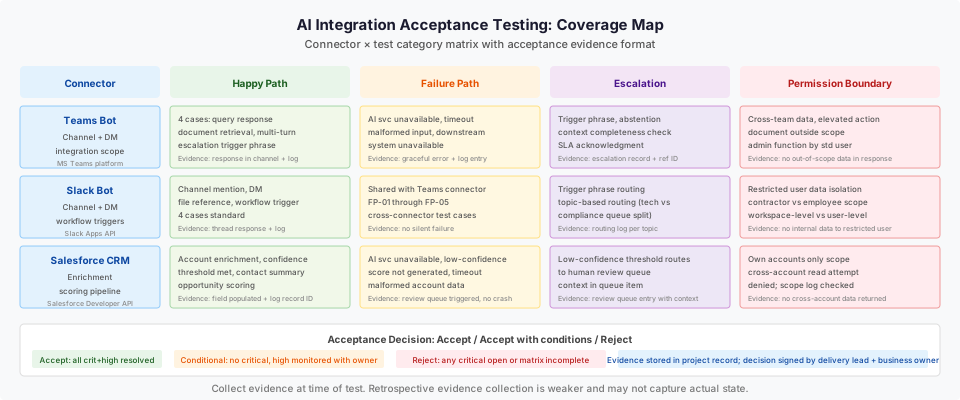
This playbook provides a structured acceptance test plan for the most common AI integration types, Teams, Slack, and CRM connectors, covering four test categories per connector: happy path, failure path, human escalation, and permission boundary.
Prerequisites:
- AI integration development complete and deployed to a staging environment with production-equivalent configuration.
- Named QA engineer and delivery lead assigned as acceptance owners.
- Test accounts configured in each connected system (Teams, Slack, Salesforce) with defined permission levels.
- Integration test data loaded (do not use real customer data in acceptance tests).
- Access to integration logs for each connector.
Inputs:
- Integration specification documenting the connector scope, data sources accessed, escalation rules, and permission model.
- Staging environment with production-equivalent permission configuration.
- Test user accounts at each permission level (standard user, elevated user, restricted user).
Outputs:
- Completed test case matrix for each connector with pass/fail evidence.
- Identified defects with severity classification.
- Signed acceptance decision with conditions (accept, accept with conditions, reject with required fixes).
Time to complete: One to three days depending on connector count and defect resolution time.
Step 1: Establish test environment and test data
Who acts: QA engineer. Output: Confirmed staging environment ready, test data loaded, test accounts provisioned.
Verify the following before beginning acceptance testing:
- Staging environment is running with production-equivalent configuration. This includes permission scopes, data source connections, and AI service configuration. A staging environment that uses a weaker permission model than production will not catch permission boundary failures.
- Test data is loaded for each connector. Use synthetic data that mimics the structure and volume of production data. For CRM connectors, load synthetic account records. For Teams/Slack connectors, populate test channels and message history.
- Test user accounts are created at each required permission level. Document which test user maps to which permission level in the test registry.
- Integration logs are accessible to the QA engineer in real time. Many acceptance failures are only diagnosable from logs.
Done when: QA engineer confirms all four items above and records the confirmation in the test registry with date and their name.
Step 2: Happy path test cases
Who acts: QA engineer. Output: Completed happy path test results for each connector.
Happy path tests verify that the integration performs its designed function correctly when inputs are well-formed, the user has appropriate permissions, and all connected systems are available.
Teams AI bot happy path test cases
| Test case | Input | Expected output | Pass criteria |
|---|---|---|---|
| T-HP-01: Standard query response | User in permitted channel sends query within scope | AI responds within 30 seconds with on-topic response | Response received, on-topic, no error message in log |
| T-HP-02: Document retrieval | User requests document the AI is configured to access | AI surfaces document content or link | Document content returned, permission log shows permitted access |
| T-HP-03: Multi-turn conversation | User sends three-message conversation | AI maintains context across messages | Responses reference prior context accurately |
| T-HP-04: Escalation trigger phrase | User sends a message matching the escalation trigger | AI acknowledges and routes to escalation queue | Escalation queue entry created, user receives confirmation |
Slack AI bot happy path test cases
| Test case | Input | Expected output | Pass criteria |
|---|---|---|---|
| S-HP-01: Channel mention response | User @mentions bot with query | Bot responds in thread within 30 seconds | Response in thread, on-topic |
| S-HP-02: DM interaction | User sends DM to bot with query | Bot responds in DM | Response in DM, correct scope applied |
| S-HP-03: File reference | User mentions an accessible file | Bot references file content appropriately | File content referenced, access log shows permitted scope |
| S-HP-04: Workflow trigger | Specific phrase triggers configured workflow | Workflow executes and confirms to user | Workflow log shows completion, user receives confirmation |
Salesforce CRM connector happy path test cases
| Test case | Input | Expected output | Pass criteria |
|---|---|---|---|
| CRM-HP-01: Account enrichment | Trigger event on account with sufficient data | AI enrichment written to configured fields | Fields populated, enrichment log shows record ID |
| CRM-HP-02: Confidence threshold met | Account enrichment with high-confidence score | Enrichment applied automatically without human review | Enrichment applied, review queue not triggered |
| CRM-HP-03: Contact summary | Sales rep requests AI summary of contact record | Summary generated with key facts from record | Summary displayed, source records referenced correctly |
| CRM-HP-04: Opportunity scoring | New opportunity created | AI score generated within configured window | Score field populated, score log entry created |
Step 3: Failure path test cases
Who acts: QA engineer. Output: Completed failure path test results for each connector.
Failure path tests verify that the integration fails gracefully when inputs are malformed, services are unavailable, or the AI cannot produce a valid response.
Failure path test cases (all connectors)
| Test case | Condition | Expected behavior | Pass criteria |
|---|---|---|---|
| FP-01: AI service unavailable | Simulate AI service outage (disable endpoint in staging) | Integration returns a user-visible error or fallback message, not a silent failure | Error message displayed, no silent queue drop, incident log entry created |
| FP-02: Malformed input | Send input with unusual encoding, empty body, or over-long text | Integration rejects gracefully with user-visible message | No unhandled exception in log, user receives "cannot process" message |
| FP-03: Response timeout | Simulate AI latency exceeding configured timeout | Integration returns timeout message, does not leave user waiting indefinitely | Timeout message displayed within configured window |
| FP-04: Downstream system unavailable | Simulate CRM or document store unavailable | Integration returns appropriate degraded response, not a crash | Graceful degradation message displayed |
| FP-05: Empty AI response | Configure AI to return empty response (use staging fixture) | Integration handles empty response without crashing | Empty response handled, user-visible message, log entry |
Step 4: Human escalation test cases
Who acts: QA engineer. Output: Confirmed escalation paths function correctly.
Escalation tests verify that human escalation routing works correctly: the right person or queue receives the escalation, the user receives confirmation, and the escalated item contains sufficient context for the human reviewer.
| Test case | Input | Expected output | Pass criteria |
|---|---|---|---|
| ESC-01: Explicit escalation trigger | User sends phrase matching escalation configuration | Escalation routed to correct queue or agent | Escalation record created in target system, user receives confirmation with reference ID |
| ESC-02: AI abstention trigger | AI declines to answer (out-of-scope or low-confidence) | User offered escalation option | Escalation offer presented, user can trigger with one action |
| ESC-03: Escalation context completeness | Escalation triggered | Escalated record includes: conversation history, user identity, timestamp, and trigger reason | Reviewer can assess context without requesting additional information |
| ESC-04: Escalation SLA acknowledgment | Escalation created | User receives SLA acknowledgment (e.g., "you will hear back within 4 hours") | Acknowledgment message received, SLA matches configured value |
| ESC-05: Escalation routing by topic | Different topic types route to different queues | Technical topics route to technical queue; compliance topics route to compliance queue | Routing log shows correct queue for each topic type |
Step 5: Permission boundary test cases
Who acts: QA engineer and security reviewer. Output: Confirmed permission boundaries are enforced.
Permission boundary tests verify that users cannot access data or trigger actions outside their permitted scope. This is the category most likely to be missed in functional testing.
| Test case | Test user | Action attempted | Expected outcome | Pass criteria |
|---|---|---|---|---|
| PB-01: Cross-team data access | Standard user (Team A) | Requests data from Team B's configured scope | AI declines or returns only Team A data | No Team B data in response, access log shows restriction |
| PB-02: Elevated action by standard user | Standard user | Attempts action requiring elevated permission | AI declines with appropriate message | Action not executed, permission denial in log |
| PB-03: Document access outside scope | Standard user | Requests document outside their configured access | AI declines or returns permitted subset | No out-of-scope document content returned |
| PB-04: Admin function by non-admin | Standard user | Attempts to modify AI configuration via bot | Request rejected | Configuration unchanged, rejection logged |
| PB-05: Restricted user data isolation | Restricted user (e.g., contractor) | Sends query that would access internal data | AI response limited to permitted scope | Restricted user receives no internal data |
Step 6: Test case matrix assembly and evidence
Who acts: QA engineer. Output: Completed test matrix with pass/fail evidence for each case.
For each test case executed, record:
| Field | Value |
|---|---|
| Test case ID | Unique ID from the matrix |
| Connector | Teams / Slack / Salesforce / Jira |
| Category | Happy path / Failure path / Escalation / Permission |
| Test date | Date executed |
| Tester | Name |
| Result | Pass / Fail / Blocked |
| Evidence | Log reference, screenshot reference, or ticket ID |
| Defect ID | If fail: ticket ID in defect tracker |
| Severity | If fail: Critical / High / Medium / Low |
Collect evidence (logs, screenshots) at time of test, not after. Evidence collected retrospectively is weaker and may not capture the actual state at test time.
Step 7: Defect classification and resolution gate
Who acts: Delivery lead. Output: Defect list with severity classifications and resolution decisions.
Classify defects by severity:
Critical: Integration allows access to data outside permitted scope, causes data loss, or silently fails without user notification. No go-live with any critical open defect.
High: Integration fails to escalate to a human when required, produces consistently wrong outputs for a core use case, or crashes on a predictable input class. No go-live with any high open defect.
Medium: Integration fails on edge case inputs with graceful error, escalation routing incorrect for minority of cases, or response quality inconsistent. Go-live conditional on agreement with business owner to accept and monitor.
Low: Cosmetic, wording, or minor UX issues. Go-live acceptable with tracked remediation timeline.
Step 8: Acceptance decision
Who acts: Delivery lead and business owner. Output: Signed acceptance decision document.
After defect classification, the delivery lead and business owner jointly decide:
Accept: All critical and high defects resolved. Medium and low defects tracked with remediation plan. Integration approved for production go-live.
Accept with conditions: No critical defects. One or more high defects accepted with specific monitoring in place and remediation committed within defined timeline. Business owner explicitly accepts the residual risk.
Reject: One or more critical defects open, or the test matrix is incomplete. Return to development for fixes and re-test.
The acceptance decision is recorded as a signed document (name, date, decision, conditions) and stored in the project record.
Reusable artifact: test case matrix template
The test case matrix for each connector type is a reusable artifact. Apply the template to new connectors by substituting connector-specific actions while keeping the four test category structure (happy path, failure path, escalation, permission).
For connectors not covered above (Jira, ServiceNow, custom APIs), apply the same four categories with connector-specific test cases derived from the connector's scope definition and permission model.
Failure and rollback paths
If the acceptance decision is Reject, the integration should not proceed to production. The staging environment should remain available for re-testing after defect resolution.
If a critical defect is discovered after go-live (missed in acceptance testing), the rollback procedure should:
- Disable the AI integration at the connector level (not the AI service level, to avoid affecting other integrations).
- Notify users that the integration is temporarily unavailable.
- Route affected tasks to the manual escalation queue.
- Conduct post-incident review and re-test before re-enabling.
Diagram: connector test category matrix
See the accompanying diagram (ai-integration-acceptance-testing-connectors-desktop.svg) showing the connector by test-category coverage map, with acceptance decision outcomes for each connector-category combination.
Done when
The playbook is complete when:
- All test cases across all in-scope connectors have a recorded result (pass, fail, or blocked with reason).
- All critical and high defects are resolved and re-tested.
- The acceptance decision document is signed by the delivery lead and business owner.
- The test matrix and evidence files are stored in the project record.
- The go-live date is confirmed or the integration is returned to development.
Common failure patterns in acceptance testing
Acceptance testing for AI integrations surfaces a consistent set of failure patterns. Knowing these patterns before testing begins helps the QA engineer design test cases that expose real issues rather than confirming the happy path.
Permission boundaries that work for one user level fail for another. Tests are often designed from the standard user perspective. A standard user requesting Team A data is correctly blocked. But the test for elevated users requesting Team B data may not have been constructed, and that combination reveals a permission misconfiguration that grants cross-team access to elevated users. Design permission boundary tests for every combination of user level and data scope, not just the most restrictive case.
Escalation routing that works in isolation fails under concurrent load. An escalation path that correctly routes a single test case may route differently when multiple escalations are created simultaneously. If the escalation queue has ordering or priority logic, test concurrent escalations before go-live.
Silent failure on dependency unavailability. An integration that handles AI service unavailability with a user-visible error message may handle CRM unavailability with a silent failure: the message is accepted, no error is shown, and no record is created. Test dependency unavailability for each connected system independently, not only for the AI service.
Human escalation that creates a record but delivers no notification. An escalation path may correctly create a queue entry but fail to notify the human reviewer. If the reviewer monitors their queue passively (by checking it on a schedule), the entry may sit unprocessed. Test that the escalation delivers an active notification (email, Slack message, or equivalent) in addition to creating the queue record.
Primary references
- Microsoft Teams platform bots documentation, source checked 2026-11-05
- Slack Apps API documentation, source checked 2026-11-05
- Salesforce developer documentation, source checked 2026-11-05
- Amazon Bedrock Agents documentation, source checked 2026-11-05
Related resources
Build an AI Change-Regression Release Gate
Turn a prompt, model or retrieval change into a versioned release decision using owned fixtures, independent grading, failure rehearsals and a tested rollback.
Review AI-Generated Code Before It Reaches Production
Review one AI-assisted change against its behavior contract, access boundaries, dependency tree and recovery evidence before accepting the exact release artifact.
Teams and Slack AI Bot Production Deployment: Scope, Permissions, Escalation, Monitoring
Production deployment checklist for an AI bot on Microsoft Teams or Slack. Covers permission scope record, escalation path, alert configuration, and go/no-go gate.