AWS Organizations SCPs: Controlling Bedrock Invocation Across a Multi-Account Organization
Write SCPs that deny Bedrock invocation outside approved accounts and enforce an approved model allowlist across a 20-account AWS Organization.
What SCPs Can and Cannot Do for Bedrock
Service Control Policies (SCPs) in AWS Organizations set permission boundaries for all IAM principals in an account. An SCP does not grant permissions; it limits what permissions IAM policies in that account can grant. If an SCP denies bedrock:InvokeModel, then no IAM policy in that account -- not even an administrator role -- can call InvokeModel.
This makes SCPs the right tool for a governance requirement like: "Only two accounts in our organization are approved to invoke Bedrock foundation models." You apply a Deny SCP to every account except the two approved ones, and the restriction is enforced at the AWS level regardless of what IAM configuration exists inside those accounts.
SCPs also allow you to enforce a model allowlist: even within an approved account, the SCP can restrict invocation to a specific set of model ARNs, preventing use of models that have not been approved by your security or procurement review.
There are three things SCPs cannot do in this context. First, they cannot restrict Bedrock invocation based on the content of the prompt or response. Second, they cannot restrict cross-account invocation patterns that originate from outside your organization (for example, a third party calling your Bedrock-integrated API). Third, they do not apply to the management account of the organization, which is exempt from SCP restrictions. Keep the management account free of workloads and use member accounts for all AI operations.
Organization Structure and SCP Inheritance
AWS Organizations organizes accounts into a tree of organizational units (OUs). SCPs attached to a parent OU or the organization root are inherited by all child OUs and accounts. SCPs at the account level apply only to that account.
For the scenario of 20 accounts with two approved for Bedrock, there are two design approaches:
Approach A: Deny at root, allow at account level. Attach a Deny SCP for bedrock:* at the organization root. Create a separate Allow SCP -- technically a Deny-with-condition SCP, since SCPs cannot directly grant -- for the two approved accounts. This requires careful policy design because SCPs use a Deny-override model: a Deny anywhere in the SCP hierarchy overrides any Allow. You cannot create a "bypass the root deny" with a child Allow SCP. The correct approach at root level is to deny everyone and then, in the Deny statement, use a StringNotEquals condition on the account ID to exclude the approved accounts from the deny. This pattern is called a "Deny unless account is in allowlist."
Approach B: Deny at OU level. Place all non-AI accounts in an OU (or a set of OUs) and attach the Deny SCP to that OU. Place the two approved AI accounts in a separate OU with no Bedrock deny. This is simpler to reason about and is the recommended pattern.
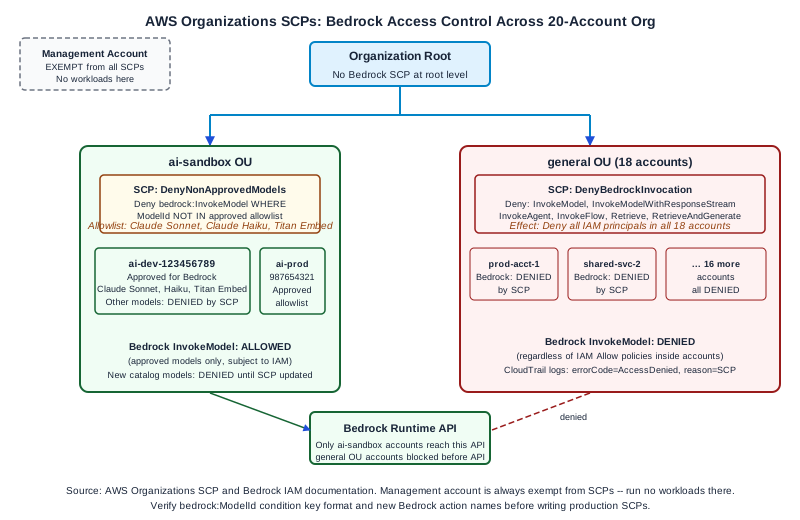
For the 20-account organization example, Approach B is cleaner. Create an ai-sandbox OU containing the two approved accounts and a general OU containing the other 18 accounts. Attach the Bedrock deny SCP to the general OU.
Writing the Bedrock Deny SCP
The deny SCP for the general OU restricts all Bedrock runtime and management actions:
{
  "Version": "2012-10-17",
  "Statement": [
    {
      "Sid": "DenyBedrockInvocation",
      "Effect": "Deny",
      "Action": [
        "bedrock:InvokeModel",
        "bedrock:InvokeModelWithResponseStream",
        "bedrock:InvokeAgent",
        "bedrock:InvokeFlow",
        "bedrock:Retrieve",
        "bedrock:RetrieveAndGenerate"
      ],
      "Resource": "*"
    }
  ]
}
This policy denies all Bedrock runtime invocation actions across every IAM principal in every account in the general OU. It does not deny Bedrock configuration or management actions (such as bedrock:CreateKnowledgeBase) -- if you also want to prevent configuration of Bedrock resources in non-approved accounts, add those actions to the statement. Review the full Bedrock action list in the IAM documentation to identify which actions you need to restrict.
Writing the Model Allowlist SCP
Inside the two approved accounts in the ai-sandbox OU, you want to enforce that only approved models can be invoked. The approved model list for this organization is: Claude 3 Sonnet, Claude 3 Haiku, and Amazon Titan Embeddings. Invocation of any other model (including newer model versions as they become available) requires going through the security review process before the SCP is updated.
The allowlist SCP uses a StringNotLike condition to deny invocation of any model ARN that does not match the approved list:
{
  "Version": "2012-10-17",
  "Statement": [
    {
      "Sid": "DenyNonApprovedModels",
      "Effect": "Deny",
      "Action": [
        "bedrock:InvokeModel",
        "bedrock:InvokeModelWithResponseStream"
      ],
      "Resource": "*",
      "Condition": {
        "StringNotLike": {
          "bedrock:ModelId": [
            "anthropic.claude-3-sonnet-20240229-v1:0",
            "anthropic.claude-3-haiku-20240307-v1:0",
            "amazon.titan-embed-text-v1"
          ]
        }
      }
    }
  ]
}
The bedrock:ModelId condition key corresponds to the model identifier in the invocation API call. Verify that the condition key name and the model ID format match the current Bedrock IAM condition keys documentation for your region, as AWS may add condition keys or change the format.
This SCP is attached to the ai-sandbox OU or to the two approved accounts individually. When a developer in an approved account attempts to invoke a model that is not on the allowlist, the call is denied by STS before it reaches Bedrock.
Worked Example: 20-Account Organization
The organization has the following structure:
- Root
- ai-sandbox OU (2 accounts:
ai-dev-123456789,ai-prod-987654321) - Attached SCP:
DenyNonApprovedModels(allowlist enforcement) - No Bedrock deny SCP -- invocation is permitted for approved models
- general OU (18 accounts: all other workload and shared service accounts)
- Attached SCP:
DenyBedrockInvocation(blanket deny)
Testing the configuration:
- From an account in the
generalOU, attempt to callbedrock:InvokeModel. Expected result:AccessDeniedExceptionwith the SCP deny in the denial reason.
- From the
ai-dev-123456789account, attempt to callbedrock:InvokeModelwith an approved model ID. Expected result: success (subject to IAM permissions within the account also allowing the call).
- From the
ai-dev-123456789account, attempt to callbedrock:InvokeModelwith a non-approved model ID (for example, a new model added to the Bedrock catalog). Expected result:AccessDeniedExceptionfrom the allowlist SCP.
- From the management account, attempt to call
bedrock:InvokeModel. Expected result: success, because the management account is exempt from SCPs. This confirms that you should run no production AI workloads in the management account.
Validating SCP inheritance with IAM Access Analyzer or the policy simulator: After attaching SCPs, use the IAM Policy Simulator to test the effective permissions for a test principal in an account in the general OU. The simulator shows SCP denies as the reason a simulated action fails, which confirms that the SCP is correctly inherited and applied.
Failure Modes
SCP not reaching an account because of OU structure. SCPs apply only to accounts directly in the OU or in descendant OUs. If you create a new account and place it at the root rather than in the general OU, it inherits the root-level SCPs but not the general OU SCP. New account onboarding processes must include explicit OU placement.
Model ID format mismatch in allowlist condition. The bedrock:ModelId condition key may match the model ID string in different formats depending on how the API call is made (using the model ID directly vs. using an inference profile ARN). Test the allowlist condition with both formats and review the Bedrock IAM condition key documentation for the exact matching behavior.
SCP applied to management account by mistake. AWS ignores SCPs attached to or inherited by the management account, but attaching them creates a maintenance hazard: future auditors may not realize the management account is exempt and may incorrectly conclude that the SCP provides coverage there. Document the management account exemption explicitly in your governance runbook.
Incomplete action list in deny SCP. Bedrock adds new actions as it releases new features (for example, bedrock:InvokeAgent was not available at Bedrock's initial launch). Review the Bedrock IAM action list each time Bedrock announces a new capability and update the deny SCP to include new invocation actions. Consider whether bedrock:* as the action is more appropriate for the general OU deny, to automatically cover new actions without requiring SCP updates.
Diagnostic Signals
CloudTrail records SCP denials in the same event stream as IAM denials. The errorCode field will be AccessDenied and the errorMessage will indicate that the request was denied by an organization SCP. This allows you to build a CloudWatch metric filter that counts SCP-denied Bedrock calls and alerts when accounts outside the ai-sandbox OU are attempting Bedrock access -- which may indicate a misconfigured workload or an attempted policy violation.
AWS Config with the scp-attached-to-ou conformance pack rule can detect changes to SCP attachments and alert when the governance configuration is modified.
Next Steps
The Ampity AWS Consulting service [/ai/amazon-bedrock-consulting] covers AWS Organizations design, SCP strategy, and governance baseline configuration for multi-account AI platforms. Verify current Bedrock IAM action lists and condition key documentation before writing SCPs, as new actions are added with feature releases.
Primary Sources
- AWS Organizations Service Control Policies, source checked 2026-11-05
- Bedrock Security and IAM, source checked 2026-11-05