S3 Storage Classes and Lifecycle Policies for AI Training Data
Match AI training dataset access frequency to S3 storage class, write lifecycle rules for active training, archived checkpoints, and cold evaluation snapshots.
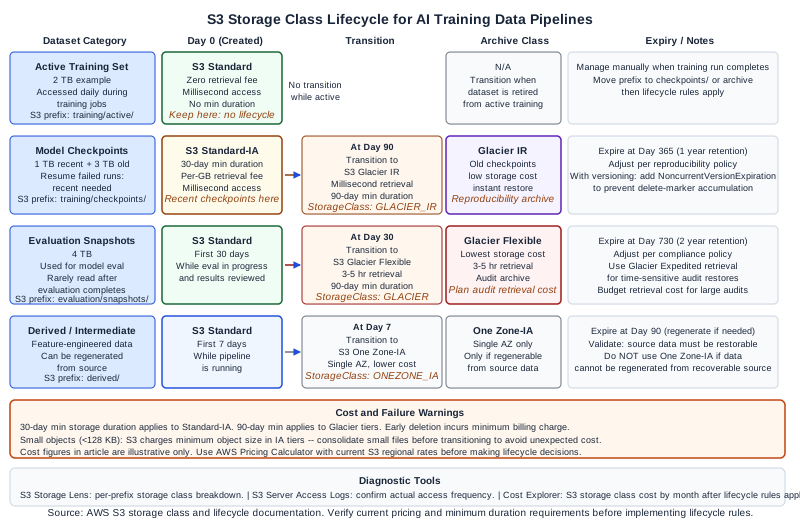
The Storage Cost Problem for AI Teams
AI training datasets grow fast and are accessed unevenly. The active training set for a current model run may be read hundreds of times per day. Last quarter's evaluation snapshots may never be read again. Model checkpoints from completed training runs need to be retained for reproducibility but are rarely restored. If all of this data lives in S3 Standard, you are paying Standard storage pricing for data that behaves like cold archive.
The direct answer to the lifecycle question is: use S3 Intelligent-Tiering or explicit storage class transitions to match each dataset category to its access pattern. For AI training workloads, three categories cover most pipelines: active training data, model checkpoints, and evaluation snapshots. Each has a distinct access pattern and optimal storage class.
Before writing lifecycle rules, verify the current S3 storage class pricing for your AWS region in the AWS pricing calculator. The cost figures in this article are illustrative examples used to demonstrate the lifecycle decision framework, not current AWS billing rates.
S3 Storage Class Overview for AI Workloads
S3 Standard. Zero retrieval fee, minimum duration requirement, and highest storage price per GB. Optimal for data accessed frequently (multiple times per week or more). Use for active training sets and embedding indices that are read during every training run or inference request.
S3 Standard-Infrequent Access (S3 Standard-IA). Lower storage price than Standard, but a per-GB retrieval fee applies when data is read. 30-day minimum storage duration applies. Optimal for data accessed roughly once per month. Use for recent model checkpoints that might be restored if a current run fails.
S3 One Zone-Infrequent Access (S3 One Zone-IA). Same retrieval pricing as Standard-IA but lower storage cost, at the cost of reduced availability (data stored in a single AZ). Acceptable for data that can be regenerated if lost (derived datasets, intermediate checkpoints). Do not use for primary training data that cannot be regenerated.
S3 Glacier Instant Retrieval. Lower storage cost than S3 Standard-IA. Retrieval within milliseconds, with a per-GB retrieval fee. 90-day minimum duration. Optimal for archive data accessed occasionally (quarterly). Use for evaluation snapshots from past quarters and model checkpoints from completed experiments.
S3 Glacier Flexible Retrieval. Lowest storage cost among Glacier tiers with standard retrieval times of 3-5 hours (expedited retrieval is available but costs more per GB). Minimum storage duration of 90 days. Optimal for cold archive data you will retrieve rarely and can wait hours for. Use for completed project datasets that must be retained for compliance but are almost never accessed.
S3 Intelligent-Tiering. Automatically moves objects between access tiers based on observed access patterns. No retrieval fees for transitions between the frequent and infrequent access tiers (a small monthly monitoring fee applies per object). Optimal when access patterns are unpredictable or mixed across a large dataset. The monitoring fee makes it less efficient than explicit lifecycle rules for datasets with well-known access patterns and large object sizes.
Categorizing AI Training Data by Access Pattern
Category 1: Active training set. The dataset used for the current model training run. Accessed multiple times daily during training jobs. Possibly accessed during data augmentation preprocessing and validation loops.
Storage class: S3 Standard. No lifecycle transition while training is active.
Category 2: Model checkpoints. Weights saved at regular intervals during training (for example, every epoch or every 10,000 steps). The most recent checkpoints are needed for resuming interrupted training runs. Older checkpoints from the same run are retained for reproducibility analysis but are rarely read.
Storage class: Keep the last 3-5 checkpoints in S3 Standard-IA. Transition older checkpoints to S3 Glacier Instant Retrieval after 90 days. Expire very old checkpoints (beyond your reproducibility retention window) after 365 days.
Category 3: Evaluation snapshots. Held-out test sets used for model evaluation at specific milestones. After the evaluation run completes, these datasets are rarely accessed. They must be retained to allow future audits of reported model accuracy.
Storage class: S3 Standard for 30 days (while evaluation is in progress and results are being reviewed). Transition to S3 Glacier Flexible Retrieval after 30 days. Retain for 2 years for audit purposes, then expire.
Category 4: Derived and intermediate datasets. Feature-engineered or augmented versions of training data generated by preprocessing pipelines. Can be regenerated from source data if needed.
Storage class: S3 One Zone-IA after 7 days. Expire after 90 days (regenerate from source if needed). The regeneration assumption must be validated -- do not use One Zone-IA for data that cannot be regenerated from a recoverable source.
Writing Lifecycle Rules
S3 Lifecycle rules are attached to a bucket and apply filters based on object prefix, tag, or object size. For AI training data pipelines, prefix-based filtering is the clearest approach: organize your S3 bucket structure so that object prefixes correspond to data categories.
s3://ml-data-bucket/
  training/active/          <-- Category 1
  training/checkpoints/     <-- Category 2
  evaluation/snapshots/     <-- Category 3
  derived/                  <-- Category 4
Lifecycle rule for checkpoints (JSON for AWS CLI or CloudFormation):
{
  "ID": "checkpoint-lifecycle",
  "Filter": { "Prefix": "training/checkpoints/" },
  "Status": "Enabled",
  "Transitions": [
    {
      "Days": 90,
      "StorageClass": "GLACIER_IR"
    }
  ],
  "Expiration": {
    "Days": 365
  }
}
Lifecycle rule for evaluation snapshots:
{
  "ID": "evaluation-snapshot-lifecycle",
  "Filter": { "Prefix": "evaluation/snapshots/" },
  "Status": "Enabled",
  "Transitions": [
    {
      "Days": 30,
      "StorageClass": "GLACIER"
    }
  ],
  "Expiration": {
    "Days": 730
  }
}
Lifecycle rule for derived datasets:
{
  "ID": "derived-dataset-lifecycle",
  "Filter": { "Prefix": "derived/" },
  "Status": "Enabled",
  "Transitions": [
    {
      "Days": 7,
      "StorageClass": "ONEZONE_IA"
    }
  ],
  "Expiration": {
    "Days": 90
  }
}
Apply these rules using the AWS CLI:
aws s3api put-bucket-lifecycle-configuration \
  --bucket ml-data-bucket \
  --lifecycle-configuration file://lifecycle-rules.json
Worked Example: Illustrative Cost Comparison
The following example uses illustrative pricing to show the lifecycle decision framework. Use the AWS pricing calculator with current S3 rates for your region to produce accurate cost estimates for your workload.
A team stores 10 TB of training data across four categories:
| Category | Size | Access | Current class | Recommended class |
|---|---|---|---|---|
| Active training set | 2 TB | Daily | S3 Standard | S3 Standard (keep) |
| Recent checkpoints (< 90 days) | 1 TB | Occasionally | S3 Standard | S3 Standard-IA |
| Old checkpoints (> 90 days) | 3 TB | Rarely | S3 Standard | S3 Glacier IR |
| Evaluation snapshots | 4 TB | Almost never | S3 Standard | S3 Glacier Flexible |
For illustrative purposes, if S3 Standard storage costs approximately 10x more per GB-month than S3 Glacier Flexible Retrieval (the actual ratio varies by region and changes over time), transitioning 4 TB of evaluation snapshots from Standard to Glacier Flexible produces a material monthly storage cost reduction. The 3 TB of old checkpoints in Glacier Instant Retrieval also reduces storage cost relative to Standard, while preserving millisecond retrieval for occasional restores.
The retrieval cost must factor into the analysis. If old checkpoints or evaluation snapshots are retrieved more frequently than anticipated, the per-GB retrieval fees for Glacier tiers offset some of the storage savings. For checkpoints accessed once per quarter, the retrieval cost is typically small relative to the storage savings at scale. Use the AWS pricing calculator to model your specific retrieval frequency and data volumes before making lifecycle decisions.
Small Object Penalty
One failure mode specific to AI data pipelines: small objects (under 128 KB) cost more per GB in S3 Intelligent-Tiering and in Infrequent Access tiers due to the minimum object size billing floor. If your training pipeline writes many small files (individual tokenized records, small feature vectors, or many tiny checkpoint metadata files), the minimum size floor applies and you may not see the expected cost reduction from storage class transitions.
For small-object datasets, consider consolidating files into larger archives (using TAR or Parquet partitioning) before storing them in S3. This reduces the object count, eliminates the small-object minimum size penalty, and also improves read throughput for training jobs that need to load many small files sequentially.
Failure Modes
Lifecycle rule not applying to versioned objects. If S3 Versioning is enabled on the bucket, the lifecycle rule Expiration action on the current version creates a delete marker rather than permanently deleting the object. Noncurrent versions accumulate unless you add a separate NoncurrentVersionExpiration rule. For ML checkpoint buckets with versioning, add explicit noncurrent version expiration to prevent unbounded storage growth.
Transition too early for Standard-IA minimum duration. S3 Standard-IA has a 30-day minimum storage duration. If you transition objects to Standard-IA before 30 days and then expire them, you are billed for the full 30-day minimum. Set transition days to at least 30 for Standard-IA and 90 for Glacier tiers to avoid early deletion charges.
Active training set accidentally transitioned. If lifecycle rules use a prefix that is too broad, they may apply to the active training set and transition it to a lower-cost tier during an active training run. Training jobs that try to read Glacier objects will fail with a retrieval delay or error. Use precise prefix filters and test lifecycle rule scope with the S3 Lifecycle rule test feature before enabling rules.
Retrieval cost spike during model audits. If regulatory or compliance audits require restoring large volumes of Glacier evaluation snapshots, the retrieval cost can be significant. Plan for audit scenarios in your cost model and use Glacier Expedited Retrieval selectively for time-sensitive restores.
Diagnostic Signals
S3 Storage Lens provides per-bucket and per-prefix breakdowns of storage class distribution, object count, and storage size. Use Storage Lens to identify buckets where most of the storage is in S3 Standard despite low access frequency -- this is the primary signal that lifecycle rules are missing or misconfigured.
S3 Server Access Logs record every request to objects in the bucket, including the object key and operation. Analyzing access logs for objects in your lifecycle-managed prefixes confirms the access frequency assumptions underlying your storage class selection.
AWS Cost Explorer with the S3 storage class breakdown shows month-over-month cost by storage class. After implementing lifecycle rules, the Standard storage line for checkpoint and evaluation prefixes should decrease month-over-month as objects transition to lower-cost tiers.
Next Steps
For teams managing AI training data infrastructure on AWS, the Ampity AWS Consulting service [/cloud/aws-consulting-migration] covers S3 lifecycle design, cost modeling, and storage architecture for ML platforms. Verify current S3 storage class pricing and minimum duration policies against the AWS S3 documentation before implementing lifecycle rules.
Primary Sources
- S3 Storage Classes, source checked 2026-11-05
- S3 Lifecycle Configuration Examples, source checked 2026-11-05
Related resources
Why Editing an S3 Lifecycle Rule Can Stop Small-Object Transitions
Diagnose S3's September 2024 lifecycle default change, read the effective configuration and compare explicit size filters before editing production rules.
Why an S3 Noncurrent-Version Expiration Rule Still Retains Old Versions
Diagnose retained S3 versions with successor-based time, configured age and count gates, marker classification and a bounded evidence worksheet.