Why an S3 Noncurrent-Version Expiration Rule Still Retains Old Versions
Diagnose retained S3 versions with successor-based time, configured age and count gates, marker classification and a bounded evidence worksheet.
A retained S3 version is not necessarily evidence that its expiration rule failed. Check when that version became noncurrent, whether the configured newer-version condition is met, and whether you are looking at a data version or a delete marker. For a rule with both age and retained-version conditions, age alone does not settle eligibility.
This diagnosis is for engineers inspecting versioning-enabled S3 general purpose buckets. It does not authorize deleting production versions, changing retention or bypassing a hold. The worksheet and fixtures below are hypothetical; no AWS bucket was exercised for this article. Directory buckets and suspended-versioning null-version behavior are outside the worked example. The NoncurrentVersionExpiration API identifies the general purpose bucket scope.
1. Bind the symptom to one exact version
“The file is old” is too broad to explain a lifecycle result. Start with the account, bucket, key, version ID and inspection time. Decide whether the symptom is an ordinary read returning not found, an old data version still listed, or a current delete marker remaining. Each asks a different question.
A marker has no object payload, but it can make an ordinary read behave as though the key were deleted. Its presence does not show that historical data versions disappeared. AWS's delete-marker documentation describes this distinction. Do not use an ordinary object listing or a screenshot of the latest key as the version inventory.
Use approved read access and a restricted evidence location. A key can contain customer identifiers even without fetching its payload. Keep the diagnostic packet to identity, timestamps, applicable configuration and relevant status. Do not copy object contents simply to prove that a version exists.
Before interpreting an absent result, confirm the inspection identity can see the required version scope. A denied listing, truncated response or wrong bucket is missing evidence, not successful expiry. Resolve that gap first rather than changing the rule to make the dashboard look different.
2. Separate current expiration from noncurrent expiration
An Expiration action and a NoncurrentVersionExpiration action do not do the same work. In a versioning-enabled bucket, expiration of the current data version can add a current delete marker and leave that data version noncurrent. Current-version expiration does not, by itself, remove the historical versions. See AWS's expiration considerations.
Read the actual enabled rule, not its display name. A rule called “delete after 30 days” might contain only current-version expiration. Another might combine current and noncurrent actions, each with a different clock. Record the applicable action and filter beside the version under investigation.
For the worked diagnosis, suppose an enabled rule selects the approved reports/ prefix and has NoncurrentDays = 30 and NewerNoncurrentVersions = 2. Those values are invented policy inputs, not recommended retention. When both are configured, the conditions act together. The lifecycle configuration guide also requires a Filter element when the newer-version count is specified and describes a count range of 1 through 100.
Do not equate a valid rule with an approved data-retention decision. The storage owner still needs the application owner to explain which historical states must remain recoverable. Removing a count condition can materially change that recovery history, even when the age value stays the same.
3. Use the successor's time, not the old version's upload time
A version can be months old yet have become noncurrent yesterday. Its original creation timestamp is not the noncurrent-age origin. AWS uses the creation time of its successor to establish when the preceding version became noncurrent, then adds the configured days and rounds up to the next midnight UTC. This is documented in the noncurrent-time calculation.
For example, hypothetical version A was uploaded on July 1 at 10:00 UTC. Version B replaced it on September 1 at 10:00 UTC. With a 30-day noncurrent condition, A's age boundary is October 2 at 00:00 UTC: September 1 at 10:00 plus 30 days, rounded up to the following midnight. Counting from July 1 would produce the wrong diagnosis.
Keep that calculated boundary separate from a completed removal timestamp. Passing a time condition does not make lifecycle processing instantaneous. Do not schedule a recovery assumption on “exactly 30 days after upload” when neither the clock origin nor observed lifecycle action supports it.
A current listing cannot always reconstruct the original successor if versions were permanently removed or the key's history changed. Do not substitute the next surviving version's timestamp without evidence. Retain an unknown clock origin, obtain an available approved history record, or limit the conclusion. The worksheet should expose that uncertainty rather than manufacture a precise expiry date.
4. Check the count gate without inventing an exact boundary
The count belongs to the same key's noncurrent history, not the bucket's total object count. A heavily rewritten report can have many newer noncurrent versions; another old report may have very few. The current version is a different state and should not be casually counted as a newer noncurrent data version.
There is a wording inconsistency worth preserving. Current AWS lifecycle examples say more than the configured number of newer noncurrent versions must exist. The older AWS Storage Blog walkthrough describes keeping the two newest noncurrent versions and expiring additional ones. These statements do not give the same equality boundary. This article does not silently choose between them or promise exact keep-two behavior.
For an initial diagnosis with a configured count of two, one known newer noncurrent data version is clearly below the condition, while three are clearly above it. A case with exactly two belongs in a separately specified boundary fixture and needs authoritative clarification or observed evidence before it supports an exact-retention promise. Marker-heavy histories also need their own treatment; the worked count rows below use ordinary data versions and no intervening markers.
An omitted count condition is not a count of zero. Capture absence explicitly and evaluate the actual rule. Likewise, do not infer that the rule retained the newest two merely because two remain in a short listing. The listing may be incomplete, the age gate may still block another version, or a protection may apply.
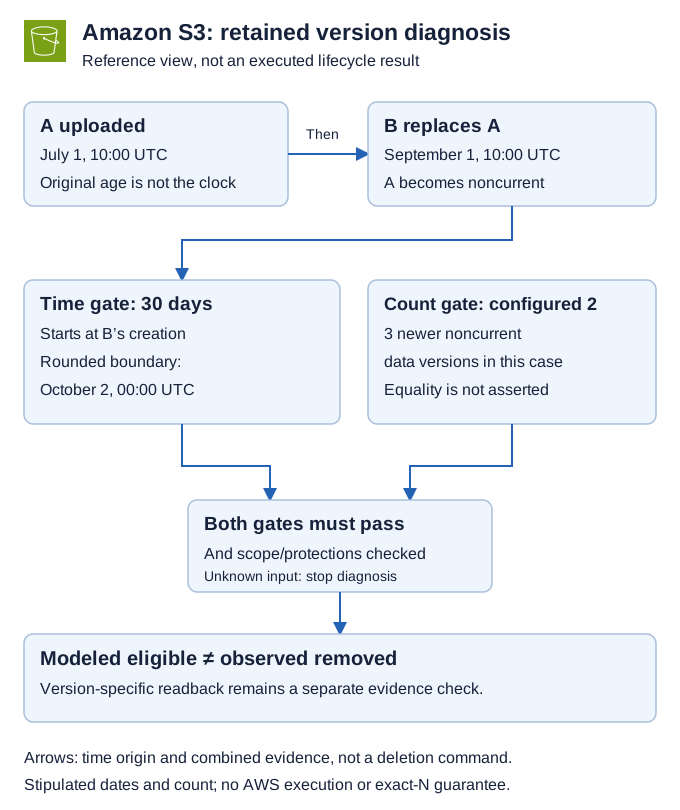
*Illustrative eligibility view for a rule with both conditions configured. It is not a deletion receipt. The equality count boundary is deliberately excluded from the passing example.*
5. Complete a worksheet before changing the configuration
Use one inspection time and one deployed rule snapshot for the initial comparison. The following completed worksheet is stipulated, not exported from S3. Assume approved reports/ keys, versioning enabled, no lock or replication blocker, complete histories and unchanged rule values of 30 days and two newer noncurrent versions. “Age passed” means the rounded UTC boundary is already in the past at October 7, 2026, 12:00 UTC.
| Case / target | Successor created | Rounded 30-day boundary | Newer noncurrent data versions | Diagnosis at inspection |
|---|---|---|---|---|
A / reports/monthly, vA | Sep 1, 10:00 UTC | Oct 2, 00:00 UTC | 3 | Both modeled gates pass; actual removal not observed |
B / reports/quarterly, vB | Sep 1, 10:00 UTC | Oct 2, 00:00 UTC | 1 | Age passed, count blocks the modeled conclusion |
C / reports/daily, vC | Sep 25, 10:00 UTC | Oct 26, 00:00 UTC | 3 | Count passed, time condition not yet reached |
D / reports/boundary, vD | Sep 1, 10:00 UTC | Oct 2, 00:00 UTC | 2 | Equality behavior unresolved; not a passing fixture |
E / reports/history-gap, vE | Unknown original successor | Unknown | 3 | Clock evidence missing; eligibility unresolved |
Case A is useful precisely because it stops at a narrow conclusion. It supports investigation of other blockers or processing, not a claim that S3 already deleted the version. Cases B and C distinguish independent gates. Case D prevents an off-by-one assumption from hiding inside a “successful” example. Case E prevents a surviving version listing from being mistaken for complete historical evidence.
Keep these additional fields beside every row: bucket owner and Region, key/version identity, read principal, capture time, enabled rule ID/filter, pagination completion, protection/replication status and observed version-specific outcome. Label which fields are returned, which are historical evidence, and which are calculated. A spreadsheet formula cannot convert an inferred successor into an observed one.
6. Classify the marker and other blockers separately
A current delete marker with older versions underneath is not an expired object delete marker. The latter has no remaining noncurrent versions. Removing expired markers is a separate lifecycle action; it is not a mechanism for removing all the payload versions underneath a marker. AWS describes that distinction in lifecycle configuration elements. A current marker with retained data should therefore lead back to the version worksheet, not directly to marker cleanup.
If both modeled gates pass, inspect protections before assuming a service defect. Object Lock considerations explain that a protected version cannot be deleted by a lifecycle expiration policy even though lifecycle can still place markers. A hold or retention state is a separate owner decision, not permission to bypass protection to finish the worksheet.
Add these fields to the selected version's evidence packet:
- Retention mode and current retain-until date, with capture time.
- Legal-hold status, separately from retention.
- Event-hold status and duration, where applicable. An active event hold can make the returned retain-until date dynamic.
- Bucket default retention configuration, labeled as a bucket setting, not proof of this version's protection.
- Version-specific replication status.
PENDINGorFAILEDblocks lifecycle action on current and noncurrent versions under AWS's expiration considerations.
AWS's lock-information permissions distinguish s3:GetObjectRetention, s3:GetObjectLegalHold and s3:GetBucketObjectLockConfiguration. Metadata-only HeadObject also needs the relevant object/version read permission; confirm the approved version-specific scope rather than fetching payloads. A version-specific GetObject uses s3:GetObjectVersion.
Record denied, unavailable or uninterpretable fields as UNKNOWN, not “no protection” or “not replicated.” Ask the storage owner to resolve the metadata and read-access gap before changing the rule. No successful readback is claimed here. Also inspect other applicable lifecycle rules; processing remains asynchronous. Record the blocker or next observation without inventing a removal deadline.
7. Collect bounded evidence and keep destructive tests isolated
The ListObjectVersions API returns data-version and marker entries with version IDs, latest status and timestamps. Pagination uses both next-key and next-version markers when the response is truncated. Preserve those page boundaries and exact-key selection; a prefix response can include nearby keys that must not enter the target's count.
Avoid treating a multi-page read during active writes as one immutable historical snapshot. Capture the observation interval, note concurrent changes and repeat or reconcile inconsistent rows. A truncated history should fail the evidence gate. A version that is absent from an authorized complete scoped read can support that narrower absence observation, but not deletion of replicas, backups or every copy.
For an approved isolated exercise, specify expected outcomes before creating synthetic versions. Include below/above count cases, a recent successor, an equality case, an out-of-prefix control and a deliberately incomplete evidence packet. The checker should reject the incomplete packet and leave the control outside the candidate set. Actual lifecycle behavior and the count equality case remain untested here.
Noncurrent expiration is irreversible. Do not test by permanently removing production versions or changing a real rule merely to provoke a result. An authorized experiment needs isolated destinations, exact identities, accepted retention, a stop boundary and observed readback. A configuration rollback cannot recreate already removed historical versions.
8. Close the diagnosis at the evidence-supported state
Use an explicit disposition: wrong action, wrong scope, clock not reached, count clearly below condition, equality unresolved, protection applies, or both modeled gates passed with removal still unverified. This is more useful than one generic “lifecycle failed” status because each state has a different next owner and action.
Start with one retained version. Read its complete scoped history and current rule, identify the original successor evidence, and fill the age/count row without writing anything. If a field is missing, resolve it before recommending a configuration change. For the different problem of small objects not transitioning after a lifecycle edit, use the S3 transition-default article, not this expiration worksheet.
An accepted diagnosis explains why the selected version remains or names the unresolved boundary honestly. It does not establish legal erasure, exact future storage savings or permission to delete.