Why Editing an S3 Lifecycle Rule Can Stop Small-Object Transitions
Diagnose S3's September 2024 lifecycle default change, read the effective configuration and compare explicit size filters before editing production rules.
If small objects stopped moving to an archive class after an S3 Lifecycle edit, inspect the configuration's default minimum-object-size behavior. The age condition may be unchanged while the configuration default has changed.
AWS changed that default in September 2024. Previously, objects smaller than 128 KB could transition by default to S3 Glacier Flexible Retrieval or S3 Glacier Deep Archive. The updated default blocks such objects from transitioning to any storage class. Older configurations keep the previous behavior until you create, edit or delete their rules. See AWS's transition considerations.
This is a configuration diagnosis for engineers operating S3 general purpose buckets. It is not a claim that every missed transition has this cause or that archiving tiny files saves money. The examples are hypothetical, and no AWS bucket was changed or tested for this article. Directory buckets are outside the transition procedure. The lifecycle API documents that their lifecycle capabilities do not include storage-class transitions.
1. Recognize the configuration change hidden behind the symptom
Consider an illustrative bucket with a pre-September-2024 rule that archives a selected prefix to S3 Glacier Flexible Retrieval after an agreed age. Its small objects used to satisfy the size default. An engineer later edits another rule in the configuration. Small-object transitions under the archive rule can now stop even though that rule's prefix and age look unchanged.
The important history is the lifecycle configuration history, not just the bucket's creation date. An old bucket can have a newly written configuration. A deployment tool can rewrite the full configuration even when its user-facing diff appears narrow. Treat “we only changed an expiration rule” as a hypothesis about the deployed request until you inspect it.
Start with three facts: the affected object's actual size and version, the matching transition rule, and the effective default returned by the service. Then retrieve the change record. If the size default does not explain the object, investigate other eligibility conditions rather than forcing this diagnosis.
2. Read the effective configuration rather than infer it from the console
Use approved read access to obtain the bucket's complete lifecycle configuration. GetBucketLifecycleConfiguration returns the rules and the x-amz-transition-default-minimum-object-size response header. Capture the equivalent field through a supported SDK or CLI if that is your normal inspection path. Preserve the actual returned value rather than assuming your client displays every response field.
Two possible values describe the defaults:
| Returned behavior | Meaning when there is no custom size filter |
|---|---|
all_storage_classes_128K | Objects smaller than 128 KB are excluded from lifecycle transitions to every class |
varies_by_storage_class | Small objects may transition to Glacier Flexible Retrieval or Deep Archive; other classes retain the default small-object restriction |
Also capture each rule's enabled status, prefix/tag filters, size filters, transition target and current/noncurrent action. A configuration header alone cannot establish that a particular object matches a rule. Keep the account, bucket, Region, request timestamp and deployment version beside the snapshot.
If the response has no lifecycle configuration, record that state. If your wrapper omits the behavior field, use a supported inspection path that exposes it. Do not save a rule merely to “see what happens,” because that write is part of the behavior under investigation.
3. Compare defaults with an explicit rule filter
For a rule-specific exception, choose a size filter that names the intended object cohort. The PUT API says custom minimum or maximum size filters take precedence over the default transition behavior. This lets you make the scope reviewable without relying on an inherited configuration default.
Here is an illustrative rule fragment, not a complete bucket configuration or a deployment command:
<Rule>
  <ID>reviewed-small-report-archive</ID>
  <Filter>
    <And>
      <Prefix>reviewed-reports/</Prefix>
      <ObjectSizeGreaterThan>4096</ObjectSizeGreaterThan>
    </And>
  </Filter>
  <Status>Enabled</Status>
  <Transition>
    <Days>180</Days>
    <StorageClass>GLACIER</StorageClass>
  </Transition>
</Rule>
The selected prefix, 4,096-byte minimum and 180-day age are illustrative policy choices, not recommendations for your data. GLACIER is the API storage-class identifier for S3 Glacier Flexible Retrieval; see the transition API for supported identifiers. This fragment says which objects can be considered; it does not validate their retrieval requirements or prove a completed transition.
AWS's filter documentation specifies sizes in bytes and excludes the exact greater-than and less-than boundaries. Under the fragment, a 4,096-byte object fails the size condition while a 4,097-byte object passes it. Other conditions must still match. Combining the prefix and size condition requires the And wrapper.
Avoid a casual ObjectSizeGreaterThan = 0 fix. It excludes empty objects and makes almost every nonempty object in the matching scope eligible on size. That may be the intended rule, but it is a significant cohort choice. A configuration-wide varies_by_storage_class setting is another option; it affects defaults across the configuration, so review every applicable transition rule first.
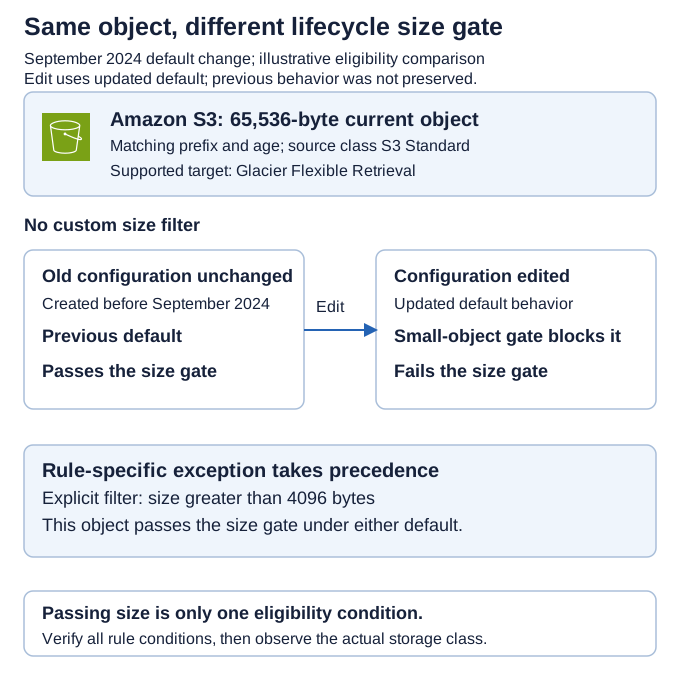
*Reference decision view for one object's transition eligibility. The edit branch assumes the request does not explicitly preserve varies_by_storage_class; a PUT can preserve that previous behavior. This shows rule evaluation, not a completed transition.*
4. Use a comparison cohort that exposes the boundary
Construct an expected-result matrix before changing a rule. The following is a local policy exercise with synthetic sizes, not observations from S3. Assume current objects in S3 Standard, matching prefix, sufficient age, a supported transition to Glacier Flexible Retrieval and no other blocker.
| Size | Previous default, no custom size filter | Updated default, no custom size filter | Explicit size > 4096 filter |
|---|---|---|---|
| 4,096 bytes | Passes size gate | Fails size gate | Fails size gate |
| 4,097 bytes | Passes size gate | Fails size gate | Passes size gate |
| 65,536 bytes | Passes size gate | Fails size gate | Passes size gate |
| 262,144 bytes | Passes size gate | Passes size gate | Passes size gate |
Use “passes size gate” rather than “will transition now.” An object outside the prefix must fail the rule even if its size passes. A younger object must not transition just because you added a size filter. Include those controls so the test cannot pass merely because all chosen objects are already eligible.
In an approved synthetic test environment, record the deployed rules and behavior value, fixture object identities, sizes, versions and upload times. Observe the actual storage-class result separately. Keep deployment acceptance, eligibility expectation and observed transition as three states. An accepted configuration write is not a transition receipt.
Lifecycle actions are asynchronous, as AWS's transition considerations explain. Define a reasonable observation and escalation window from the selected service behavior and your operating requirements; do not invent a fixed completion time. A short period with no observed move is not proof that the size override failed. Retrieve the effective configuration again and inspect other blockers before making another change.
5. Treat the write as a whole-configuration change
PutBucketLifecycleConfiguration replaces the existing configuration. A request containing only the example rule can remove unrelated rules. That is why the fragment above is not offered as a paste-ready production request.
Before a change, export the complete existing state and inspect the deployment tool's planned request. Retain required expiration, noncurrent-version and incomplete-upload rules. Check whether the tool can specify and preserve the selected default behavior. Review both the rule body and that behavior, since a text diff of the body alone can miss the material change.
The bucket/data owner should accept the intended cohort, retrieval expectations and retention effects. The platform owner should apply the reviewed configuration through the normal change path. Afterward, compare the service readback with the approved full configuration and record any discrepancy before declaring deployment accepted.
S3 lifecycle management applies lifecycle actions to existing objects as well as new ones. A narrow-looking rule edit can therefore affect an existing data estate. Inspect that estate by size and matching scope before increasing eligibility.
Restoring the old configuration is a control change, not proof that completed transitions were undone. Keep the handling of already moved objects separate from the configuration rollback. If the data is required for a time-sensitive recovery path, test its actual retrieval behavior before expanding the rule.
6. Decide whether the small-object exception is useful
Diagnosing the changed default does not settle the economic decision. More eligible objects can mean more requests and overhead. The current S3 pricing guidance documents per-object transition charges, archive metadata overhead and minimum storage durations. For Flexible Retrieval and Deep Archive it describes 40 KB of additional metadata per archived object, split between Standard and archive billing rates.
For a synthetic cohort of 1,000 objects with 20 KB of payload each, payload totals 20,000 KB while that metadata allowance totals 40,000 KB. These volumes do not share one rate and are not a cost quote. They illustrate why object count matters alongside payload bytes. Replace them with your actual cohort and dated Region-specific prices before making a savings decision.
Also ask how often objects will be read and how long they will remain archived. A workload that needs rapid retrieval may be poorly served by an archival exception even when the modeled storage line falls. Aggregating objects can change overhead, but also changes retrieval granularity, indexing and recovery procedures. It is a separate design decision, not an automatic fix for this configuration issue.
7. Close the diagnosis with evidence
Keep a short record:
Account, general purpose bucket, Region and inspection timestamp:
Affected key/version and observed size/storage class:
Matching transition rule and other eligibility conditions:
Effective default behavior before/after, with source evidence:
Configuration change/deployment request that explains the difference:
Chosen explicit filter or default, and scope rationale:
Full-configuration comparison and approved deployment readback:
Synthetic positive/negative cohort and actual observation results:
Retrieval constraints, unresolved blockers and decision owner:
The diagnosis is strong when the configuration readback, edit history and object-size cohort agree. If they do not, keep the cause unresolved. Do not turn this plausible default change into a universal explanation for any object still in Standard.
Your next action is to capture the current configuration and behavior value for one affected bucket, then compare a small and a larger matching object against the rule. Use the existing storage and data-path cost guide for the broader economic decision. Change the lifecycle rule only after the intended object cohort and full configuration are reviewable.