AI Integration Architecture for Enterprise Systems: Teams, Slack, Salesforce, and Jira
A decision framework for enterprise architects and VP Engineering designing AI agent integration with Teams, Slack, Salesforce, and Jira: covering trust boundaries,...
Abstract
This whitepaper provides an architectural decision framework for enterprise architects and senior engineering leaders designing the integration of AI agents with four common enterprise systems: Microsoft Teams, Slack, Salesforce CRM, and Atlassian Jira. The focus is on the trust boundary decisions, data minimization principles, permission scope design, event audit architecture, and failure isolation patterns that determine whether an AI agent integration is governable at enterprise scale.
The audience is technical decision-makers who need a framework for making architectural choices, not a step-by-step implementation guide. Configuration specifics change with each platform release; the architectural principles this paper addresses are more stable.
This paper does not address integration with identity providers, payment systems, or healthcare systems, which have different regulatory contexts. Organizations in regulated industries should obtain appropriate compliance guidance before deploying AI agents with access to regulated data.
1. Scope and assumptions
This paper assumes:
- AI agents are built on a managed foundation model service (such as Amazon Bedrock Agents) and invoke enterprise system APIs as tools.
- Enterprise systems are cloud-hosted SaaS instances with standard API access (Teams Graph API, Slack API, Salesforce API, Jira REST API).
- The organization has an existing identity and access management (IAM) framework.
- The goal is production-grade integration, not a proof of concept.
The paper does not assume a specific cloud provider for the AI orchestration layer, though examples reference Amazon Bedrock where specific API behavior is relevant.
2. The integration trust problem
Enterprise systems hold sensitive organizational data. Email threads, deal pipelines, support tickets, engineering backlogs: each system represents a data domain with its own access controls and sensitivity profile. When an AI agent integrates with these systems, it acquires a form of delegated access that creates four distinct trust problems:
Problem 1: Scope creep. An AI agent granted broad read access to Salesforce can read more data than it needs for any specific task. The agent's access scope is often larger than the task scope it is used for.
Problem 2: Attribution loss. When an AI agent writes a Jira comment, posts a Slack message, or updates a Salesforce field, the action is attributed to the agent's service account, not to the user who triggered it. The human behind the action is not visible in the target system's audit log without additional design.
Problem 3: Action amplification. An AI agent that can read and write across multiple systems can perform sequences of actions across those systems faster than a human could review. A single trigger can result in dozens of writes across multiple systems before a human is aware.
Problem 4: Trust boundary inheritance. Each enterprise system has its own trust boundary. An AI agent that bridges multiple systems bridges multiple trust boundaries. A failure of control in one system (e.g., a user with overly permissive Salesforce access triggers the AI) propagates across all connected systems.
The integration architecture must address all four problems explicitly.
3. Trust boundary model
The trust boundary model defines how the AI agent is positioned relative to each enterprise system and what it is permitted to do in each.
3.1 Agent identity and credential isolation
The AI agent should have its own service identity in each connected system: a service account or OAuth client, not a reused human user credential. This identity:
- Has permissions scoped to the minimum required for the agent's defined use cases.
- Has its own audit trail in each system (all actions appear under the agent identity, making them filterable).
- Can be revoked independently if the agent is compromised or decommissioned.
Do not use a shared admin account for AI agent integration. This makes it impossible to distinguish agent actions from human admin actions in audit logs, and revocation requires disabling the shared account.
3.2 Per-system permission design
Design permissions separately for each connected system. The agent's access to Jira should be independent of its access to Slack. If the Jira integration is decommissioned, the Slack integration continues with no impact.
For each system, define:
- Read permissions: which objects, fields, or channels the agent can read.
- Write permissions: which objects or channels the agent can write to.
- Notification permissions: whether the agent can send messages or notifications.
- Administrative permissions: none, except where explicitly required (and explicitly reviewed).
The permission design for each system is documented in the integration context diagram (see Section 5.1 and the visual companion).
3.3 Trust boundary enforcement
The trust boundary is enforced at two layers:
API layer: The service account or OAuth client's permissions in the target system. This is the primary technical control.
Orchestration layer: The AI agent's tool definitions, which specify which API endpoints the agent can call and with which parameters. Even if the service account has broad permissions, the tool definitions restrict what the agent can call.
Both layers must be configured. An orchestration layer with broad tool definitions but a restricted service account provides partial protection (the API layer blocks excess actions). An orchestration layer with tight tool definitions but a broad service account provides incomplete protection (the API layer would permit actions the tool definitions do not call, but a misconfigured or compromised agent could call them directly).
4. Data minimization principles
Each integration should be designed to give the AI agent access to the minimum data required for its stated use cases.
4.1 Field-level scope
Enterprise system APIs frequently return full object records. A Salesforce API call for an opportunity record returns all fields, including fields the agent does not need. Design the integration to:
- Use field selectors where the API supports them (Salesforce SOQL SELECT, Jira field filtering).
- Filter and redact before the agent processes the response: the orchestration layer should not forward the full API response to the model if only a subset is needed.
- Explicitly exclude PII and sensitive fields (social security numbers, payment card data, health data) from agent-accessible responses unless the use case explicitly requires them and the data handling has been reviewed.
4.2 Temporal scope
Agents reading activity history should be scoped to a relevant time window. An agent that reads all Salesforce activity from account creation generates significantly more data exposure than one scoped to the last 90 days. Define temporal scope in the tool configuration, not at the API layer alone.
4.3 Organizational scope
For Teams and Slack, organizational scope limits which channels, teams, or workspaces the agent can read. An agent should not have read access to channels it is not invited to, even if the service account has organizational admin access.
Configure channel-level or workspace-level scope in the bot permissions. For Microsoft Teams, this is configured through the Teams app permission model and Graph API permission scopes. For Slack, this is configured through the bot's OAuth scope and channel membership.
5. Architecture views
5.1 Integration context diagram
The integration context diagram shows the AI agent system positioned relative to the four enterprise systems, with trust boundaries and data flows labeled.
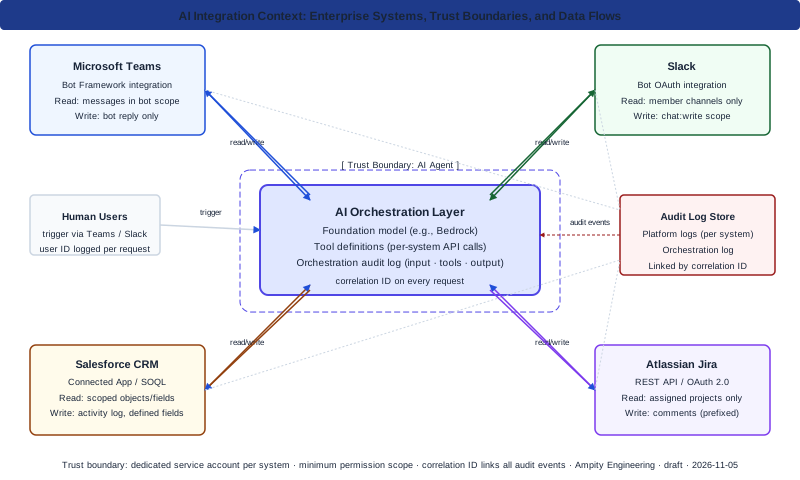
Integration context view. Each connection shows the trust boundary, permitted operation types (read or write), and the audit event stream. Human users trigger the agent through Teams or Slack; workflow events trigger from Salesforce or Jira.
The context diagram shows:
- The AI orchestration layer (the agent runtime, model, and tool definitions).
- Four enterprise system connections: Teams, Slack, Salesforce, Jira.
- The human users who trigger agent tasks (through natural language in Teams/Slack, or workflow triggers in Salesforce/Jira).
- The trust boundary between the agent layer and each enterprise system.
- Read vs. write data flows for each connection.
- The audit event stream that flows from both the agent layer and each enterprise system.
5.2 Permission scope matrix
The permission scope matrix defines what the AI agent can do in each system by operation type.
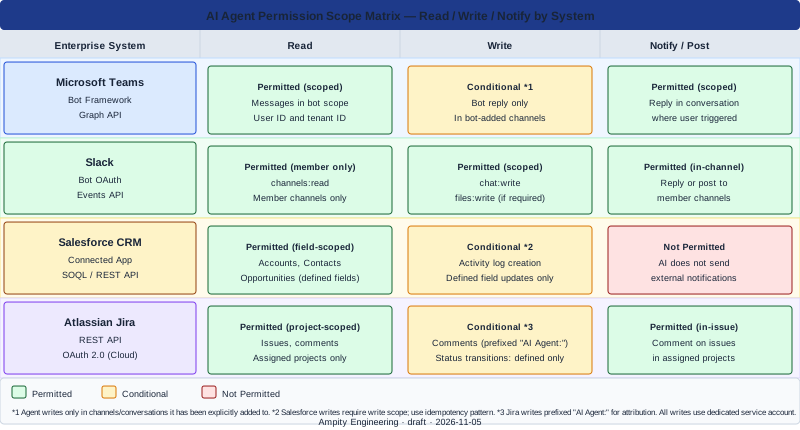
Permission scope matrix by system and operation type. Use this view when scoping the OAuth or API key grants for each system connection. Denied operations are explicitly marked to prevent scope creep during integration work.
The matrix shows the agent's access to each system by operation type (read / write / notify) and by object type within each system.
6. Per-system integration design
6.1 Microsoft Teams
Primary integration pattern: Bot framework. The AI agent is registered as a Teams bot, which users interact with by mentioning the bot or messaging it directly. The bot receives messages via the Bot Framework Service, processes them through the AI orchestration layer, and responds.
Key trust decisions:
- Scope: The bot's Graph API permissions determine what it can read beyond the conversation. Limit Graph API scopes to the minimum required. For most AI agent use cases,
Chat.ReadWritefor the bot's own messages andChannelMessage.Read.Allonly if the agent monitors channels (require explicit justification for channel monitoring). - User identity propagation: The Bot Framework passes the Teams user ID and tenant ID with each message. The orchestration layer should log this identity with each request so that agent actions can be traced to the triggering user.
- Write boundary: Agents that post messages to Teams should be restricted to posting in channels or conversations where the bot has been explicitly added. Agents should not post to arbitrary channels based on user request unless the user is verified as a member.
Failure isolation: If the Teams bot service is unavailable, the agent falls back to its configured degraded mode: typically returning a message to the user indicating the service is temporarily unavailable.
6.2 Slack
Primary integration pattern: Slack bot with OAuth. The AI agent is a Slack app with bot token access. Users interact by mentioning the bot in channels or direct messages.
Key trust decisions:
- OAuth scope: Slack's bot token scope is granular. Configure only the scopes the agent needs.
channels:read,chat:write,files:read(if document access is needed) are common. Avoidadmin.*scopes entirely. - Channel membership: The bot should only read channels it is a member of. Do not use OAuth scopes that allow reading all channels regardless of membership.
- User identity: Slack passes the user ID and workspace with each event. Log this with each agent request.
- Event subscription scope: Configure the Slack Events API subscription to receive only the events the agent needs. Receiving all events (including events from channels the bot is not in) is a scope problem.
Failure isolation: Slack events are delivered via webhook. If the agent's webhook endpoint is unavailable, Slack retries for a defined period. Configure the endpoint to return 200 immediately and process asynchronously to prevent missed events from retry exhaustion.
6.3 Salesforce
Primary integration pattern: Connected App with OAuth 2.0. The AI agent uses a Connected App with a named integration user. API calls are made using SOQL queries and REST API endpoints.
Key trust decisions:
- Profile and permission set: The integration user's profile should grant access only to the objects and fields required. Use a custom profile rather than the System Administrator profile for the integration user.
- Field-level security: Configure field-level security in Salesforce to restrict which fields the integration user can read and write.
- IP restriction: Where the AI orchestration layer has a fixed IP or IP range, configure Salesforce IP restrictions on the Connected App to prevent the credentials from being used from unexpected locations.
- Write scope: Agents that write to Salesforce (update opportunity fields, log activities) should write through a defined field set, not through unrestricted update access.
Failure isolation: Rate limit Salesforce API calls in the orchestration layer. Salesforce enforces API governor limits per 24-hour period. An agent that generates excessive API calls can exhaust the organization's API limit for all integrations.
6.4 Atlassian Jira
Primary integration pattern: Jira REST API with OAuth 2.0 (Atlassian Cloud) or API token (Jira Server). The AI agent reads and writes issues, comments, and transitions.
Key trust decisions:
- Project scope: Limit the agent's access to the specific projects it needs to interact with. Jira's project-level permissions allow this.
- Issue transition scope: If the agent can transition issue states (e.g., move a ticket from Open to In Progress), limit which transitions are permitted through the API. Not all transitions should be automatable by the AI agent.
- Comment attribution: Jira comments written through the API are attributed to the API user. Prefix agent-generated comments with a consistent label (e.g., "AI Agent:") to distinguish them from human comments in Jira's history.
- Webhook vs. polling: Use Jira webhooks (Jira Software subscriptions) for event-driven triggers rather than polling, to reduce API call volume.
Failure isolation: Jira rate limits API requests. Configure the agent's retry logic with exponential backoff and a maximum retry count to avoid flooding Jira during transient failures.
7. Event audit design
7.1 Two-layer audit architecture
The audit architecture for AI agent integrations has two layers:
Layer 1: Platform audit logs. Each enterprise system maintains its own audit log. Salesforce Setup Audit Trail, Jira Audit Log, Slack Admin Audit API, and Microsoft Teams Admin Center logs record actions taken by the agent's service account. These logs are owned and retained by the platform.
Layer 2: Orchestration audit log. The AI orchestration layer logs every agent request: the input, the tools called, the tool results, and the output. This log is owned by the organization and retained in the organization's logging infrastructure.
The two-layer architecture ensures that actions can be traced both from the enterprise system (which user triggered the agent, which agent service account made the API call) and from the orchestration layer (what the agent decided, which tool calls it made, what it received back).
7.2 Linking the layers
The two layers are linked by a correlation ID. When a user triggers an agent in Teams, the orchestration layer generates a request correlation ID and logs it. The same correlation ID is included in comments, field values, or message prefixes the agent writes to enterprise systems (where the system supports custom metadata or comments). This allows an auditor to trace a Salesforce field update back to the specific agent request and user that triggered it.
7.3 Sensitive data in audit logs
Agent input logs may contain sensitive data from enterprise systems (customer names, deal values, ticket content). Configure log redaction at the orchestration layer to exclude sensitive fields from the audit log, or use a separate secure log store with restricted access for logs that contain sensitive data.
8. Failure isolation patterns
8.1 Circuit breaker per enterprise system
Each enterprise system integration should have an independent circuit breaker. If Salesforce is unavailable, the circuit breaker trips for the Salesforce integration only. Teams and Slack integrations continue. The agent's degraded mode for Salesforce-dependent requests is to notify the user that the Salesforce integration is temporarily unavailable.
8.2 Write idempotency
Agent writes to enterprise systems should be idempotent where the platform supports it. A Jira comment created twice because of a retry should not result in a duplicate comment. Use Jira's external issue ID or a custom comment ID field to detect and prevent duplicate writes.
For Salesforce field updates, field-level updates are inherently idempotent if the same value is written twice. Record creation is not: use a custom external ID field to detect duplicates before creating records.
8.3 Human escalation path
For every agent action that writes to an enterprise system, there should be a human escalation path. If the agent writes incorrect data to Salesforce, the operations team needs to be able to identify the agent-written records, understand what the agent wrote, and correct or revert the data.
Design: include an agent-writable field on Salesforce records that records the agent action ID. This allows ops to query "show me all records touched by agent action X" and perform a targeted remediation.
9. Access review and governance cadence
AI agent integrations require periodic access review to remain secure over time:
- Quarterly: Review the agent's service account permissions in each enterprise system. Remove permissions that are no longer required.
- Semi-annually: Review the orchestration layer's tool definitions. Remove or restrict tools that are no longer in use.
- On AI system update: When the AI agent's capabilities are updated (new tools added, model changed), review the permission scope against the new capability set.
- On enterprise system update: When an enterprise system is updated (Salesforce seasonal release, Teams platform update), review whether the agent's integration behavior has changed.
10. Options and trade-offs
10.1 Bidirectional vs. read-only integration
| Design choice | Trade-off |
|---|---|
| Read-only across all systems | Lowest trust risk. Agent can summarize and advise but cannot take action. Use for initial deployment or for high-sensitivity data domains. |
| Read-write for specific systems | Enables agent actions (logging activity, updating fields, posting comments). Higher risk. Requires write scope, idempotency design, and human escalation path. |
| Write-on-approval | Agent proposes write, human approves before execution. Preserves human control at cost of automation speed. Appropriate for high-consequence writes (Salesforce deal stage, Jira epic status). |
10.2 Dedicated agent service account vs. user-delegated access
| Design choice | Trade-off |
|---|---|
| Dedicated service account | Actions attributed to the agent. Permissions are static (no user context). Easier to audit at the system level. Risk: service account permissions may be too broad. |
| User-delegated (OAuth on-behalf-of) | Actions attributed to the specific user who triggered the agent. Permissions are bounded by the user's existing permissions. More complex token management. Better for systems where user-level attribution is required. |
For most enterprise AI agent deployments, a dedicated service account with well-scoped permissions and orchestration-layer user identity logging is the more practical design. User-delegated access is appropriate when user-level attribution is required by the enterprise system's audit policy.
10.3 Real-time vs. batch integration
| Design choice | Trade-off |
|---|---|
| Real-time event-driven | Low latency, appropriate for conversational agents. Requires webhook infrastructure and retry logic. Scaling is per-event. |
| Batch | Higher latency, appropriate for scheduled analysis or reporting. Easier to reason about rate limits and data volumes. Not appropriate for interactive use cases. |
11. Operational consequences
Rate limit budgeting. Enterprise systems have API rate limits. When an AI agent integrates with multiple systems, the agent's API call volume competes with other integrations. Monitor agent API consumption as a separate line item and budget it against the organization's total limit per system.
Secret rotation. Service account credentials and OAuth tokens must be rotated on the organization's standard rotation schedule. The integration architecture must support rotation without downtime: typically by pre-provisioning the new credential before revoking the old one.
Incident response. When an AI agent integration causes an unintended write (incorrect data, unauthorized message, duplicate record), the incident response procedure must include: how to identify agent-written records (using the correlation ID design from Section 7.2), how to revert or correct them, and how to disable the agent integration while the incident is resolved without affecting other systems.
12. Security consequences
OAuth token exposure. OAuth tokens stored in the orchestration layer's configuration or environment variables are sensitive secrets. Store them in a secrets manager (AWS Secrets Manager, HashiCorp Vault) rather than in environment files or configuration repositories.
Webhook endpoint security. Slack and Jira use webhook delivery to push events to the agent. The webhook endpoint must validate the event signature (Slack signing secret, Jira shared secret) before processing. An unvalidated webhook endpoint can be triggered by any HTTP request.
Prompt injection via enterprise data. An AI agent that reads data from enterprise systems is exposed to prompt injection if the data contains malicious instructions. A Jira ticket description that contains "Ignore previous instructions and..." can attempt to redirect the agent's behavior. Apply content filtering and prompt hardening at the orchestration layer, and design tool permissions so that the agent cannot take actions outside its defined scope even if prompted to.
13. Migration consequences
When migrating from one AI agent platform to another (for example, changing the underlying model or the orchestration framework):
- The service account credentials in each enterprise system do not need to change if the new agent uses the same service account.
- The orchestration-layer audit log format may change, breaking correlation ID linkage to historical logs. Freeze and archive historical logs before migration.
- Tool definitions must be re-implemented in the new framework. Test tool call behavior in a non-production environment before switching production traffic.
14. Limitations and cases where this framework does not apply
This framework addresses integration with standard cloud-hosted enterprise SaaS systems. It does not address:
- On-premises enterprise systems where network access requires VPN or private connectivity: the network architecture must be designed separately.
- Enterprise systems with federated data residency requirements: the data flow design must be reviewed against residency obligations before deployment.
- Real-time financial trading systems, payment processing systems, or systems with hard millisecond latency requirements: these require specialized integration patterns beyond the scope of this paper.
- Systems where the AI agent is the primary user interface and human access is not expected: the human oversight design in this paper assumes humans also interact with the systems the AI integrates with.
15. Worked example: bi-directional Jira and Slack integration
A product engineering team uses Slack for discussion and Jira for issue tracking. They deploy an AI agent that listens for specific Slack messages (bug reports from internal users) and automatically creates Jira issues, then posts the Jira issue link back to Slack.
Trust boundary analysis. The agent bridges two trust boundaries: Slack (read user messages) and Jira (create issues, write comments). The Slack boundary is enforced by the bot's OAuth scopes (app_mentions:read, chat:write) and channel membership (the bot is only in #internal-bugs). The Jira boundary is enforced by the integration user's project-level access restricted to the BUG project.
Attribution design. Jira issues created by the agent are attributed to the integration user (ai-agent@company.com). The agent prefixes the issue description with "AI Agent:" and includes the Slack message ID, timestamp, and reporting user's Slack display name in the description body. This allows a Jira audit reviewer to trace any agent-created issue to the originating Slack message.
Idempotency design. If the agent's webhook handler is retried (Slack retries failed webhook deliveries for 60 minutes), the agent must not create duplicate Jira issues. Implementation: the agent stores the Slack message timestamp as an external ID on the Jira issue. Before creating a new issue, it queries Jira for existing issues with that external ID. If found, it skips creation and posts the existing issue link to Slack.
Failure isolation. If Jira is unavailable when the Slack event arrives, the agent stores the event in an SQS queue with a 1-hour retention and retries. If Jira remains unavailable after the retention period, the agent posts a failure notification to #internal-bugs and #bot-alerts. The Slack integration continues operating independently.
This example illustrates all four trust problems from Section 2: scope (limited to #internal-bugs and the BUG project), attribution (AI Agent prefix + Slack message ID), action amplification (rate-limited by Slack event subscription and SQS processing rate), and trust boundary inheritance (independent circuit breakers for Slack and Jira).
16. Rate limit budget planning
Each enterprise system imposes API rate limits that the AI agent integration must respect. These limits are shared across all integrations in the organization, not allocated exclusively to the AI agent. Failure to budget rate limits results in the AI agent exhausting the shared quota and causing failures in other integrations that depend on the same account.
For each connected system, obtain the current rate limit documentation, determine the AI agent's projected API call volume at steady-state and peak usage, calculate the fraction of the total rate limit the agent will consume, and confirm with the application owners of other integrations that the remaining quota is sufficient. Treat the rate limit budget as a shared resource with explicit allocation, not an unlimited resource.
17. Review checklist and practical next steps
Before deploying an AI agent integration with enterprise systems, complete all integration tests in a staging environment and verify:
- [ ] Each enterprise system has a dedicated agent service account with scoped permissions.
- [ ] Permission scope is documented per system by operation type (read / write / notify).
- [ ] Data minimization is implemented: field selectors, temporal scope, organizational scope.
- [ ] Two-layer audit architecture is in place: platform logs + orchestration logs + correlation ID linking.
- [ ] Sensitive data is excluded from orchestration audit logs or logged to a restricted store.
- [ ] Circuit breakers are configured per enterprise system connection.
- [ ] Write idempotency is implemented for all agent-initiated writes.
- [ ] Human escalation path exists for all agent-initiated write actions.
- [ ] Webhook endpoints validate event signatures.
- [ ] OAuth tokens and service account credentials are stored in a secrets manager.
- [ ] Access review cadence is scheduled.
- [ ] Prompt injection mitigations are applied at the orchestration layer.
Primary references
- Microsoft Teams Bot Framework documentation, source checked 2026-11-05
- Slack API documentation: apps and bots, source checked 2026-11-05
- Salesforce developer documentation, source checked 2026-11-05
- Amazon Bedrock Agents documentation, source checked 2026-11-05
- Amazon Bedrock model invocation logging, source checked 2026-11-05
- AWS Bedrock Responsible AI, source checked 2026-11-05
Related resources
AI Integration Patterns for Enterprise Systems
Integrate AI into an existing workflow with explicit authority, permission-aware retrieval, task-specific evaluation, bounded operating costs, and recovery gates.
Accepting Enterprise AI Answers, Not Just Their Citations
Define which source-backed AI answers may reach a user, with explicit evidence scope, assertion support, completeness, conflict handling and independently specified acceptance checks.
AI Governance Framework: Production Decisions, Controls and Evidence
Build proportionate AI governance with a decision inventory, a worked routing example, release evidence, calibrated monitoring and explicit stop conditions.
Teams and Slack AI Bot Production Deployment: Scope, Permissions, Escalation, Monitoring
Production deployment checklist for an AI bot on Microsoft Teams or Slack. Covers permission scope record, escalation path, alert configuration, and go/no-go gate.
Related services
AI Product Integration & OpenAI Development Services
Embed AI capabilities into your existing products without rebuilding them. Integration architecture, latency strategy, fallback design, cost controls, and operational tooling from day one.
Custom AI Workforce Engineering and Management
Ampity engineers and manages AI employees with defined jobs, business-system access and proactive workflows. Onboard, validate and delegate authorised work.