Direct Connect vs VPN: Commercial and Technical Trade-offs for Hybrid Connectivity
Compare AWS Direct Connect and Site-to-Site VPN for hybrid cloud connectivity. Covers bandwidth, latency, reliability, cost, lead time, and decision criteria with...
AWS provides two primary options for connecting on-premises infrastructure to your VPC: AWS Direct Connect and AWS Site-to-Site VPN. Direct Connect uses a dedicated physical connection through a colocation facility. Site-to-Site VPN uses encrypted tunnels over the public internet. The choice between them, or the decision to use both, depends on bandwidth requirements, latency sensitivity, reliability needs, setup time constraints, and cost tolerance.
This article compares both options across the dimensions that affect the decision and provides worked examples for different workload profiles. Source: AWS Direct Connect User Guide, AWS Site-to-Site VPN User Guide, checked 2026-11-05.
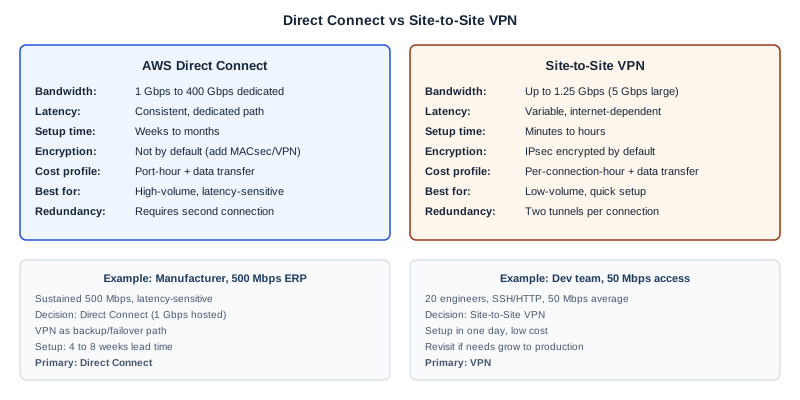
How each option works
AWS Direct Connect
Direct Connect links your internal network to AWS through a standard Ethernet fiber-optic cable at a Direct Connect location (a colocation facility where AWS has presence). One end of the cable connects to your router (or your partner's equipment), the other to an AWS Direct Connect router. Traffic between your network and AWS does not traverse the public internet.
Direct Connect supports dedicated connections at 1 Gbps, 10 Gbps, 100 Gbps, and 400 Gbps port speeds. Hosted connections through partners are available at lower speeds (50 Mbps to 10 Gbps depending on the partner). You create virtual interfaces on the connection: private VIFs for VPC access, public VIFs for AWS public services, and transit VIFs for Transit Gateway connectivity.
AWS Site-to-Site VPN
Site-to-Site VPN creates an encrypted IPsec connection between your on-premises network and AWS. Each VPN connection includes two tunnels for redundancy. Traffic is encrypted and travels over the public internet.
Standard VPN tunnels support up to 1.25 Gbps per tunnel. Large Bandwidth Tunnels, available for connections attached to Transit Gateway or Cloud WAN, support up to 5 Gbps per tunnel. VPN supports BGP for dynamic routing and can be configured within minutes once the customer gateway device is prepared.
Comparison across decision dimensions
| Dimension | AWS Direct Connect | Site-to-Site VPN |
|---|---|---|
| Bandwidth | 1 Gbps to 400 Gbps (dedicated); 50 Mbps to 10 Gbps (hosted) | Up to 1.25 Gbps standard; up to 5 Gbps large bandwidth tunnel |
| Latency | Consistent, lower latency (dedicated path) | Variable, depends on internet path and congestion |
| Reliability | High, dedicated fiber path (but single point of failure without redundancy) | Dependent on internet availability; two tunnels per connection |
| Encryption | Not encrypted by default (encryption via MACsec or VPN overlay) | IPsec encrypted by default |
| Setup time | Weeks to months (physical cross-connect required) | Minutes to hours (software configuration) |
| Cost model | Port-hour charges + data transfer out | Per-connection-hour charge + data transfer out |
| Cost at scale | More cost-effective for high-volume, consistent traffic | More cost-effective for low-volume or intermittent traffic |
| Redundancy | Requires second connection at same or different location | Built-in two-tunnel redundancy per connection |
| Network requirements | Colocation at Direct Connect location; 802.1Q VLAN; BGP | Internet connectivity; compatible VPN device; BGP optional |
| IPv6 support | Supported for private and public VIFs | Limited: IPv6 outer IPs only on Transit Gateway/Cloud WAN |
When Direct Connect is the right choice
Direct Connect is appropriate when:
Bandwidth requirements exceed VPN limits. If your workloads require sustained throughput above 5 Gbps (the maximum per large bandwidth tunnel), Direct Connect is the only option. Common scenarios include large-scale data replication, database synchronization, and high-volume backup to S3.
Latency consistency matters. Applications that are sensitive to network jitter and latency variability (real-time trading, industrial control, video conferencing infrastructure) benefit from the dedicated path that Direct Connect provides. Internet-based VPN latency varies with congestion.
Data transfer costs are significant. For organizations transferring large volumes of data from AWS to on-premises, Direct Connect data transfer rates are lower than internet data transfer rates. At high volumes, the port-hour cost of Direct Connect is offset by data transfer savings.
Compliance requires a private network path. Some regulatory frameworks require that data in transit does not traverse the public internet, even if encrypted. Direct Connect provides this without the internet hop, though MACsec or a VPN overlay should be added for encryption.
When VPN is the right choice
VPN is appropriate when:
You need connectivity quickly. VPN can be configured in hours. If you need hybrid connectivity for a project that starts next week, VPN provides immediate access while Direct Connect provisioning takes weeks or months.
Bandwidth requirements are moderate. For workloads under 1 Gbps sustained throughput, VPN provides adequate bandwidth at lower cost. Developer access to cloud environments, lightweight application integration, and administrative traffic are well served by VPN.
Budget constraints rule out Direct Connect port costs. Direct Connect has a minimum port-hour cost regardless of utilization. For intermittent or low-utilization connectivity, VPN's per-hour cost is more aligned with usage.
You need encrypted connectivity by default. VPN provides IPsec encryption without additional configuration. Direct Connect requires adding MACsec or a VPN overlay for encryption.
Worked examples
Example 1: Manufacturer with 500 Mbps ERP traffic
A manufacturer runs an on-premises ERP system that synchronizes inventory and order data with analytics workloads on AWS. The data transfer averages 500 Mbps sustained during business hours, with peaks to 800 Mbps during batch processing windows.
Decision: Direct Connect (1 Gbps hosted connection).
The sustained 500 Mbps throughput exceeds what is comfortable on a standard VPN tunnel (1.25 Gbps maximum, but internet congestion may reduce effective throughput). The ERP integration is latency-sensitive because order processing has real-time requirements. A 1 Gbps hosted connection through a Direct Connect partner provides consistent bandwidth without internet variability. Setup time is 4 to 8 weeks, which aligns with the project timeline.
For redundancy, the manufacturer adds a Site-to-Site VPN as a backup path. If the Direct Connect connection fails, traffic fails over to VPN at reduced bandwidth.
Example 2: Development team with 50 Mbps access
A software development team of 20 engineers needs access to development and staging environments running in AWS. Traffic is primarily SSH, HTTP, and occasional build artifact transfers, averaging 50 Mbps.
Decision: Site-to-Site VPN.
The bandwidth requirement is well within VPN limits. The traffic is not latency-sensitive. Setup can be completed in a day. The cost of a Direct Connect port for 50 Mbps of development traffic is not justified. If the team grows significantly or production workloads are added, the decision can be revisited.
Example 3: Hybrid architecture with mixed requirements
An enterprise runs production databases on-premises with application servers in AWS. Database replication requires 2 Gbps sustained with sub-10ms latency. Additionally, 200 employees access cloud-hosted applications for general business use.
Decision: Direct Connect (10 Gbps dedicated) for production + VPN for general access.
The database replication requirement demands Direct Connect for bandwidth and latency consistency. General employee access works well over VPN. Separating the traffic paths provides cost efficiency (VPN for low-priority traffic) and security segmentation (production database traffic on a dedicated path).
Failure modes
Under-sizing Direct Connect for growth. If your bandwidth needs will grow beyond the current connection size, plan for upgrade or additional connections from the start. Adding a physical connection takes weeks.
Assuming VPN provides consistent bandwidth. VPN throughput depends on internet conditions. If your workload requires guaranteed bandwidth, test during peak internet congestion hours before committing.
Skipping redundancy for Direct Connect. A single Direct Connect connection is a single point of failure. AWS recommends at least two connections at different locations for critical workloads.
Ignoring data transfer cost at volume. Organizations transferring terabytes from AWS monthly may find that Direct Connect's lower data transfer rate justifies the port cost, even if bandwidth requirements alone would not.
Next step
Map your workloads by bandwidth requirement, latency sensitivity, and data transfer volume. Use that mapping to determine whether VPN, Direct Connect, or a combination provides the right trade-off for your environment.
Ampity designs and implements hybrid cloud networking as part of accountable AWS engagements. To discuss your connectivity requirements, visit our AWS Consulting service page.
Related resources
Accept the Customer Site, Not Just the AWS Deployment
Set application acceptance for a customer site that loses its AWS connection, including local acknowledgement, backlog capacity, identity and recovery ownership.
Building an Honest AWS Migration Business Case: TCO Components and Common Omissions
Build a complete total cost of ownership comparison for an AWS cloud migration. Covers direct and indirect cost components, commonly understated items, and a worked example mapping 20 on-premises servers to AWS.
AWS Enterprise Support vs Third-Party Managed Services: Cost and Coverage Comparison
Compare AWS Enterprise Support with third-party managed services across cost, coverage, response time, and human judgment availability. Includes a decision framework by workload criticality.