Bedrock VPC Endpoint: Keeping AI Traffic Private Inside AWS
Provision a Bedrock VPC interface endpoint, validate that API calls stay within the VPC with no internet route, and enforce private-only access with an SCP. Includes...
By default, an application running inside a VPC reaches the Bedrock API through the public internet, unless you route the connection through the VPC's NAT Gateway and from there through an internet gateway, or unless you have configured a VPC interface endpoint. For workloads in regulated industries where data leaving the AWS network is an audit concern, the VPC interface endpoint is the control that keeps Bedrock API traffic on the AWS private network.
A VPC interface endpoint for Bedrock creates a private IP address in your subnet. DNS resolves the Bedrock service endpoint hostname to that private IP rather than to the public endpoint. Your application code does not change. The same Bedrock SDK call that previously exited through an internet gateway now stays within AWS's internal network.
This article covers provisioning the VPC endpoint, validating DNS resolution, confirming the no-internet route, and writing an SCP to prevent Bedrock calls outside the endpoint.
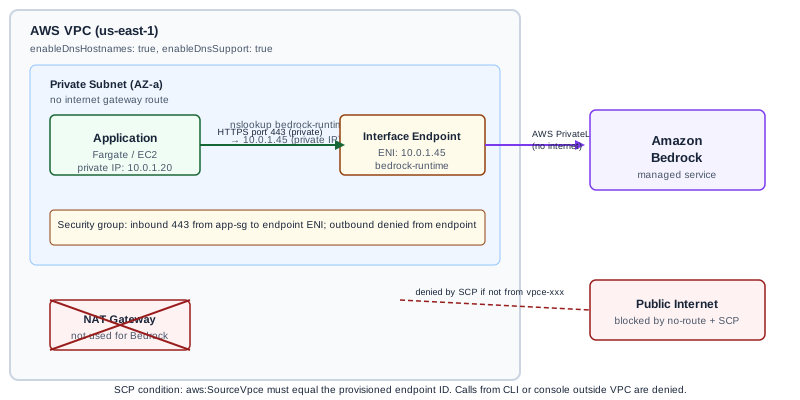
What the VPC interface endpoint does and does not do
The endpoint creates a private path from your VPC to the Bedrock service over AWS PrivateLink. Traffic travels within AWS's infrastructure and does not traverse the public internet. The source IP seen by Bedrock is a private RFC-1918 address from your VPC, not a public IP from your NAT Gateway.
What the endpoint does not do:
- It does not restrict which IAM principals can call Bedrock. That is controlled by IAM policies and resource-based policies on the endpoint itself.
- It does not encrypt the traffic. AWS encrypts traffic between services within its infrastructure, but the endpoint does not add application-layer encryption.
- It does not prevent data from flowing between your application and Bedrock within AWS's network. If you have data residency requirements beyond "stays on AWS network," you need additional controls such as regional endpoint restrictions.
The endpoint supports Bedrock Runtime (model invocations) and Bedrock Control Plane (management operations) separately. Check the Bedrock VPC interface endpoints documentation for the current list of service names, as AWS may add new endpoints for specific Bedrock services.
Provisioning the VPC interface endpoint
You need:
- A VPC with private subnets in the target region
- A security group that allows HTTPS outbound from your application to the endpoint (port 443)
- DNS resolution enabled on the VPC (enableDnsHostnames and enableDnsSupport must be true)
Using the AWS console:
- Navigate to VPC > Endpoints > Create Endpoint
- Select "AWS services" and search for "bedrock"
- Select the service name for Bedrock Runtime: typically
com.amazonaws.{region}.bedrock-runtime - Select your VPC and the private subnets where the endpoint ENI should be placed
- Assign the security group: allow HTTPS inbound from the application's security group
- Enable Private DNS Name (the default): this causes DNS to resolve the public Bedrock hostname to the endpoint's private IP
After creation, the endpoint status moves from "pending" to "available" in a few minutes.
DNS validation
After the endpoint is active, validate that DNS resolves the Bedrock hostname to a private IP address. Run a DNS lookup from an EC2 instance or container inside the VPC:
$ nslookup bedrock-runtime.us-east-1.amazonaws.comIf Private DNS is configured correctly, the response will show private IP addresses (10.x.x.x or other RFC-1918 addresses). If it shows public IP addresses, Private DNS is not resolving through the endpoint. Check that enableDnsHostnames is true on the VPC and that you selected "Enable Private DNS Name" during endpoint creation.
Confirming the no-internet route
After DNS validation, verify that the route from your private subnet to Bedrock does not traverse an internet gateway or NAT gateway. Check the route table for your private subnet:
- There should be no route pointing to an internet gateway (igw-xxxxxxxx) for the Bedrock endpoint IP range
- VPC endpoint routes appear in the route table as "local" gateway entries that route traffic through the endpoint
A stricter test: temporarily remove the NAT gateway route from your private subnet's route table, then attempt a Bedrock API call. If the call succeeds, it is routing through the endpoint (which is local to the VPC). If it fails, the application was relying on the internet path. Restore the NAT gateway route after the test.
Worked example: healthcare workload
A healthcare application processes clinical notes using Bedrock in a private subnet. The compliance requirement: no PHI-adjacent traffic may leave the AWS network.
Setup:
- VPC with two private subnets in us-east-1 (AZ a and AZ b)
- Application container in a Fargate task running in the private subnet
- Bedrock Runtime VPC endpoint provisioned in both AZs (each subnet gets an ENI)
- Security group: inbound 443 from application security group; outbound denied
- DNS Private Name enabled
Validation steps:
- From the Fargate task, run:
nslookup bedrock-runtime.us-east-1.amazonaws.com; confirm the response shows a private IP address - Remove NAT gateway route temporarily; call Bedrock; confirm call succeeds (endpoint routing confirmed)
- Restore NAT gateway route
Audit log entry format (illustrative):
Date: 2026-11-05
Resource: vpc-endpoint/vpce-0abc1234567890def
Service: com.amazonaws.us-east-1.bedrock-runtime
DNS resolution check: bedrock-runtime.us-east-1.amazonaws.com → 10.0.1.45 (private)
No-internet route test: PASS (Bedrock call succeeded without NAT)
Reviewer: [name]
This record is part of your compliance evidence. Keep it alongside the endpoint ARN and the date it was validated.
Enforcing with an SCP
An SCP can require that Bedrock invocations originate from within a specific VPC endpoint. This prevents application code outside the VPC (or developers with direct API access) from bypassing the endpoint:
{
  "Version": "2012-10-17",
  "Statement": [
    {
      "Sid": "RequireBedrockVPCEndpoint",
      "Effect": "Deny",
      "Action": [
        "bedrock:InvokeModel",
        "bedrock:InvokeModelWithResponseStream",
        "bedrock:Converse",
        "bedrock:ConverseStream"
      ],
      "Resource": "*",
      "Condition": {
        "StringNotEquals": {
          "aws:SourceVpce": "vpce-0abc1234567890def"
        }
      }
    }
  ]
}
This SCP denies Bedrock invocations unless they originate from the specified VPC endpoint. Apply it to the OUs or accounts where the healthcare workload runs. Any call from outside that endpoint, including from the AWS console, the CLI on a developer machine, or a Lambda function without VPC configuration, is denied.
Test the SCP before applying it in production. Use the IAM Policy Simulator to verify which principals it affects, and confirm that your application's execution role is making calls through the specified endpoint.
Failure modes
Private DNS not resolving. The most common setup issue. Confirm enableDnsHostnames and enableDnsSupport are true on the VPC, and that "Enable Private DNS Name" was selected during endpoint creation.
Security group blocking endpoint traffic. The endpoint ENI has a security group. If that security group does not allow inbound HTTPS from your application, calls fail even though the endpoint exists. The error looks like a connection timeout, not a DNS failure.
Endpoint in one AZ only. If your endpoint only has an ENI in AZ-a but your Fargate task runs in AZ-b, traffic may still route through NAT for AZ-b. Place endpoint ENIs in all AZs where your application runs.
SCP applied before validation. If you apply the VPC endpoint SCP before confirming the application uses the endpoint, you may deny your own application access. Validate first; apply the SCP after.
Endpoint not supported for specific Bedrock features. Not all Bedrock features are available through the same VPC endpoint. For example, Bedrock Knowledge Bases and Bedrock Agents have separate endpoint service names. Create separate endpoints for each service your application uses.
What to do next
The next useful step is provisioning the endpoint in a non-production VPC and running DNS and route validation before any production traffic moves. Test the application against the private endpoint. Apply the SCP in a test OU before production. After production deployment, add the validation record to your compliance evidence package.
For Ampity's AWS infrastructure and security work, see the AWS Consulting service page.
Primary references
- Bedrock VPC interface endpoints, source checked 2026-11-05
- Create an interface endpoint, source checked 2026-11-05
Related resources
Bedrock Guardrails: Configuring Enterprise Content and PII Policies
Configure Amazon Bedrock Guardrails for enterprise compliance: topic denial, PII redaction, and contextual grounding checks. Includes a financial services worked example with account number masking and investment advice blocking.
AWS Organizations SCPs: Controlling Bedrock Invocation Across a Multi-Account Organization
Write SCPs that deny Bedrock invocation outside approved accounts and enforce an approved model allowlist across a 20-account AWS Organization.