Bedrock Prompt Management: Versioning and Promoting Prompts to Production
Use Amazon Bedrock Prompt Management to version prompts, test variants, and promote through dev-staging-prod without manual copy. Covers prompt lifecycle, alias-based...
Prompt engineering has an infrastructure problem. When a prompt is defined as a string in application code, promoting it from development to production requires a code change, a deployment pipeline, and all the overhead that comes with it. When a prompt lives in a shared document, there is no version history and no way to roll back when a change degrades answer quality.
Bedrock Prompt Management addresses this by treating prompts as versioned AWS resources. A prompt has a draft state for iteration, numbered versions for stable references, and aliases that point to a specific version. Your application uses the alias. When you want to promote a new prompt version to production, you update the alias. The application continues to use the same alias ARN; it starts receiving the new version.
This article covers creating prompt versions, testing variants, and promoting through environments. The worked example uses a customer support prompt.
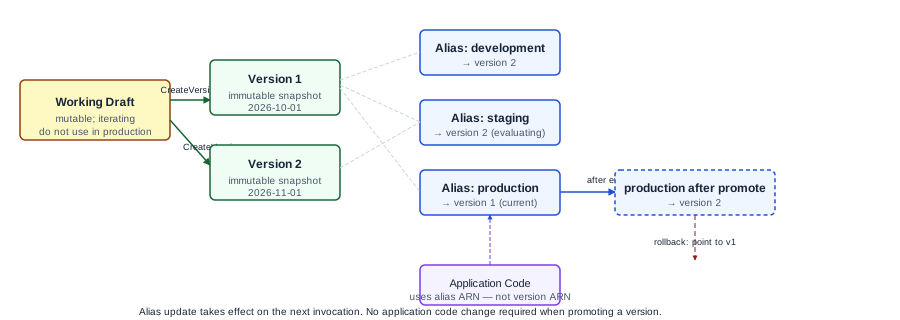
How prompts, versions, and aliases relate
A prompt in Bedrock Prompt Management is a named resource that contains the prompt text, optionally a model configuration, and optionally variable placeholders. The working copy is called the working draft. When you want to create a stable snapshot, you create a version: an immutable numbered copy of the working draft at that moment.
Aliases are mutable pointers to a specific version. Your application code should reference the alias ARN, not the version ARN directly. When you promote a new version, you update the alias to point to it. If a version causes problems, you roll back by pointing the alias to the previous version.
prompt: customer-support-reply
  draft:    (working copy, in progress)
  version 1: (snapshot from 2026-10-01, stable)
  version 2: (snapshot from 2026-11-01, candidate)

alias: production  → currently points to version 1
alias: staging     → currently points to version 2
Your staging application uses the staging alias ARN. When version 2 passes evaluation, you update the production alias to point to version 2. Your production application immediately uses the new prompt without a code change.
Prompt variables and input templates
Prompt Management supports variable placeholders in the prompt text using double-brace syntax: {{variable_name}}. When you invoke a prompt, you supply the values for each variable. This separates the prompt structure from the runtime data.
For a customer support reply prompt:
System: You are a customer support assistant for {{company_name}}. Reply in a professional and helpful tone. Keep responses under 200 words.

User: The customer has submitted this support ticket:
{{ticket_content}}

Provide a draft reply that acknowledges the issue and states next steps.
Variables company_name and ticket_content are supplied at invocation time. The prompt structure is managed as a versioned resource; the customer-specific data is not stored in the prompt.
Worked example: customer support prompt lifecycle
Starting state: A customer support team is using a prompt defined in application code. The prompt has drifted across three codebases and is no longer consistent.
Step 1: Create the canonical prompt in Prompt Management:
Using the Bedrock console or API, create a new prompt named customer-support-reply. Enter the prompt text with variables. Save as working draft. At this point, no version exists; the working draft is not suitable for production reference.
Step 2: Create version 1:
Call CreatePromptVersion (or use the console). This creates version 1 as an immutable snapshot. Record the version ARN and the timestamp in your prompt change log.
Prompt: customer-support-reply
Version 1 created: 2026-11-01
Model: anthropic.claude-3-5-sonnet-20241022-v2:0
Description: Initial migration from inline code prompts
Step 3: Create the production alias:
Create an alias named production pointing to version 1. Update your production application to use the alias ARN instead of a hardcoded model invocation with an inline prompt. Your application now retrieves and uses the prompt from Prompt Management at invocation time, or you embed the alias reference in your Flows or agent configuration.
Step 4: Test a variant:
The customer success team wants to test a prompt that includes empathy language in the opening sentence. Create a modified working draft and create version 2.
Evaluation gate: Run version 2 against a test set of 20 representative tickets. For each ticket, compare the draft reply from version 2 to the reply from version 1. Score on: acknowledges the issue (yes/no), states next steps (yes/no), tone quality (1-5), and length compliance (under 200 words). Require that version 2 matches or exceeds version 1 on all criteria before promotion.
Illustrative comparison (fictional scores, not actual model outputs):
| Criterion | Version 1 | Version 2 | Threshold |
|---|---|---|---|
| Issue acknowledged | 18/20 | 19/20 | 18/20 |
| Next steps stated | 17/20 | 18/20 | 17/20 |
| Avg tone score | 3.8 | 4.1 | 3.5 |
| Length compliant | 20/20 | 20/20 | 20/20 |
Version 2 meets all thresholds. Record the evaluation result and promote by updating the production alias to point to version 2.
Step 5: Rollback if needed:
If production quality degrades after promotion, update the production alias to point back to version 1. The rollback takes effect immediately on the next invocation that uses the alias.
Alias naming conventions for environment promotion
Use aliases that map to your environments rather than to version numbers. If you name an alias version-2, you need to update the alias name when you want a different version in that environment, which defeats the purpose.
Recommended convention:
| Alias name | Purpose |
|---|---|
development | Latest candidate; engineers iterate here |
staging | Evaluated candidate pending production approval |
production | Current production version |
Your CI/CD pipeline can automate alias updates as part of the deployment process, without requiring application code changes.
Integration with Flows and Agents
Bedrock Flows can reference a Prompt Management prompt in a prompt node. This means prompt changes do not require a Flows definition update when you promote a new prompt version through aliases. The Flow continues to call the same alias; the alias delivers the new version.
Bedrock Agents do not directly reference Prompt Management prompts in the same way, but you can structure your agent's orchestration Lambda to retrieve the current prompt from Prompt Management using the alias ARN before constructing the agent input.
Failure modes
Working draft referenced in production. If your application references the working draft instead of a versioned alias, any change to the working draft takes immediate effect in production. The working draft has no version history. Use numbered versions and aliases for all production references.
Alias update with no evaluation gate. Updating the production alias without running the evaluation test set means regressions reach production. Define the evaluation gate before the first promotion and require its output for every subsequent promotion.
Variable name mismatch. If the prompt uses {{customer_name}} but your application passes customer-name (with hyphen), the variable substitution fails or leaves the placeholder unreplaced. Use consistent variable naming conventions and test substitution before version creation.
Model config drift. Prompt Management can store a model configuration alongside the prompt text. If you change the model in the Prompt Management resource but your application still passes its own model override, the stored model config has no effect. Decide whether model selection lives in the prompt resource or in application code, and keep it consistent.
Version accumulation without cleanup policy. Because Prompt Management retains all versions, long-running projects accumulate many versions. Without a cleanup policy, the version list becomes difficult to navigate and the purpose of older versions is unclear. Document version intent in the version description field when you create each version, and periodically archive or document versions older than six months.
What to do next
Create your first prompt in Bedrock Prompt Management, create version 1, and update one application to use the alias ARN. Run your existing prompt evaluation test against the alias to confirm it delivers the expected behavior. This baseline makes the first promotion controllable.
For regression testing before each promotion, see the article on Prompt Change Regression Tests. For Ampity's work on LLM systems, see the LLM and RAG Systems service page.
Primary references
- Construct and store reusable prompts with Prompt Management, source checked 2026-11-05
- Create a prompt in Prompt Management
Related resources
Bedrock Knowledge Bases: Retrieval Configuration Trade-offs
Choose chunking strategy, embedding model, and retrieval settings for Amazon Bedrock Knowledge Bases with known trade-offs documented. Covers fixed-size, hierarchical, and semantic chunking with a worked HR policy corpus example.
Migrating to the Bedrock Converse API from Model-Specific SDKs
Map InvokeModel request and response shapes to the Bedrock Converse API, handle streaming and tool use, and migrate a Claude-specific integration. Covers the shape differences, multi-turn conversation design, and what InvokeModel still does that Converse does not.