Migrating to the Bedrock Converse API from Model-Specific SDKs
Map InvokeModel request and response shapes to the Bedrock Converse API, handle streaming and tool use, and migrate a Claude-specific integration. Covers the shape...
The Bedrock Converse API provides a single request structure that works across all Bedrock foundation models that support messages. With InvokeModel, you write a request body shaped for each model's native format (a Claude request does not look like a Llama request). With Converse, you write one structure and change only the model ID. This matters when you want to evaluate a different model without rewriting your integration, or when you need to route between models without maintaining multiple request builders.
This article maps the InvokeModel structure to the Converse structure, covers streaming and tool use, and walks through a practical migration from a Claude-specific InvokeModel integration. Where the two APIs differ in capability, the differences are stated explicitly.
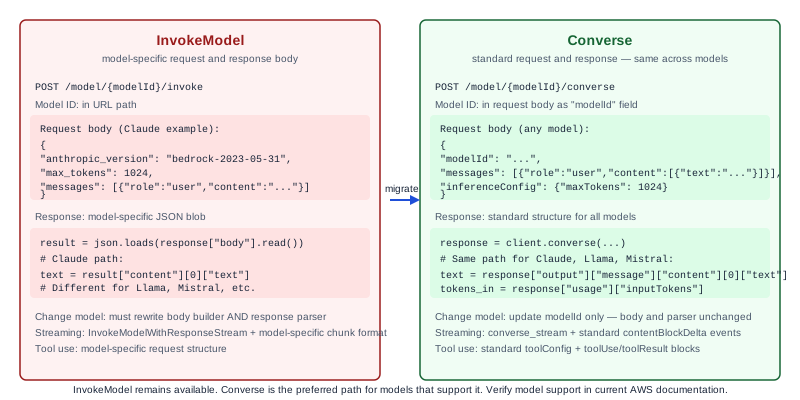
What Converse is and is not
The Converse API is on the bedrock-runtime endpoint, same as InvokeModel. It supports models that use the messages format. As of the source-checked date, this includes Claude, Llama, Mistral AI models, and others; check the Supported models for Converse page for the current list, as it changes.
Converse normalizes the request structure across those models. It does not eliminate all model differences. If a model supports unique inference parameters not covered by the standard request shape, you can pass them in a additionalModelRequestFields field that contains the model-specific additions as an opaque blob. These fields bypass the normalization.
Converse also does not cover fine-tuned models deployed as custom models in all cases. Check the current documentation for your specific model ARN and whether it supports Converse. InvokeModel remains the path for capabilities Converse has not absorbed.
InvokeModel request shape vs Converse request shape
With InvokeModel, the request body is a JSON blob specific to the model. For Claude via InvokeModel, a request looks like this (illustrative, not production code):
{
  "anthropic_version": "bedrock-2023-05-31",
  "max_tokens": 1024,
  "messages": [
    {
      "role": "user",
      "content": "What is the capital of France?"
    }
  ],
  "system": "You are a helpful assistant."
}
This body is passed as a byte string in the body field of the InvokeModel request. The model ARN or ID goes in a separate modelId path parameter. The response body is also model-specific JSON that you parse by knowing which model you invoked.
With Converse, the request body moves to a standard structure at the API level:
{
  "modelId": "anthropic.claude-3-5-sonnet-20241022-v2:0",
  "messages": [
    {
      "role": "user",
      "content": [
        {
          "text": "What is the capital of France?"
        }
      ]
    }
  ],
  "system": [
    {
      "text": "You are a helpful assistant."
    }
  ],
  "inferenceConfig": {
    "maxTokens": 1024,
    "temperature": 0.7
  }
}
Key structural differences:
| Field | InvokeModel (Claude) | Converse |
|---|---|---|
| Model ID | URL path parameter | modelId in request body |
| Request body | Model-specific JSON blob | Standard Converse structure |
| Message content | String or array (model-specific) | Array of content blocks |
| System prompt | Model-specific field | system array of text blocks |
| Max tokens | Model-specific field name | inferenceConfig.maxTokens |
| Temperature | Model-specific field name | inferenceConfig.temperature |
| Response body | Model-specific JSON | Standard output.message structure |
| Token usage | In model-specific location | usage.inputTokens, usage.outputTokens |
The Converse response always contains an output.message field with the model's response in the standard message format, and a usage field with token counts. You parse the same fields regardless of which model you invoked.
Multi-turn conversation
With InvokeModel, there is no native conversation state. If you want multi-turn, you maintain a messages array in your application code and send the full history with each request. This is the same with Converse: Converse is stateless from AWS's perspective. You send the full conversation history in the messages array. What Converse provides is a consistent structure for that history that works across models.
Each turn adds a user message and an assistant message. The Converse API validates that messages alternate between user and assistant roles, and that the first message is from the user. Some models have context window limits on how many tokens the full conversation history can consume. When the history grows beyond the model's limit, you need to summarize or truncate older turns in your application before sending.
Streaming
For streaming responses, use ConverseStream instead of Converse. The request structure is identical. The response is an event stream. Each event in the stream contains a partial content block. Your application receives the events as they arrive and assembles the response.
For Python using the boto3 SDK, the stream is accessed through the response's stream field, which provides an iterable of events. The event structure for streaming is different from the non-streaming response: you receive contentBlockDelta events with text chunks, and a final messageStop event when the response is complete.
If you were previously using InvokeModelWithResponseStream and parsing model-specific streaming chunks, the migration to ConverseStream removes the model-specific parsing. You parse standard contentBlockDelta events regardless of model.
Tool use
Converse supports tool use (function calling) through a standard toolConfig field that specifies the available tools and their JSON schemas. The model returns a toolUse content block when it wants to call a tool, and you send back the result in a toolResult block in the next message.
This is a significant normalization compared to InvokeModel, where tool use formatting is model-specific. Claude's tool use format, Llama's format, and Mistral's format differ. With Converse, the tool definition and result exchange use the same structure for all models.
Worked example: Claude InvokeModel to Converse migration
Before migration, the integration uses InvokeModel with a Claude-specific body parser:
# Before: model-specific body construction and response parsing
import boto3
import json

client = boto3.client("bedrock-runtime", region_name="us-east-1")

def invoke_claude(user_message: str, system_prompt: str) -> str:
    body = {
        "anthropic_version": "bedrock-2023-05-31",
        "max_tokens": 1024,
        "system": system_prompt,
        "messages": [{"role": "user", "content": user_message}]
    }
    response = client.invoke_model(
        modelId="anthropic.claude-3-5-sonnet-20241022-v2:0",
        body=json.dumps(body),
        contentType="application/json",
        accept="application/json"
    )
    result = json.loads(response["body"].read())
    return result["content"][0]["text"]  # Claude-specific field path
After migration to Converse:
# After: standard Converse request and response structure
import boto3

client = boto3.client("bedrock-runtime", region_name="us-east-1")

def invoke_model(model_id: str, user_message: str, system_prompt: str) -> str:
    response = client.converse(
        modelId=model_id,
        messages=[
            {
                "role": "user",
                "content": [{"text": user_message}]
            }
        ],
        system=[{"text": system_prompt}],
        inferenceConfig={"maxTokens": 1024}
    )
    # Standard field path regardless of model
    return response["output"]["message"]["content"][0]["text"]
The post-migration version works for any Converse-compatible model by changing model_id. The response field path does not change between models. If you later want to test Llama or Mistral for cost or performance reasons, you change the model ID and nothing else.
What to check during migration:
- The model you are migrating to must be available in Converse. Verify by checking supported models in the current documentation.
- If you passed model-specific parameters (like
top_kfor Claude) that are not ininferenceConfig, move them toadditionalModelRequestFields. Not all model-specific parameters transfer to the other side when you switch models, so evaluate which are truly required. - Token usage fields are now in
response["usage"]["inputTokens"]andresponse["usage"]["outputTokens"]. Update any cost tracking code that read these from model-specific paths. - If you are migrating a streaming integration, change
invoke_model_with_response_streamtoconverse_streamand update the event parsing.
Failure modes and edge cases
Model not supported by Converse. If you specify a model ID that does not support Converse, you receive a validation error. The error message identifies the model. This is not a permissions problem; it means the model uses InvokeModel only.
Content block format error. The Converse messages array requires content to be an array of content blocks, not a plain string. Passing a string where a block array is expected causes a validation error. This is the most common migration mistake.
System prompt format. InvokeModel Claude accepts system as a plain string. Converse requires system as an array of text blocks. Update any code that constructs the system prompt as a string.
Streaming event structure change. InvokeModelWithResponseStream returns model-specific chunks. ConverseStream returns standard events. If your streaming parser splits on model-specific delimiters or keys, it will break.
Inference parameter coverage. Not all inference parameters supported by InvokeModel are covered in Converse's inferenceConfig. For parameters outside the standard set, pass them in additionalModelRequestFields and test that they are accepted correctly.
What to do next
The next useful step is running your existing test suite against the Converse endpoint before switching production traffic. Verify that the response field paths are correct in your parsing code and that token usage accounting still works. Check the Converse API reference for the complete request and response schema.
For LLM deployment and integration work, see the LLM and RAG Systems service page.
Primary references
- Inference using the Converse API, source checked 2026-11-05
- Converse API reference, source checked 2026-11-05
Related resources
Bedrock Knowledge Bases: Retrieval Configuration Trade-offs
Choose chunking strategy, embedding model, and retrieval settings for Amazon Bedrock Knowledge Bases with known trade-offs documented. Covers fixed-size, hierarchical, and semantic chunking with a worked HR policy corpus example.
Bedrock Guardrails: Configuring Enterprise Content and PII Policies
Configure Amazon Bedrock Guardrails for enterprise compliance: topic denial, PII redaction, and contextual grounding checks. Includes a financial services worked example with account number masking and investment advice blocking.