Bedrock Batch Inference: Offline Document Processing Job Design
Structure input manifests for Bedrock batch inference, choose the right model, handle partial failures, and design resubmission logic. Covers a 10,000-contract legal...
Bedrock batch inference is for workloads that do not need a response in real time. You prepare a file of requests, start a job, and retrieve the results from S3 when the job completes. The tradeoff is latency for cost: AWS documents that batch inference pricing is lower than on-demand model invocation. The job runs in the background and can take minutes to hours depending on the input volume and model.
This article covers input manifest structure, partial failure handling, and output validation. The worked example processes 10,000 contracts for clause extraction.
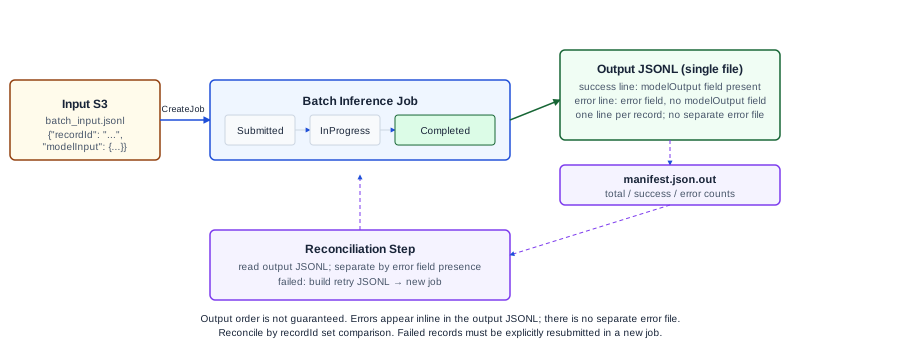
What batch inference provides and what it does not
Batch inference accepts a JSONL input file where each line is one request. The job submits those requests asynchronously, writes results to an S3 output prefix, and updates the job status. You poll for status or trigger a notification when the job completes.
What batch inference does not provide:
- Real-time responses. If you need a result in under a second, use on-demand invocation.
- Guaranteed completion time. Job duration depends on model availability and input volume. AWS does not publish SLA completion guarantees for batch jobs.
- Automatic resubmission of failed records. Failed records are written to a separate error output. You identify and resubmit them manually or through your own retry logic.
- Output ordering. The output JSONL records are not guaranteed to be in the same order as the input.
Input manifest format
The input file is a JSONL file stored in S3. Each line contains a JSON object with:
recordId: a unique identifier for this record (up to 64 characters). You choose the format. This ID links input records to output records.modelInput: the request body for the model, in the same format as the model's InvokeModel request body.
Illustrative input line for a Claude model (not production code):
{"recordId": "contract-00001", "modelInput": {"anthropic_version": "bedrock-2023-05-31", "max_tokens": 500, "messages": [{"role": "user", "content": "Extract all termination clauses from this contract: [contract text]"}]}}Each line is one request. Keep the total file under any size limits documented in the Batch inference documentation. For large volumes, split input into multiple jobs rather than creating one very large file.
Choosing record IDs
Your recordId is what connects input to output. Use a consistent, human-readable format that maps back to your source document system:
contract-{source_id}-{page_range}For example: contract-00001-p1-p10 for pages 1-10 of contract 1.
If you split one source document into multiple chunks (for context-window reasons), use a suffix that identifies the chunk. This lets you reassemble the extracted clauses per document after the job completes.
Do not use recordIds that could collide across resubmissions. If you resubmit failed records in a new job, use a modified ID format (contract-00001-retry1) or store a mapping from retry IDs to original IDs.
Submitting a batch job
Submit via the CreateModelInvocationJob API or the console. Required inputs:
- Input S3 URI (the JSONL file or prefix)
- Output S3 URI prefix (where results and errors are written)
- Model ID
- An IAM role with permissions to read from the input bucket and write to the output bucket
- Job name
The job transitions through states: Submitted → InProgress → Completed or Failed. Poll the GetModelInvocationJob API for status, or configure EventBridge to receive notifications on state changes.
Output file format
The output is a JSONL file in the specified output prefix. Each line contains:
recordId: same as the inputmodelInput: the original request bodymodelOutput: the model's response, in the same format as InvokeModel would return for that model
For records that failed during inference, the modelOutput field is replaced by an error object in the same output JSONL line. There is no separate error file. An error record looks like:
{"recordId": "contract-00001", "modelInput": {...}, "error": {"errorCode": 400, "errorMessage": "bad request"}}A manifest.json.out file in the output prefix provides a summary with totalRecordCount, processedRecordCount, successRecordCount, errorRecordCount, inputTokenCount, and outputTokenCount. Source: View batch inference results, checked 2026-11-05.
After job completion, process the output file:
- Read all lines; separate lines where
erroris present from lines wheremodelOutputis present - Store successful results keyed by
recordId - Collect failed
recordIds from error lines; decide whether to resubmit, log, or flag for manual review
Worked example: 10,000-contract legal review
A legal operations team has 10,000 contracts stored in S3. They want to extract termination clauses from each contract for a compliance review. The contracts average 25 pages each.
Input preparation:
Each contract is split into chunks of 3,000 tokens or less (to fit within Claude's context window alongside the extraction prompt). An average 25-page contract produces about 4-5 chunks. The total input is approximately 45,000-50,000 records.
The input JSONL is built programmatically:
# Illustrative, not production code
import json

records = []
for contract_id, chunks in contract_chunks.items():
    for chunk_idx, chunk_text in enumerate(chunks):
        record = {
            "recordId": f"{contract_id}-chunk{chunk_idx:02d}",
            "modelInput": {
                "anthropic_version": "bedrock-2023-05-31",
                "max_tokens": 500,
                "messages": [{
                    "role": "user",
                    "content": f"Extract any termination clauses from this contract section. If none, return 'NONE'. Section:\n\n{chunk_text}"
                }]
            }
        }
        records.append(json.dumps(record))

with open("batch_input.jsonl", "w") as f:
    f.write("\n".join(records))
Output validation:
After job completion, validate the output:
| Validation check | Method | Acceptable threshold |
|---|---|---|
| All input recordIds present in output or error file | Set comparison | 100% (no missing records) |
| Error rate | error_count / total_count | Determine based on your tolerance; >5% warrants investigation |
| Output format parseable | JSON parse each output line | 100% |
| "NONE" rate plausible | Count "NONE" responses | Should match expected clause distribution |
For records where the model returned "NONE" for all chunks of a contract, manually review a sample to confirm the contract genuinely has no termination clause rather than the model missing it.
Partial failure resubmission:
If 150 records failed:
- Build a new JSONL from the failed recordIds (use the original input file to look up their content)
- Submit a new batch job with the retry records
- Merge the retry output with the original output
Do not modify the original recordId values during resubmission if you can avoid it. If you must distinguish retries, map retry IDs back to original IDs before merging.
IAM permissions for the job role
The role you pass to CreateModelInvocationJob needs:
s3:GetObjecton the input bucket and prefixs3:PutObjecton the output bucket and prefixbedrock:InvokeModelon the model ARN
Do not over-provision. The role should not have s3:* or bedrock:*. Scope it to the specific resources and actions.
Failure modes
Missing records in output. The output may not contain all input records if the job failed mid-run. Check manifest.json.out for totalRecordCount vs processedRecordCount. Compare input recordId set against all output lines (including error lines) to identify any records with no output at all.
Record too large. If a record's modelInput exceeds the model's input token limit, it fails and appears in the error file. Pre-chunk to stay within limits, with a safety margin.
Output bucket permissions missing. If the job role cannot write to the output prefix, the job fails. Verify S3 permissions before submitting large jobs.
No monitoring for partial completion. Without a recordId-reconciliation step, a partially completed job can appear successful if the success metric is "job reached Completed state" rather than "all records present in output."
Downstream system not idempotent. If you write extracted clauses to a database and the job is resubmitted, you may write duplicate records. Make downstream writes idempotent using the recordId as a deduplication key.
What to do next
The next useful step is running a pilot job on a representative 100-record sample before committing to the full corpus. Validate the output quality, error rate, and processing time on the pilot, then estimate the full-job duration and cost. For current pricing, see the Bedrock pricing page.
For Ampity's LLM and document processing work, see the LLM and RAG Systems service page.
Primary references
- Bedrock batch inference overview, source checked 2026-11-05
- Create a Bedrock batch inference job
Related resources
Bedrock Knowledge Bases: Retrieval Configuration Trade-offs
Choose chunking strategy, embedding model, and retrieval settings for Amazon Bedrock Knowledge Bases with known trade-offs documented. Covers fixed-size, hierarchical, and semantic chunking with a worked HR policy corpus example.
Migrating to the Bedrock Converse API from Model-Specific SDKs
Map InvokeModel request and response shapes to the Bedrock Converse API, handle streaming and tool use, and migrate a Claude-specific integration. Covers the shape differences, multi-turn conversation design, and what InvokeModel still does that Converse does not.