Park Your Cloud: Multi-Cloud Scheduling on Amazon ECS
Ampity built Park Your Cloud to schedule idle non-production resources across AWS, Azure and Google Cloud, with self-service onboarding, scoped cloud identities and...
[Overview] Turn predictable idle hours into scheduled cloud operations
Park Your Cloud is an Ampity-built SaaS product for scheduling the start and stop of non-production resources across AWS, Microsoft Azure and Google Cloud. It gives teams one place to manage working-hour schedules for development, staging, QA and UAT environments instead of maintaining separate scripts for each cloud. For the wider workload review, see our cloud cost optimization service.
Ampity designed and implemented the product's multi-cloud scheduling model, customer onboarding and AWS application platform. The hosting design combines Amazon ECS, an Application Load Balancer, AWS WAF and Amazon RDS for PostgreSQL. Customer-cloud operations use scoped identities rather than storing long-term access credentials for each connected cloud account.
[Context] A product built from an operating problem
The initial problem was idle non-production cloud spend in Ampity's own environment. The longer-term opportunity was to make the same capability available as a self-service product for other teams managing resources across multiple clouds.
Manual stop/start scripts put schedule logic, permissions and failure handling in separate places. A cron schedule also needs deliberate treatment of time zones, daylight-saving changes, holidays and different team working hours. A failed job can leave resources running, while an incorrectly scoped job can interrupt work that needs to stay available.
The goal was a repeatable product experience: connect the required cloud scope, discover supported resources, choose a schedule and record what each scheduled action did. Customers should not need to visit every cloud console for routine scheduling.
[Goals] Build scheduling and the operating platform together
- Support AWS, Azure and Google Cloud through a unified inventory and scheduling experience.
- Replace customer-maintained stop/start scripts with centrally managed schedules.
- Provide guided, self-service onboarding using scoped cloud identities.
- Keep long-term connected-account credentials out of the product's storage.
- Establish infrastructure as code, container release automation, monitoring and audit logging from the start.
[Design] Separate the portals, cloud control and persistent state
Customer Portal, Support Portal and Cloud Control are independently deployed ECS services. The customer and support subdomains use Amazon Route 53, with an Application Load Balancer and AWS WAF at the application edge. The design spans two Availability Zones and separates web, application and database subnet tiers.
Amazon RDS for PostgreSQL provides persistent state with a Multi-AZ standby. Amazon ECR holds versioned container images. ECS service auto scaling adjusts capacity for the individual services, rather than requiring every part of the product to scale together.
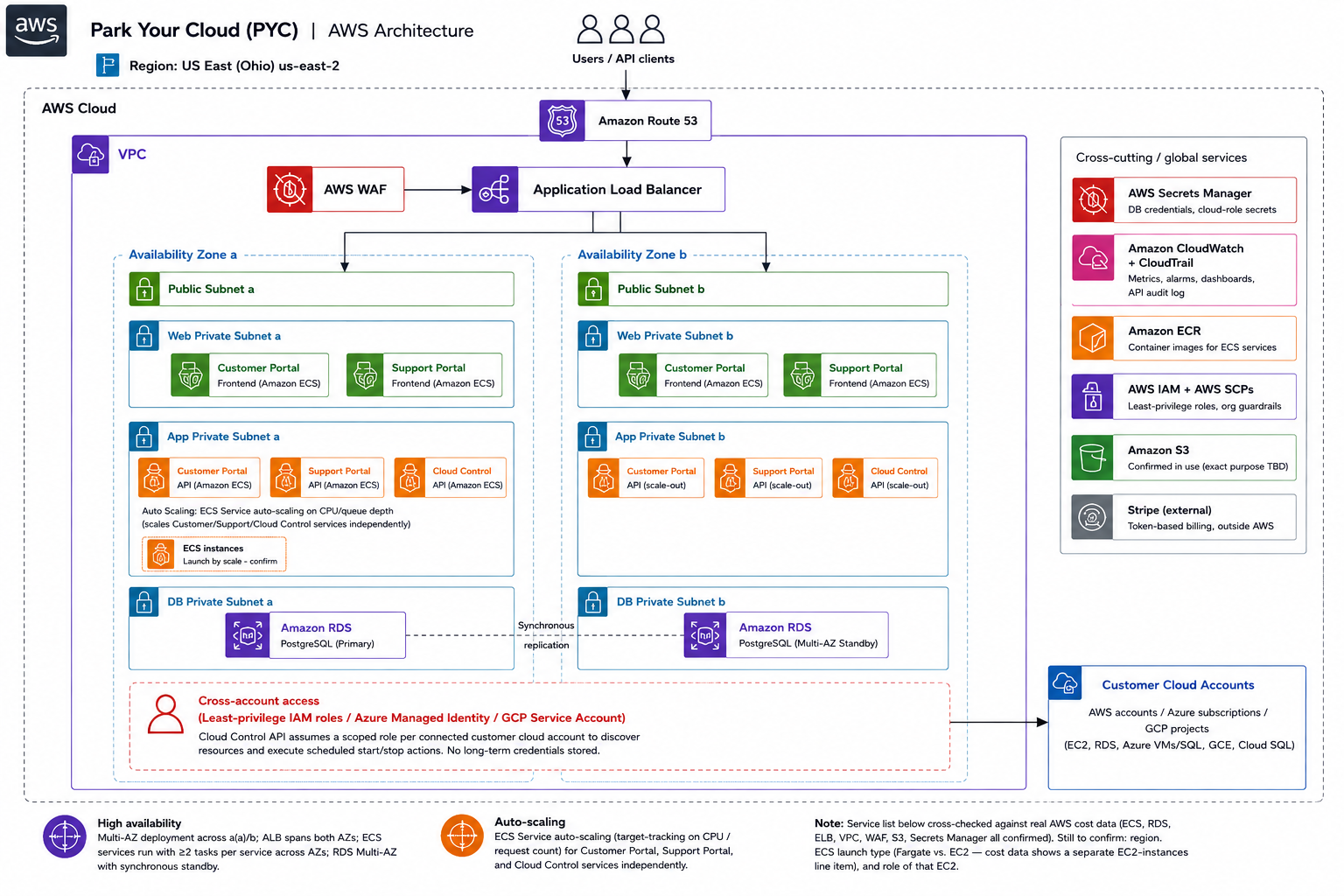
The supplied project diagram is shown as provided. Its notes leave the final AWS Region, ECS launch type and role of the separately billed EC2 instances to be confirmed. The project account also mentions a separate EC2 cost line. This case therefore identifies the confirmed compute service as Amazon ECS without treating the Fargate assumption as a verified deployment detail.
[Access] Connect customer clouds through limited, revocable identities
Cloud Control discovers resources and carries out scheduled start/stop actions within the permissions granted for a connected account. The recorded identity model uses AWS IAM roles, Azure Managed Identities and Google Cloud Service Accounts.
The absence of stored long-term customer-cloud credentials does not mean the application has no secrets. AWS Secrets Manager holds database credentials and connection metadata. The distinction is between application secrets needed to run the service and reusable customer-cloud access keys that the product is designed not to retain.
CloudWatch supplies operating visibility, while CloudTrail records AWS API activity. Stripe handles token-based, self-service billing outside AWS. Access scope, audit visibility and billing are separate responsibilities in the design.
[Delivery] From architecture to self-service onboarding
- Assessment and design: Define the supported scheduling model, cloud access patterns and ECS application architecture.
- Containerization: Build application images, version them and store them in Amazon ECR.
- Platform deployment: Connect ECS services to load balancing, WAF and the private Multi-AZ PostgreSQL database.
- Cross-cloud onboarding: Guide customers through connecting the scoped identities required by each cloud.
- Go-live and validation: Validate production workflows and provide self-service signup with a free-trial onboarding path.
Infrastructure as code and CI/CD make the platform and release path repeatable. They reduce manual setup work while leaving the team responsible for application behavior, access configuration, schedule exceptions and operating support.
[Results] A reusable multi-cloud scheduling product
The delivered scope brings multi-cloud inventory, scheduling and onboarding into one product. Teams can manage routine non-production start/stop schedules without maintaining their own per-cloud scripts. The AWS platform supports independently scaled services, managed database availability and container releases.
The project account reports an estimated 25 to 30 percent reduction in hosting costs compared with a traditional VM-based, script-managed hosting approach. This is an estimate for the product's hosting comparison, not a measured customer-cloud savings result or a savings promise for every workload. The supplied material does not include the cost model, utilization inputs or observation period needed to reproduce that estimate.
The source also records reduced manual release work, customer-controlled cloud identities and a foundation for further multi-cloud expansion. No uptime percentage, failover duration or universal performance result is attributed to the architecture alone.
[Applicability] Use schedules where availability follows known hours
This approach fits non-production environments whose idle periods can be defined with the people using them. Before scheduling, confirm the supported resource actions, dependencies, time zones and exceptions. A resource being non-production does not by itself establish that it is safe to stop.
Explore Park Your Cloud or see how Ampity approaches AWS application platforms. For a similar product or scheduling requirement, share the workload and operating constraints.