Bedrock Knowledge Base Rebuild After Schema Change: Safe Migration Checklist
Safely migrate a Bedrock Knowledge Base after a metadata schema change. Covers impact assessment, parallel index build, retrieval quality comparison, traffic cutover,...
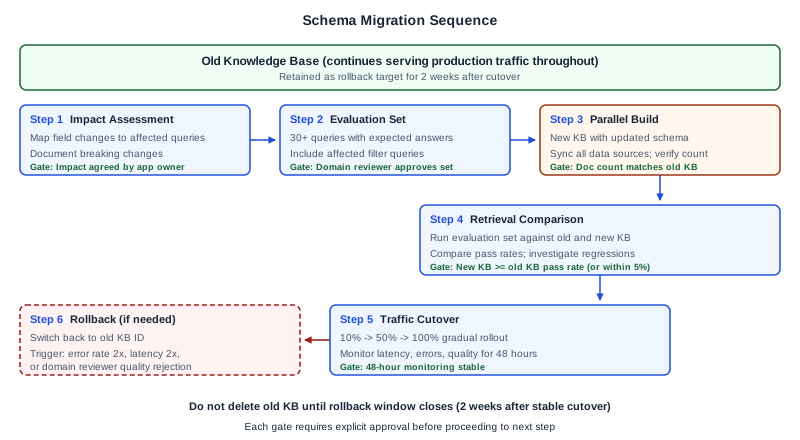
Why schema changes require a rebuild
Amazon Bedrock Knowledge Bases have different mutability constraints for different configuration dimensions. Use the following decision branch before starting a rebuild:
Changes that require a new Knowledge Base resource:
- Embedding model change: the
UpdateKnowledgeBaseAPI does not permit changingknowledgeBaseConfiguration(which includes the embedding model) after creation. Source: UpdateKnowledgeBase API, checked 2026-11-05. - Vector store configuration change:
storageConfigurationmust match the original values inUpdateKnowledgeBase. A change to the underlying vector store schema or type requires a new resource.
Changes that may not require a new Knowledge Base resource:
- Metadata field additions: adding new metadata attributes to source documents and updating the data source configuration may be achievable via
UpdateDataSourceand a re-sync, without creating a new Knowledge Base. Verify this against the UpdateDataSource API for your specific data source type. - Chunking strategy change: changing the chunking configuration requires re-ingesting all documents. For customer-managed Knowledge Bases, assess whether this can be done by updating the data source chunking configuration and running a full re-sync, or whether the vector store index schema change requires a new resource. The safe path is a parallel new Knowledge Base if you cannot verify the in-place path for your vector store type.
This playbook covers the parallel new Knowledge Base path, which applies definitively to embedding model changes and is the safe option for chunking and vector store changes. If you have confirmed that your change is a metadata field addition achievable via UpdateDataSource and re-sync, you do not need this playbook. Source: Modify a knowledge base, checked 2026-11-05.
Step 1: Assess the schema change impact
Owner: ML engineer.
Before building the new Knowledge Base, assess what the schema change affects and which queries will behave differently.
Impact assessment checklist
| Question | Answer | Implication |
|---|---|---|
| Are new metadata fields being added? | New fields require updated data source configuration and may enable new filter queries | |
| Are existing metadata fields being removed? | Any queries or applications that filter on removed fields will break | |
| Are field names or types changing? | Application code that references old field names must be updated | |
| Is the chunking strategy changing? | All documents must be re-ingested; chunk sizes and boundaries will differ | |
| Is the embedding model changing? | Entire vector index must be rebuilt; retrieval behavior may change significantly | |
| Are data source connectors changing? | Connector configuration in the new Knowledge Base must be verified |
Identifying affected queries
- List all metadata filter fields currently used in application queries.
- Map each filter to the schema change to determine whether it is unchanged, modified, or removed.
- For modified fields, determine the mapping from old to new field names or types.
- For removed fields, determine whether the application can function without the filter or needs an alternative.
- Document the expected impact on retrieval results for each affected query pattern.
Output: Impact assessment document with field-level mapping and affected query list.
Decision gate: ML engineer and application owner agree on the impact assessment before proceeding to parallel build.
Step 2: Prepare the evaluation set
Owner: ML engineer, with domain reviewer input.
The evaluation set is the tool you use to compare retrieval quality between the old and new Knowledge Bases. It must be representative of production query patterns.
Minimum evaluation set requirements:
- At least 30 queries covering the most common query patterns
- At least 5 queries that use metadata filters affected by the schema change
- At least 5 edge-case queries (ambiguous, multi-topic, or queries that previously returned poor results)
- Expected answer or expected source passage for each query
- Relevance scoring criteria (e.g., correct source passage in top 3 results = pass)
Evaluation set structure:
| Query ID | Query text | Expected source | Metadata filter | Pass criteria |
|---|---|---|---|---|
| Q001 | "What is the parental leave policy for contractors?" | HR-POLICY-042, section 3 | department=HR | Correct passage in top 3 |
| Q002 | "How do I request a laptop replacement?" | IT-PROC-019 | department=IT | Correct passage in top 5 |
| ... | ... | ... | ... | ... |
Output: Evaluation set document with at least 30 queries, expected answers, and pass criteria.
Step 3: Build the new Knowledge Base in parallel
Owner: ML engineer, with platform engineer support.
Build the new Knowledge Base as a separate resource while the old one continues serving production traffic.
Build procedure
- Create the new Knowledge Base resource with the updated schema configuration: new metadata field definitions, updated chunking strategy (if changed), and embedding model configuration.
- Configure data source connections for the new Knowledge Base pointing to the same source data (S3 buckets, SharePoint, Confluence, etc.) as the old Knowledge Base.
- Start the data source sync. Monitor the sync job for errors, document count, and completion time. Compare the document count against the old Knowledge Base to verify completeness.
- Verify sync completion. Check the sync job status and confirm that:
- Document count matches the expected count
- No documents failed ingestion
- Sync logs show no errors or warnings that affect schema fields
- Metadata fields are populated as expected (spot-check using test retrieval queries)
- Record the sync evidence:
| Checkpoint | Old KB | New KB | Match? |
|---|---|---|---|
| Document count | |||
| Data source count | |||
| Last sync timestamp | |||
| Sync errors | |||
| Metadata fields populated |
Output: New Knowledge Base resource ID, sync completion evidence, document count verification.
Failure mode: Syncing the new Knowledge Base from a stale data source. Ensure the source data is current before syncing the new Knowledge Base. If source documents are updated between old and new syncs, the retrieval comparison will be invalid.
Step 4: Run retrieval comparison
Owner: ML engineer, with domain reviewer for quality assessment.
Run the evaluation set against both the old and new Knowledge Bases and compare retrieval quality.
Comparison procedure
- For each query in the evaluation set, send the query to both Knowledge Bases using the same retrieval parameters (numberOfResults, search type, metadata filters adjusted for the new schema).
- Record the returned passages and their source metadata for both Knowledge Bases.
- Score each result against the pass criteria.
- Calculate the overall pass rate for both Knowledge Bases.
Comparison results template
| Query ID | Old KB result | Old KB pass? | New KB result | New KB pass? | Notes |
|---|---|---|---|---|---|
| Q001 | HR-POLICY-042 s3 | Pass | HR-POLICY-042 s3 | Pass | |
| Q002 | IT-PROC-019 | Pass | IT-PROC-019 | Pass | New metadata filter works |
| Q003 | ... | Fail | ... | Pass | Schema change improved this query |
| ... | ... | ... | ... | ... |
Decision criteria
| Outcome | Action |
|---|---|
| New KB pass rate >= old KB pass rate | Proceed to cutover |
| New KB pass rate within 5% of old KB | Investigate failing queries; proceed if failures are acceptable |
| New KB pass rate more than 5% below old KB | Investigate root cause; do not proceed until quality is resolved |
| New KB has new failures on previously passing queries | Investigate each regression; fix before cutover |
Output: Retrieval comparison report with per-query results and overall pass rates.
Decision gate: ML engineer and domain reviewer approve the comparison results before cutover.
Step 5: Cut over traffic
Owner: Application owner, with ML engineer support.
Traffic cutover routes production queries from the old Knowledge Base to the new one.
Cutover procedure
- Pre-cutover verification. Confirm the new Knowledge Base ID is correct. Verify that the application's Knowledge Base ID configuration mechanism (feature flag, environment variable, configuration service) is working correctly.
- Gradual rollout (recommended). If the application supports traffic splitting, route 10% of traffic to the new Knowledge Base for 2 hours, then 50% for 2 hours, then 100%. Monitor retrieval quality, latency, and error rates at each stage.
- Immediate cutover (if gradual is not possible). Switch 100% of traffic to the new Knowledge Base. Monitor closely for the first 2 hours.
- Post-cutover monitoring. Track the following for at least 48 hours:
- Retrieval latency (p50, p95, p99)
- Error rate (failed retrievals, empty results)
- Answer quality (if automated quality scoring is available)
- User-reported issues
Cutover checklist
| Step | Status | Timestamp | Owner |
|---|---|---|---|
| New KB sync verified | ML engineer | ||
| Evaluation set passed | ML engineer | ||
| Domain reviewer approved | Domain reviewer | ||
| Application config updated | Application owner | ||
| 10% traffic routed | Application owner | ||
| 50% traffic routed | Application owner | ||
| 100% traffic routed | Application owner | ||
| 2-hour monitoring passed | ML engineer | ||
| 48-hour monitoring passed | ML engineer |
Step 6: Rollback procedure
Owner: ML engineer.
If the cutover reveals problems that cannot be resolved quickly, roll back to the old Knowledge Base.
Rollback criteria
Initiate rollback if any of the following occur within the monitoring period:
- Retrieval error rate exceeds 2x the baseline
- Retrieval latency p95 exceeds 2x the baseline for more than 15 minutes
- Domain reviewer identifies answer quality degradation that cannot be resolved by query or filter adjustment
- Application owner reports user-facing issues attributed to the Knowledge Base change
Rollback procedure
- Switch the application Knowledge Base ID back to the old resource.
- Verify that traffic is flowing to the old Knowledge Base.
- Confirm retrieval quality returns to baseline levels.
- Document the rollback reason and the specific queries or metrics that triggered the rollback.
- Investigate the root cause before attempting the cutover again.
Post-rollback
The old Knowledge Base must remain operational for the entire rollback window (typically 2 weeks after successful cutover). Do not delete the old Knowledge Base or its vector store until the rollback window has closed and all parties have confirmed the new Knowledge Base is operating correctly.
Common failure modes in schema migrations
Rebuilding when UpdateDataSource would suffice. Metadata field additions that do not change the vector index schema can often be handled by updating the data source configuration and running a full re-sync, without creating a new Knowledge Base resource. Before starting a rebuild, verify whether the change falls into the additive metadata category covered by UpdateDataSource. Unnecessary rebuilds consume parallel storage, require a full evaluation set run, and introduce cutover risk that is not present in an in-place update.
Syncing the new Knowledge Base from stale source data. If documents in the source S3 bucket are updated between the old Knowledge Base sync and the new Knowledge Base sync, the retrieval comparison will reflect different document states rather than different schema configurations. Freeze source document updates during the migration window, or document which updates occurred and assess their impact on the comparison results.
Evaluation set that does not cover the changed schema. When adding a metadata field, the evaluation set must include queries that use the new field as a filter. An evaluation set that only tests queries compatible with the old schema cannot demonstrate whether the new metadata field works correctly. Add filter-specific queries for each new metadata field before running the comparison.
Rollback window closing before quality is confirmed. The old Knowledge Base should remain operational for a minimum rollback window (typically 2 weeks) after the cutover. Teams under storage cost pressure sometimes delete the old Knowledge Base early. Establish the rollback window in the cutover checklist and require a named sign-off from the domain reviewer and the application owner before the old resource is deleted.
Worked example: HR policy knowledge base adding department metadata
An HR Knowledge Base serves 500 employees with policy questions. The current schema does not include a department metadata field, so all queries search the entire corpus. The team wants to add a department field to enable scoped retrieval (e.g., "show me only Engineering department policies").
Impact assessment: No existing fields are being removed. One field (department) is being added. No existing queries will break because the field is additive. New queries using the department filter will be possible.
Schema change: Add department metadata field to document metadata. Source documents in S3 are tagged with department using S3 object metadata.
Parallel build: New Knowledge Base created with department field in the metadata configuration. Data source sync completed; 842 documents ingested (matching old KB count of 842). Department field populated for 780 documents; 62 documents lack department tagging in S3 and will be discoverable to all queries (no filter match).
Evaluation results: 35-query evaluation set. Old KB: 31/35 pass (88.6%). New KB without department filter: 32/35 pass (91.4%). New KB with department filter: 30/30 filtered queries pass (100% of queries where department was specified).
Cutover: Gradual rollout over 4 hours. No issues detected. 48-hour monitoring shows stable performance with improved precision on department-scoped queries.
Old KB retention: Retained for 2 weeks. Deleted after domain reviewer confirmed no regressions.
Primary references
- Amazon Bedrock Knowledge Bases: modify a knowledge base, source checked 2026-11-05
- UpdateKnowledgeBase API reference, source checked 2026-11-05
- UpdateDataSource API reference, source checked 2026-11-05
- Amazon Bedrock Knowledge Bases overview, source checked 2026-11-05
Done when
- New Knowledge Base is serving 100% of production traffic
- Post-cutover monitoring shows stable quality for 48+ hours
- Old Knowledge Base is retained for the agreed rollback window
- Domain reviewer has accepted answer quality
- Impact assessment, comparison report, and cutover evidence are documented
Operational review after migration
After a successful schema migration, schedule a 30-day post-migration review. The review should confirm that the retrieval metrics in production match the evaluation set results from Gate 2, that the domain reviewer has not received any user-reported quality complaints attributable to the migration, and that no new metadata fields have been added to source documents without a corresponding schema update in the Knowledge Base configuration. Document this review in the engagement evidence folder before closing the migration as complete.
Next step
After a successful schema migration, update your operational runbook to include the schema change procedure for future changes. Schedule the next evaluation set refresh to incorporate new query patterns that the schema change enables.
Ampity designs and operates Bedrock Knowledge Base systems with defined acceptance criteria. To discuss your RAG system, visit our LLM and RAG Systems service page.
Related resources
Bedrock Embedding Migration: What Must Be Rebuilt?
Decide when a Bedrock embedding change needs new document vectors, a rebuilt index or a matched query route, with a worked compatibility example.
Build a Writer-by-Writer Authority Ledger Before Database Cutover
Account for old sessions, reconnects, delayed jobs and effective database permissions before admitting application writes to a separate PostgreSQL target.
Bedrock Knowledge Bases: Retrieval Configuration Trade-offs
Choose chunking strategy, embedding model, and retrieval settings for Amazon Bedrock Knowledge Bases with known trade-offs documented. Covers fixed-size, hierarchical, and semantic chunking with a worked HR policy corpus example.
Bedrock RAG Pipeline Deployment: Index Build, Retrieval Test, Guardrail Config, Go-Live
A production deployment checklist for Bedrock-powered RAG systems. Covers index build log verification, retrieval quality testing, guardrail validation, monitoring setup, and a go/no-go gate for each stage.