EKS IRSA for Bedrock: Least-Privilege Access from Containerized Workloads
Configure IRSA on EKS to grant containers model-scoped Bedrock access with least privilege. Includes IAM trust policy, service account setup, and lateral access...
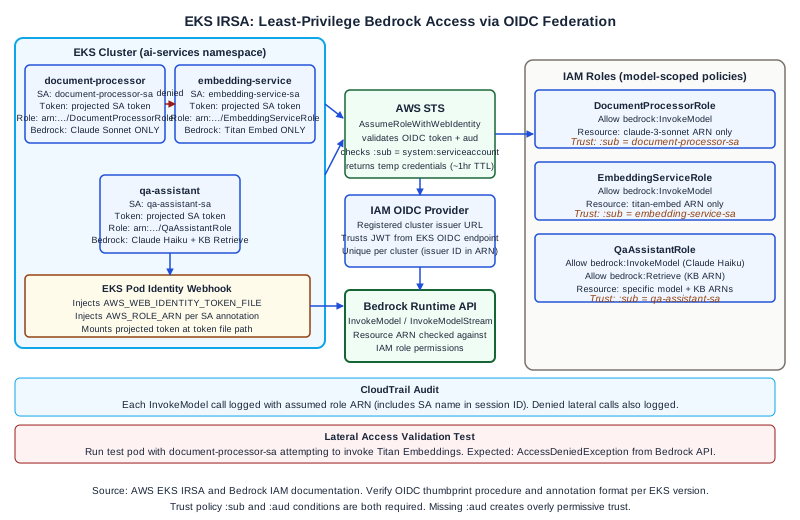
Why IRSA Matters for Bedrock Access
Containers running on Amazon EKS need AWS credentials to call the Bedrock API. The wrong approach is to pass long-lived IAM access keys as environment variables or Kubernetes secrets. Long-lived keys rotate manually, and a compromised container exposes those keys indefinitely. The right approach is IAM Roles for Service Accounts (IRSA), which lets a Kubernetes service account assume a time-limited IAM role using the cluster's OIDC identity provider.
IRSA solves three problems simultaneously: credential rotation (the assumed role credentials expire and are auto-renewed by the AWS SDK), scope isolation (each service account gets its own IAM role with its own permission boundary), and auditability (CloudTrail records which role and which OIDC identity made each Bedrock API call).
The goal of this article is to walk through the complete IRSA configuration for Bedrock access: creating the OIDC provider for your cluster, writing a model-scoped IAM policy, creating the IAM role with the correct trust policy, binding the role to a Kubernetes service account, and validating that lateral access across service accounts is blocked.
How the OIDC Federation Chain Works
EKS clusters expose an OpenID Connect (OIDC) issuer endpoint. When you register this endpoint as an Identity Provider in IAM, you allow IAM to trust JWT tokens issued by that endpoint. When a pod annotated with a service account runs, the EKS Pod Identity Webhook injects two environment variables (AWS_WEB_IDENTITY_TOKEN_FILE and AWS_ROLE_ARN) and mounts a projected service account token at the token file path. The AWS SDK reads these automatically and calls sts:AssumeRoleWithWebIdentity using the projected token to obtain temporary credentials for the annotated IAM role. Those temporary credentials expire (typically after one hour) and the SDK renews them automatically.
The trust policy on the IAM role is the security gate. It specifies which OIDC provider can assume the role and, critically, which Kubernetes service account identity is allowed. The subject condition in the trust policy takes the form system:serviceaccount:<namespace>:<serviceaccount-name>. This binds the role to exactly one service account in one namespace.
Setting Up the OIDC Provider
If you created your EKS cluster with eksctl, the OIDC provider is likely already registered. Verify with:
aws eks describe-cluster --name <cluster-name> --query "cluster.identity.oidc.issuer" --output textThis returns a URL like https://oidc.eks.us-east-1.amazonaws.com/id/EXAMPLE1234567890. Check whether this issuer is registered in IAM:
aws iam list-open-id-connect-providersIf the provider is not listed, register it. Using eksctl:
eksctl utils associate-iam-oidc-provider --cluster <cluster-name> --approveOr using the AWS CLI, extract the thumbprint and create the provider directly with aws iam create-open-id-connect-provider. Consult the EKS documentation for the thumbprint extraction procedure, as it involves retrieving the OIDC issuer's TLS certificate chain.
Writing a Model-Scoped Bedrock IAM Policy
Least-privilege Bedrock access means granting bedrock:InvokeModel for specific model ARNs only, not bedrock:* or bedrock:InvokeModel on *. Bedrock model ARNs follow the pattern:
arn:aws:bedrock:<region>::foundation-model/<model-id>For example, to restrict a service account to invoking only Anthropic Claude 3 Sonnet:
{
  "Version": "2012-10-17",
  "Statement": [
    {
      "Sid": "BedrockInvokeClaudeSonnet",
      "Effect": "Allow",
      "Action": [
        "bedrock:InvokeModel",
        "bedrock:InvokeModelWithResponseStream"
      ],
      "Resource": [
        "arn:aws:bedrock:us-east-1::foundation-model/anthropic.claude-3-sonnet-20240229-v1:0"
      ]
    }
  ]
}
If a service also needs to list available models for health checks or version validation, add bedrock:ListFoundationModels with resource * as a separate statement, since that action does not support resource-level restrictions. Keep the ListFoundationModels permission in a separate statement from InvokeModel to make the policy intent clear during review.
Do not grant bedrock:* even in development environments. The habit of using wildcard actions spreads to production configurations. Write specific actions from the start.
Creating the IAM Role with Trust Policy
Create the IAM policy from the JSON above, then create the role with a trust policy that restricts assumption to the specific service account:
{
  "Version": "2012-10-17",
  "Statement": [
    {
      "Effect": "Allow",
      "Principal": {
        "Federated": "arn:aws:iam::<account-id>:oidc-provider/oidc.eks.<region>.amazonaws.com/id/<oidc-id>"
      },
      "Action": "sts:AssumeRoleWithWebIdentity",
      "Condition": {
        "StringEquals": {
          "oidc.eks.<region>.amazonaws.com/id/<oidc-id>:sub": "system:serviceaccount:ai-services:document-processor-sa",
          "oidc.eks.<region>.amazonaws.com/id/<oidc-id>:aud": "sts.amazonaws.com"
        }
      }
    }
  ]
}
The :sub condition is the binding that restricts this role to the document-processor-sa service account in the ai-services namespace. Any other service account that attempts to assume this role will be denied by STS.
Using eksctl to create the role and service account together:
eksctl create iamserviceaccount \
  --cluster <cluster-name> \
  --namespace ai-services \
  --name document-processor-sa \
  --attach-policy-arn arn:aws:iam::<account-id>:policy/BedrockInvokeClaudeSonnet \
  --approve
This command creates the IAM role, attaches the policy, writes the trust policy with the correct OIDC condition, and annotates the Kubernetes service account with the role ARN.
Worked Example: Three Microservices with Separate Service Accounts
Consider an AI platform team running three microservices on EKS, each with different Bedrock access requirements:
document-processor: Extracts structured data from documents. Needs bedrock:InvokeModel on Claude 3 Sonnet only.
embedding-service: Generates text embeddings for a vector index. Needs bedrock:InvokeModel on Amazon Titan Embeddings only.
qa-assistant: Runs a retrieval-augmented Q&A flow. Needs bedrock:InvokeModel on Claude 3 Haiku and bedrock:Retrieve on a specific Knowledge Base ARN.
Three separate IAM policies are created, one per service. Three separate IAM roles are created, one per service, each with a trust policy binding to the specific service account in the specific namespace. Three Kubernetes service accounts are annotated with the corresponding role ARNs.
Lateral access validation test. To confirm that document-processor-sa cannot call Bedrock with the embedding-service role, run a test pod that uses the document-processor-sa service account and attempts to invoke the Titan Embeddings model:
kubectl run lateral-test \
  --image=amazon/aws-cli \
  --serviceaccount=document-processor-sa \
  --namespace=ai-services \
  --rm -it -- \
  aws bedrock-runtime invoke-model \
    --model-id amazon.titan-embed-text-v1 \
    --body '{"inputText":"test"}' \
    --cli-binary-format raw-in-base64-out \
    /tmp/out.json
The expected result is an AccessDeniedException from the Bedrock API. If the call succeeds, the IAM policy on document-processor-sa's role is broader than intended and must be corrected.
Similarly, run the inverse test: a pod using embedding-service-sa attempting to invoke Claude 3 Sonnet should be denied.
Log both test results and their CloudTrail entries. The CloudTrail record for the denied call should show the document-processor-sa role ARN as the caller, confirming that the OIDC federation chain correctly identified the calling identity.
Failure Modes
Missing :aud condition in trust policy. If you omit the :aud condition (sts.amazonaws.com), the trust policy may be overly permissive and allow JWT tokens from the OIDC provider for audiences other than STS. Always include both :sub and :aud conditions.
Namespace mismatch. The :sub condition includes the namespace name. If the service account is deployed to a different namespace than what the trust policy specifies, STS rejects the AssumeRoleWithWebIdentity call. The error from the AWS SDK is typically "WebIdentityErr: failed to retrieve credentials" and appears as a pod startup failure or first-request error. Check that the namespace in the trust policy exactly matches the namespace where the pod runs.
Multiple clusters sharing one OIDC provider. Each EKS cluster has a unique OIDC issuer ID. Trust policies on IAM roles reference the specific OIDC issuer ID, so a role created for cluster A cannot be assumed from cluster B. This is the correct isolation behavior. If you need to share a role across clusters, you need a trust policy with multiple federated principals.
Pod not receiving injected environment variables. IRSA requires the EKS Pod Identity Webhook to be running in the cluster. On clusters created with eksctl, this is installed by default. If pods do not receive AWS_WEB_IDENTITY_TOKEN_FILE and AWS_ROLE_ARN, check that the pod's service account is annotated with eks.amazonaws.com/role-arn and that the webhook deployment is healthy.
Diagnostic Signals
CloudTrail is the primary audit log for IRSA-based Bedrock calls. Each InvokeModel call records the assumed role ARN, which includes the service account name in the session identifier. This lets you answer: which service called which Bedrock model, and when.
For debugging IRSA credential failures, the most useful signal is the pod's AWS SDK log at debug level. Set the environment variable AWS_SDK_LOAD_CONFIG=true and AWS_DEFAULT_REGION explicitly, then run the pod with the AWS SDK's debug logging enabled. The SDK logs the token file path, the assumed role ARN, and the STS call result.
Next Steps
For teams building production AI platforms on EKS with Bedrock integration, the Ampity AWS Consulting service [/ai/amazon-bedrock-consulting] covers IRSA design, IAM policy review, and EKS security baseline configuration. Verify current IRSA configuration steps against the EKS documentation primary source, as the webhook installation procedure and annotation format are subject to change across EKS versions.
Primary Sources
- IAM Roles for Service Accounts, source checked 2026-11-05
- Bedrock Security and IAM, source checked 2026-11-05
Related resources
Workload Identity Still Needs a Narrow Trust Policy
Review who can assume a cloud deployment role, not just whether credentials are short-lived. Separate token identity, workflow protections and resource permissions, then test the access that should be denied.
An Enterprise AWS Tenant Needs a User Identity Lifecycle Contract
Separate enterprise SSO, tenant membership, administrator scope and session withdrawal from AWS workload identities, using explicit lifecycle and denial evidence.