Amazon Bedrock vs SageMaker: Choosing the Right AI Runtime for Production Workloads
Decision matrix for choosing between Amazon Bedrock and SageMaker covering model access, fine-tuning, latency, cost, and operational overhead for three workload types.
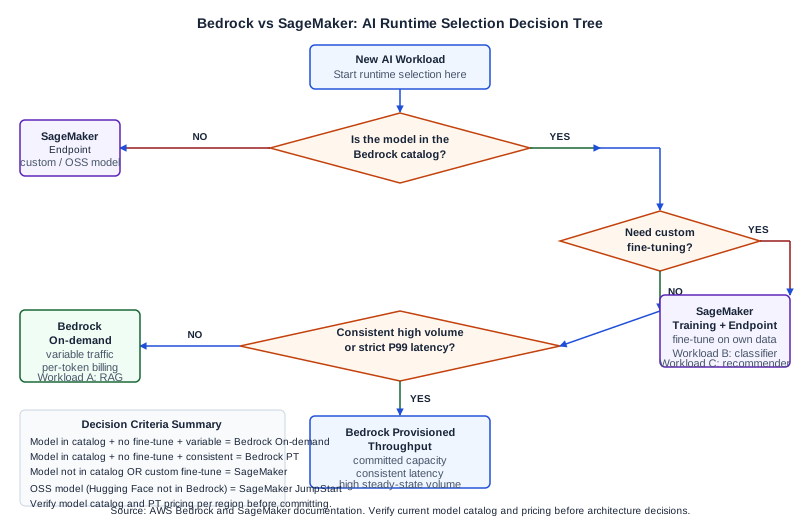
The Core Decision in Plain Terms
Amazon Bedrock and Amazon SageMaker both run AI workloads on AWS, but they target different engineering problems. Bedrock gives you API-level access to foundation models from multiple providers -- Anthropic, Amazon, Meta, Mistral, and others -- without you owning or operating any model infrastructure. SageMaker is a managed ML platform that lets you train, fine-tune, and host models from any source, including your own custom architectures.
The selection question is not which service is better in an absolute sense. It is which service fits the operational model and model access pattern your workload requires.
If your workload needs access to large commercial foundation models with no fine-tuning and minimal operational overhead, Bedrock is the natural starting point. If your workload requires training or fine-tuning a model on your own data, deploying a model from an open-source registry (such as Hugging Face), or running custom inference code with specific hardware requirements, SageMaker is the right tool.
Many production AI platforms use both services: Bedrock for foundation model inference on tasks where vendor models are sufficient, and SageMaker for custom model hosting, fine-tuning pipelines, and batch transform jobs.
What Amazon Bedrock Provides
Bedrock is a fully managed foundation model inference service. You call a model via the Bedrock API and receive a response. You do not provision infrastructure, manage scaling, or handle model updates. The underlying model instances are owned and operated by AWS; you are consuming a managed service.
Bedrock's model catalog includes models for text generation, chat, embeddings, image generation, and document understanding. The service provides on-demand inference (pay per token or per request), Provisioned Throughput (committed capacity for consistent latency), and cross-region inference profiles for routing traffic across AWS regions.
Bedrock also includes built-in features that complement inference: Knowledge Bases for managed vector retrieval, Agents for multi-step task orchestration, Flows for structured pipeline execution, Guardrails for content filtering, and Data Automation for document extraction. These features reduce the amount of integration code your team needs to write compared to assembling the same capabilities from standalone components.
Bedrock does support model customization (fine-tuning) for certain models in the catalog. You provide training data in S3, Bedrock runs the fine-tuning job on managed infrastructure, and stores the customized model weights. However, the model customization capability in Bedrock is narrower than SageMaker: you can run continued pre-training or fine-tuning on supported models, but you cannot bring an arbitrary open-source model and fine-tune it. For custom model architectures or Hugging Face models not in the Bedrock catalog, SageMaker is required.
What Amazon SageMaker Provides
SageMaker is a managed ML platform that covers the full model lifecycle: data labeling, training, fine-tuning, evaluation, model registry, real-time hosting, batch inference, and MLOps pipelines. You can train models using SageMaker-managed training jobs with your choice of instance type, run distributed training across multiple GPU instances, and host the resulting model on a SageMaker Endpoint.
SageMaker Endpoints are managed hosting containers. You push a model artifact to S3, configure the endpoint with an instance type and scaling policy, and SageMaker handles the deployment, health checking, and auto-scaling. You have full control over the inference container, which can be a prebuilt SageMaker framework container (PyTorch, TensorFlow, Hugging Face) or a custom container you build and push to ECR.
SageMaker also provides JumpStart, which is a model hub that includes Hugging Face models, foundation models from third-party providers, and AWS-provided models. JumpStart lets you deploy open-source foundation models such as Llama variants to SageMaker Endpoints with a few clicks, which makes it a viable path for teams that need foundation model inference on open-source models with control over the deployment.
The operational overhead of SageMaker is higher than Bedrock. You choose instance types, manage endpoint scaling configuration, monitor endpoint health, handle cold starts on scale-from-zero, and pay for endpoint instance hours rather than per-token or per-request. For teams with dedicated MLOps capability, this overhead is acceptable. For teams that want to minimize inference infrastructure management, it is a significant consideration.
Decision Matrix: Five Criteria
Model access. Bedrock wins for access to commercial foundation models (Anthropic Claude, Amazon Titan, Meta Llama via Bedrock, Mistral, Cohere, and others) without negotiating separate provider contracts. SageMaker wins for open-source models from Hugging Face or custom architectures that are not in the Bedrock catalog.
Fine-tuning needs. For fine-tuning supported Bedrock models on your own data, Bedrock's managed fine-tuning is the lower-overhead option. For fine-tuning open-source models, training custom architectures, or running full RLHF pipelines, SageMaker is required.
Latency profile. Bedrock on-demand inference is subject to the latency of the managed model service, which varies by model and load. Bedrock Provisioned Throughput provides committed capacity for more consistent latency. SageMaker Endpoints give you direct control over instance type and scaling, which allows you to tune for specific latency targets and avoid multi-tenancy variability. For latency-critical workloads with strict P99 requirements, SageMaker with dedicated instances may be preferable.
Cost model. Bedrock on-demand pricing is per token or per request. There is no idle cost. SageMaker Endpoint pricing is per instance-hour, which means you pay for capacity even when requests are low. For workloads with spiky or low-volume traffic, Bedrock on-demand is typically more cost-efficient. For high-volume workloads with consistent throughput, Bedrock Provisioned Throughput or a right-sized SageMaker Endpoint may be more cost-efficient than Bedrock on-demand. Run cost projections for your specific request volume before making a commitment.
Operational overhead. Bedrock requires no infrastructure management, no instance type selection, and no scaling configuration for the inference layer. SageMaker requires endpoint configuration, scaling policy setup, instance monitoring, and endpoint version management. Teams with no dedicated MLOps function should weight this criterion heavily in favor of Bedrock for inference workloads where Bedrock's model catalog covers their requirements.
Three Workload Types Mapped to Runtimes
Workload A: Foundation model RAG system. A retrieval-augmented generation system that retrieves chunks from a knowledge base and uses a large language model to generate answers. The model used is a commercial foundation model (Claude or Titan) that is in the Bedrock catalog. The team has no need to modify the model weights, and the volume is variable throughout the day.
Runtime selection: Bedrock on-demand inference with Bedrock Knowledge Bases. No infrastructure to manage. Per-token cost scales with usage. Bedrock Agents or Flows can orchestrate the retrieval-generation loop without additional infrastructure.
Workload B: Custom fine-tuned text classifier. A text classification model that has been fine-tuned on domain-specific labelled data to classify customer support tickets into 40 internal categories. The base model is a Hugging Face BERT variant fine-tuned using the team's proprietary labelled dataset. The classifier runs in real time on new support tickets as they arrive, with a volume of several thousand requests per hour during business hours and near zero outside business hours.
Runtime selection: SageMaker Endpoint with auto-scaling. The model is not in the Bedrock catalog and cannot be deployed via Bedrock. The team needs fine-tuning control using their proprietary labels. Auto-scaling to zero (or near zero) outside business hours manages cost during low-traffic periods. SageMaker Serverless Inference is an option if the latency tolerance is sufficient and cold starts are acceptable.
Workload C: Real-time recommendation engine. A collaborative filtering recommendation model, trained weekly on user behavior data using a SageMaker Training Job. The model is retrained each week and the new version promoted to the production endpoint. Response time must be under 50ms at P95. Request volume is relatively constant at several hundred requests per second.
Runtime selection: SageMaker Real-time Endpoint with a dedicated instance type sized for the latency target. The model is a custom ML architecture, not a foundation model. Weekly retraining and versioned promotion is handled via SageMaker Model Registry. The consistent traffic volume makes per-instance-hour pricing efficient. A Bedrock Provisioned Throughput commitment would not apply here because this is a custom model, not a Bedrock catalog model.
Failure Modes in the Selection Decision
The most common selection error is choosing Bedrock when the workload actually requires fine-tuning a model type that Bedrock does not support. Teams discover this after spending engineering time building a Bedrock integration, then finding that the model accuracy is insufficient for their use case and that fine-tuning the Bedrock model on their data requires a model type that Bedrock's customization feature does not cover.
The second common error is choosing SageMaker for foundation model inference when Bedrock would have been sufficient, resulting in unnecessary infrastructure management overhead and higher cost on variable-traffic workloads.
Before committing to either service, verify three things: (1) whether the model you need is available in the Bedrock catalog, (2) whether your fine-tuning requirements are met by Bedrock's customization feature or require SageMaker, and (3) whether your latency and throughput requirements are met by Bedrock on-demand or Provisioned Throughput before assuming you need a SageMaker Endpoint.
Next Steps
For AWS architecture decisions across AI and cloud workloads, the Ampity AWS Consulting service [/ai/amazon-bedrock-consulting] covers runtime selection, cost modeling, and production deployment patterns. Verify current service quotas, model catalog availability, and Provisioned Throughput pricing for your specific AWS region from the AWS documentation primary sources before finalizing architecture decisions.
Primary Sources
- What is Amazon Bedrock, source checked 2026-11-05
- What is Amazon SageMaker, source checked 2026-11-05
Related resources
Split an AI Migration by Capability, Not by Endpoint
Keep provider-bound work on its existing route while evaluating a bounded Bedrock capability. Record state ownership, held work, routing evidence and the full included cost of the split.
Test the Client Retry Contract Before Moving an AI Request to Bedrock
Inspect SDK-owned attempts, authentication, endpoint paths and timeout handling before changing an AI client's base URL. Includes an offline probe and a worked retry-budget comparison.