Lambda Cold Starts and Concurrency for Bedrock-Integrated Serverless Workloads
Configure provisioned concurrency, reserved concurrency, and timeout margins for Lambda functions calling Bedrock. Covers cold start mitigation and throttle handling.
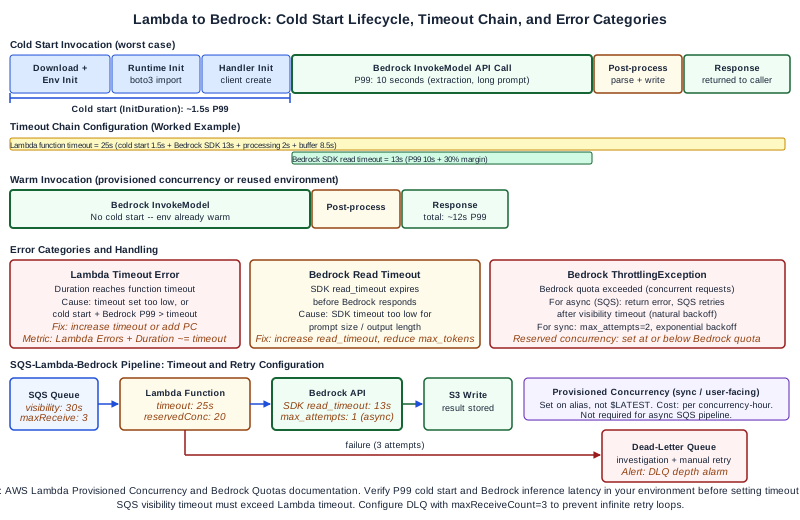
Why Lambda Cold Starts Matter More When Bedrock Is in the Call Chain
Lambda cold starts add initialization latency to the first invocation of a new execution environment. For Lambda functions that do not call external services with long response times, cold start delays of a few hundred milliseconds may be acceptable. For Lambda functions that call Bedrock foundation models, the cold start adds to an invocation that already has significant latency: foundation model inference for typical prompt lengths typically takes between 1 and 15 seconds depending on the model, prompt size, and output length.
When you add a cold start of 500ms to 2 seconds to a Bedrock call that takes 5 seconds, the total time for the first request is 6 to 7 seconds. If your Lambda function has a timeout configured at 10 seconds, there is now a material risk that cold-started invocations will approach or breach the timeout limit, particularly for requests with longer prompts or larger output lengths.
The direct answer to the configuration question: for Bedrock-integrated Lambda functions that serve user-facing or latency-sensitive workloads, configure provisioned concurrency to eliminate cold starts, reserved concurrency to cap resource usage, and a timeout margin that accounts for the worst-case Bedrock inference time for your workload.
Understanding Lambda Cold Starts in a Bedrock Context
A Lambda cold start occurs when the Lambda service must initialize a new execution environment. This happens when there are no warm (idle) execution environments available to handle an incoming invocation. The initialization phases are:
Runtime initialization. The Lambda service downloads the function package or container image, starts the runtime process (Python, Node.js, etc.), and runs the initialization code outside the handler function. For Python-based Bedrock integration, initialization typically includes importing the boto3 library and creating the Bedrock client. The boto3 import and client instantiation are significant contributors to cold start duration in Python lambdas.
Handler initialization (first invocation). The first time the handler function runs, any connection pooling or resource initialization inside the handler also adds to perceived latency.
Cold start duration varies by runtime, function package size, and VPC configuration. Functions in a VPC have historically had longer cold starts due to network interface attachment, though the Lambda service has improved this significantly. Verify current cold start characteristics for your runtime and VPC configuration by measuring P95 cold start duration in your own environment.
Warm execution environments are reused across subsequent invocations without re-running initialization code. The number of warm environments scales with concurrent invocations. When concurrent invocations exceed the number of warm environments, additional cold starts occur to provision new environments.
The Timeout Chain Problem
When Lambda calls Bedrock, there is a timeout chain: the Lambda function timeout must be greater than the Bedrock API call timeout, which must be greater than the expected Bedrock inference time.
If you set the Lambda timeout to 30 seconds and the Bedrock API call has a 25-second SDK client timeout, but a particular request takes 28 seconds for Bedrock to respond (due to a long prompt or slow model response), the Bedrock SDK call times out at 25 seconds and the Lambda returns an error. The Lambda timeout of 30 seconds was never reached, but the Bedrock call still failed.
The correct approach is to configure the timeout chain explicitly:
- Estimate the worst-case Bedrock inference time for your workload. Test with the longest prompts you expect in production. Use the P99 inference latency from the Bedrock built-in CloudWatch metrics for your specific model and input/output token range.
- Add a safety margin of 20-30% to the P99 Bedrock inference time. This becomes your Bedrock SDK client timeout.
- Add cold start margin (P99 cold start duration for your function) plus the Bedrock SDK client timeout plus any post-processing time. This becomes your Lambda function timeout.
- Set the Lambda function timeout to the value from step 3, with an additional buffer of 2-5 seconds.
Example: if P99 Bedrock inference time is 8 seconds, set Bedrock SDK timeout to 10 seconds. If P99 cold start is 2 seconds and post-processing is 1 second, set Lambda timeout to 10 + 2 + 1 + 3 buffer = 16 seconds. Round up to 20 seconds for the Lambda configuration.
Configuring the Bedrock SDK Client Timeout in Python
The AWS SDK for Python (boto3) uses botocore's configuration for connection and read timeouts. For Bedrock invocations, the read timeout is the critical setting -- it controls how long the SDK waits for a response after the request is sent.
import boto3
from botocore.config import Config
import json

# Configure outside the handler for reuse across warm invocations
bedrock_config = Config(
    region_name="us-east-1",
    connect_timeout=5,      # seconds for initial connection
    read_timeout=25,        # seconds to wait for model response
    retries={
        "max_attempts": 2,  # total attempts including first try
        "mode": "standard"
    }
)

bedrock_client = boto3.client(
    "bedrock-runtime",
    config=bedrock_config
)

def handler(event, context):
    try:
        response = bedrock_client.invoke_model(
            modelId="anthropic.claude-3-haiku-20240307-v1:0",
            body=json.dumps({
                "anthropic_version": "bedrock-2023-05-31",
                "max_tokens": 1024,
                "messages": [{"role": "user", "content": event["prompt"]}]
            })
        )
        result = json.loads(response["body"].read())
        return {"statusCode": 200, "body": result["content"][0]["text"]}

    except bedrock_client.exceptions.ThrottlingException:
        # Return a retriable error code -- caller should back off and retry
        return {"statusCode": 429, "body": "Bedrock throttled, retry with backoff"}

    except Exception as e:
        # Log the error type for diagnostic categorization
        print(f"ERROR type={type(e).__name__} message={str(e)}")
        raise
The boto3 client is instantiated outside the handler function so that it is initialized once per execution environment and reused across warm invocations. This reduces cold start impact for subsequent invocations and avoids creating a new TCP connection to Bedrock for every request.
Provisioned Concurrency Configuration
Provisioned Concurrency keeps a specified number of Lambda execution environments initialized and warm, eliminating cold starts for invocations handled by those environments. For Bedrock-integrated Lambda functions that serve real-time requests, provisioned concurrency is the most direct solution to cold start latency.
Configure provisioned concurrency on a Lambda function alias or version:
# Publish a version
aws lambda publish-version --function-name bedrock-document-processor

# Set provisioned concurrency on the version
aws lambda put-provisioned-concurrency-config \
  --function-name bedrock-document-processor \
  --qualifier 1 \
  --provisioned-concurrent-executions 5

# Or set on an alias
aws lambda put-provisioned-concurrency-config \
  --function-name bedrock-document-processor \
  --qualifier production \
  --provisioned-concurrent-executions 5
The number of provisioned concurrent executions to set depends on your expected baseline concurrent request rate. If your application normally handles 3-4 concurrent requests at any given moment and you are willing to tolerate cold starts for traffic spikes above that level, set provisioned concurrency to 5. For traffic spikes above 5 concurrent requests, Lambda will cold-start additional environments.
For applications with highly predictable traffic patterns, use Application Auto Scaling to schedule provisioned concurrency increases before expected peaks:
aws application-autoscaling register-scalable-target \
  --service-namespace lambda \
  --resource-id function:bedrock-document-processor:production \
  --scalable-dimension lambda:function:ProvisionedConcurrency \
  --min-capacity 2 \
  --max-capacity 20

aws application-autoscaling put-scheduled-action \
  --service-namespace lambda \
  --resource-id function:bedrock-document-processor:production \
  --scalable-dimension lambda:function:ProvisionedConcurrency \
  --scheduled-action-name scale-up-business-hours \
  --schedule "cron(0 8 * * ? *)" \
  --scalable-target-action MinCapacity=10,MaxCapacity=20
Provisioned concurrency incurs a continuous cost (charged per concurrency-hour) even when no requests are being processed. Calculate the cost of provisioned concurrency against the latency improvement it provides. For batch processing pipelines where cold start latency is acceptable, provisioned concurrency is not cost-justified.
Reserved Concurrency Configuration
Reserved Concurrency caps the maximum number of concurrent Lambda executions for a function. It serves two purposes:
- It prevents one Lambda function from consuming all available concurrent executions in your account, which would cause throttles on other Lambda functions.
- It provides a quota you can rely on: the function will always have up to this many concurrent executions available (subject to Bedrock API quotas on the other side of the call).
For Bedrock-integrated functions, set reserved concurrency at or below the Bedrock API's concurrent invocation quota for your account and region. If Bedrock throttles at a certain concurrent call rate, having Lambda concurrency configured higher than that rate results in Lambda executions that immediately receive a Bedrock ThrottlingException and must handle the error. Setting Lambda reserved concurrency below the Bedrock throttle limit reduces the volume of wasted Lambda executions.
aws lambda put-function-concurrency \
  --function-name bedrock-document-processor \
  --reserved-concurrent-executions 20
Worked Example: Document Processing Pipeline
A document processing pipeline uses Lambda to call Bedrock for document classification and extraction. Documents are submitted via SQS queue. The Lambda function reads a document from S3, calls Bedrock for classification, then calls Bedrock again for extraction of the classified document type.
Timeout chain analysis:
- Bedrock P99 inference for classification: 4 seconds (small prompt, short output)
- Bedrock P99 inference for extraction: 10 seconds (longer prompt, structured output)
- Total Bedrock time: 14 seconds
- Cold start P99: 1.5 seconds (Python, 50MB package, no VPC)
- SQS visibility timeout must exceed Lambda timeout
Bedrock SDK read timeout: 13 seconds (10s P99 + 30% margin) Lambda function timeout: 13 + 1.5 (cold start) + 2 (processing + S3 read) + 3 (buffer) = 19.5 seconds, rounded to 25 seconds. SQS visibility timeout: set to 25 seconds plus SQS polling interval (5 seconds), so 30 seconds.
If the Lambda timeout expires before Bedrock responds, SQS re-enqueues the message after the visibility timeout. Without configuring a dead-letter queue (DLQ), this creates an infinite retry loop for documents that consistently cause long Bedrock inference times. Configure a DLQ on the SQS queue with a maxReceiveCount of 3 to route documents that fail three consecutive processing attempts to the DLQ for investigation.
Throttle handling:
When the Lambda function receives a ThrottlingException from Bedrock, the SQS-Lambda integration with batch size 1 and a DLQ is the correct handling pattern for a batch processing pipeline. The function returns an error, SQS treats the message as a failed delivery, waits for the visibility timeout, and retries. The retry delay acts as natural backoff against Bedrock throttles.
For higher-throughput pipelines with batch sizes greater than 1, implement partial batch response reporting: return successfully processed message IDs and failed message IDs separately so SQS only re-enqueues failed items.
Cold start mitigation for this pipeline:
For the document processing pipeline, cold starts are acceptable because SQS-triggered Lambda processing is asynchronous and latency tolerance is measured in seconds, not milliseconds. Provisioned concurrency is not cost-justified here. Instead, optimize the cold start duration by:
- Using a minimal Python package with only the required
boto3andbotocoredependencies (no unused libraries) - Using Lambda container images with pre-cached layer access rather than ZIP packages for faster initialization if the package size exceeds 10MB
- Placing the boto3 client initialization outside the handler function (already shown in code example above)
For the synchronous, user-facing variant of this same pipeline (where a user waits for the classification result), set provisioned concurrency to cover the baseline request rate and configure the timeout chain as above.
Failure Modes
Timeout set below cold start plus Bedrock P99. If you set Lambda timeout to 10 seconds but cold start + Bedrock P99 is 12 seconds, cold-started invocations will consistently timeout. The CloudWatch error metric shows Duration values peaking near the timeout limit. Increase the timeout or add provisioned concurrency to eliminate cold starts.
SDK retry storms on Bedrock throttle. The boto3 SDK's standard retry mode retries on ThrottlingException with exponential backoff, up to max_attempts. If max_attempts is set to 5 and your Lambda timeout is 25 seconds, the retry loop inside a throttled Lambda execution may consume the full timeout window, increasing your AWS Lambda execution costs and failing the request anyway. For SQS-triggered pipelines, set max_attempts to 1 (no retries) and rely on SQS visibility timeout for retry orchestration. For synchronous Lambda functions, 2 retries with exponential backoff is reasonable.
Provisioned concurrency on wrong qualifier. Provisioned concurrency must be set on a Lambda alias or a specific published version, not on $LATEST. If you deploy new code to $LATEST and your provisioned concurrency is on alias production pointing to an older version, the new code is not warmed. Update the alias to point to the new version after deployment.
SQS visibility timeout too short. If SQS visibility timeout is shorter than Lambda timeout, the message becomes visible to other consumers while the Lambda is still processing it, resulting in duplicate processing of the same document. Always set SQS visibility timeout to at least Lambda timeout plus polling interval.
Diagnostic Signals
CloudWatch Lambda metrics:
InitDuration: reports cold start initialization time per invocation. HighInitDurationvalues confirm cold starts are occurring.Duration: total execution time including cold start. Compare against timeout setting -- values approaching timeout indicate a risk of timeout failures.Throttles(Lambda metric): reports Lambda concurrency throttles (not Bedrock throttles). High Lambda throttles mean reserved concurrency limit is too low for the incoming request rate.Errors: use metric filter on the error log message type to separate Bedrock throttle errors from Bedrock timeout errors from Lambda timeout errors.
Bedrock CloudWatch metrics:
InvocationLatency: the Bedrock-side model latency. Compare this with LambdaDurationto understand what fraction of Lambda execution time is spent waiting for Bedrock.InvocationClientErrors: Bedrock 4xx errors including throttles.
For the SQS-Lambda pipeline, monitor SQS ApproximateNumberOfMessagesNotVisible as a leading indicator of concurrency saturation: if this metric grows persistently, Lambda is not processing messages fast enough, which may indicate throttling, timeouts, or insufficient concurrency.
Next Steps
For teams building serverless AI processing pipelines on AWS, the Ampity AWS Consulting service [/ai/amazon-bedrock-consulting] covers Lambda concurrency design, Bedrock integration patterns, and serverless architecture review. Verify current Bedrock service quotas for concurrent invocations in your region and confirm Lambda cold start characteristics for your runtime and package size before setting timeout and concurrency configurations.
Primary Sources
- Lambda Provisioned Concurrency, source checked 2026-11-05
- Bedrock Quotas and Limits, source checked 2026-11-05
Related resources
Your EventBridge Target DLQ Is Empty. Did Lambda Finish?
Distinguish Classic EventBridge target delivery from Lambda asynchronous processing and failed capture before drawing conclusions from an empty dead-letter queue.
What Should an AI Workflow Do During a Provider Outage?
Choose safe delay, tested fallback or a bounded manual path during an AI outage. Preserve task state, reconcile uncertain writes and control backlog recovery.