Bedrock Inference Profiles: Per-Team Cost Allocation and Showback
Create application inference profiles, attach cost allocation tags, and produce per-team showback reports from AWS Cost Explorer. Covers system-defined vs application...
Without inference profiles, Bedrock API costs appear as a single line item by model in Cost Explorer. If three product teams are all invoking Claude through the same AWS account, you cannot tell from Cost Explorer alone how much each team spent. Inference profiles solve this by creating a named resource per team that carries cost allocation tags through the billing system.
This article covers application inference profiles, which you create and tag yourself. It is distinct from system-defined cross-region inference profiles, which are predefined by AWS for routing across regions. You can build an application inference profile that routes through a system-defined cross-region profile if you need both capabilities.
The two types of inference profiles
System-defined (cross-region) inference profiles are predefined by AWS. They specify a model and a set of regions. When you invoke through a cross-region profile, Bedrock distributes requests across those regions, which can help with capacity. You cannot tag these profiles for cost allocation.
Application inference profiles are created by you. They reference either a single-region foundation model or a system-defined cross-region profile as their base. You attach your own tags to the application profile. When a team invokes Bedrock using the application inference profile ARN instead of the model ARN, the resulting charges appear in Cost Explorer under those tags.
The price charged is based on the region from which you invoke, using the model's standard on-demand pricing. Inference profiles do not change your pricing tier or discount eligibility.
Creating an application inference profile
An application inference profile requires:
- A name you define
- A model source: either a foundation model ARN in a specific region, or a cross-region system inference profile ARN
- Tags that your cost allocation reports will use
Using the AWS CLI (illustrative; verify current CLI command structure):
aws bedrock create-inference-profile \
  --inference-profile-name "product-team-alpha" \
  --model-source '{"copyFrom": "arn:aws:bedrock:us-east-1::foundation-model/anthropic.claude-3-5-sonnet-20241022-v2:0"}' \
  --tags '{"Team": "product-alpha", "CostCenter": "CC-1001", "Environment": "production"}' \
  --region us-east-1
The response includes the inference profile ARN. This ARN is what your team's application code uses in place of the model ARN when calling InvokeModel, Converse, or ConverseStream.
Application inference profiles are scoped to the account and region where they are created. If your teams operate in multiple regions, create separate profiles per region. Cross-region routing itself is a separate feature via system-defined cross-region profiles.
Tag strategy for cost allocation
Cost allocation tags must be activated in AWS Billing before they appear in Cost Explorer. After creating tags on a resource, there is typically a delay before they appear in cost reports. The delay for new tags can extend to 24 hours or more. Plan your tag activation and your first reporting period accordingly.
Recommended tag structure for a platform team managing multiple product teams:
| Tag key | Example values | Purpose |
|---|---|---|
Team | product-alpha, product-beta, platform | Per-team cost split |
CostCenter | CC-1001, CC-1002 | Financial allocation to business unit |
Environment | production, staging, development | Environment-level split within a team |
Project | ai-search, ai-drafting | Project-level tracking |
Keep the tag taxonomy consistent across all Bedrock profiles and other AWS resources your teams use. Inconsistent tag keys make Cost Explorer filters unreliable.
Worked example: three-team platform showback
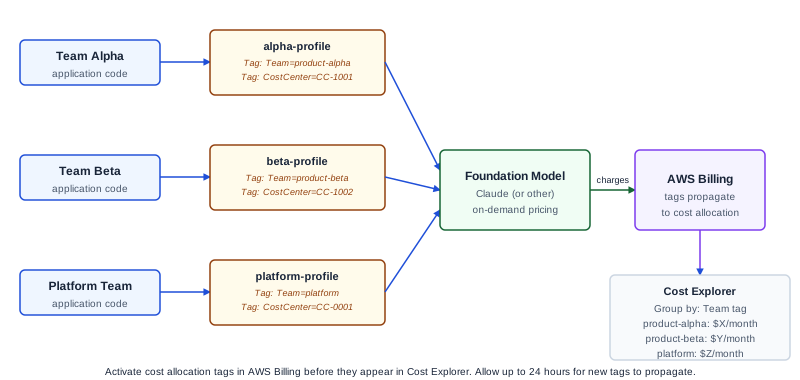
A platform team manages a shared AWS account for AI development. Three product teams (Alpha, Beta, and Platform Internal) invoke Claude through the account. Each needs a monthly cost showback report.
Setup:
Create one application inference profile per team, all pointing to the same underlying model:
alpha-profile  → claude-3-5-sonnet  → Tag: Team=product-alpha, CostCenter=CC-1001
beta-profile   → claude-3-5-sonnet  → Tag: Team=product-beta, CostCenter=CC-1002
platform-profile → claude-3-5-sonnet → Tag: Team=platform, CostCenter=CC-0001
Each team's application code receives its profile ARN. The team never references the model ARN directly. The profile ARN is what they put in their modelId field.
Monthly showback report:
In AWS Cost Explorer, filter by the service "Amazon Bedrock" and group by the Team tag. This produces a per-team cost breakdown. Export this as CSV for your monthly showback report.
Illustrative output structure (not actual values; verify against your account's Cost Explorer data):
| Team | Month | Bedrock Charges | Input Tokens (est.) | Output Tokens (est.) |
|---|---|---|---|---|
| product-alpha | 2026-10 | $X | --- | --- |
| product-beta | 2026-10 | $Y | --- | --- |
| platform | 2026-10 | $Z | --- | --- |
Actual dollar amounts and token counts come from your Cost Explorer report against your account's actual usage. This table structure is illustrative of the report shape; the values are not provided here because they depend on your usage volume and current AWS pricing, which changes over time.
Token-level visibility:
Inference profiles feed CloudWatch usage metrics when model invocation logging is enabled. You can emit per-profile metrics and build CloudWatch dashboards for real-time token usage by team, supplementing the monthly Cost Explorer view with intra-month tracking.
What application inference profiles do not cover
Provisioned Throughput commitments are separate from inference profiles. If you purchase Provisioned Throughput for a model, the commitment cost appears in your bill differently from on-demand invocations. Provisioned Throughput has its own billing structure independent of inference profile tags.
Knowledge base retrieval can use an inference profile for the generation step, but the retrieval (embedding) step and Knowledge Base sync charges appear separately. Tag coverage is not uniform across all Bedrock features.
Cross-account showback. Application inference profiles are per-account. If your teams are in separate AWS accounts, the cost tracking approach is different: each account sees its own Bedrock charges, and you aggregate at the Organizations level using Cost Explorer across accounts. Inference profiles solve the within-account team attribution problem, not the cross-account problem.
Failure modes
Tags not appearing in Cost Explorer. Most commonly because: the tag was not activated in AWS Billing, the profile was created before tag activation (activation applies going forward), or there is a reporting delay. Wait at least 24 hours after tag activation before expecting tags to appear.
Team invokes model ARN directly. If a team bypasses the inference profile ARN and invokes the model ARN directly, the invocation is not tagged. The cost appears in Cost Explorer as untagged Bedrock usage. Enforce inference profile use through IAM policy if necessary: deny bedrock:InvokeModel when the resource is a model ARN, and allow it only when the resource is an inference profile ARN in your approved profile list.
Profile ARN propagation errors. If a team's application is misconfigured with the wrong profile ARN, it invokes under a different team's cost center. Validate ARN configuration during deployment.
High-cardinality tag sprawl. Using ProjectName or FeatureFlag as a tag key with many unique values makes Cost Explorer difficult to use and report on. Keep tag cardinality manageable.
Diagnostic signals
If your Cost Explorer "Bedrock" line item contains significant untagged spend, some invocations are bypassing inference profiles. Enable Service Control Policies or IAM condition keys that restrict bedrock:InvokeModel to only inference profile ARNs in your account to enforce consistent tagging.
If monthly reports show unexpectedly high spend for one team, check their CloudWatch logs for high output token volumes, which typically drive most cost. The input/output token split is relevant because output tokens cost more per token than input tokens for most models.
What to do next
The next useful step is creating application inference profiles for each team and distributing the profile ARNs before any team invokes Bedrock directly. Activate cost allocation tags in AWS Billing. Run the first Cost Explorer report at the end of the month to verify the tag split is working as expected.
For the broader AWS cost management approach, see the AWS Cost Management documentation. For Ampity's AWS consulting work, see the AWS Consulting service page.
Primary references
- Set up a model invocation resource using inference profiles, source checked 2026-11-05
- Create an application inference profile
- Organizing and tracking costs using AWS cost allocation tags
- AWS Cost Explorer, source checked 2026-11-05
Related resources
Bedrock Knowledge Bases: Retrieval Configuration Trade-offs
Choose chunking strategy, embedding model, and retrieval settings for Amazon Bedrock Knowledge Bases with known trade-offs documented. Covers fixed-size, hierarchical, and semantic chunking with a worked HR policy corpus example.
AWS Data Transfer Pricing: Types, Fees and Tracking
Classify AWS transfer charges by service, route and direction. Reconcile billing units, processing fees and rate evidence with a worked tracking example.
Related services
LLM & RAG Development Services for Enterprise
LLM and RAG development services for enterprise applications. Implement retrieval, integrations, access controls and evaluation using your accepted answer criteria.
AWS Consulting & Migration Services
AWS consulting for architecture and Well-Architected reviews, cost optimisation, FinOps and migration. Plan changes around workload evidence and recovery needs.