Bedrock Flows: Designing Multi-Step AI Pipelines with Branching and Error Handling
Build Bedrock Flows with condition nodes, loop control, and error branches. Understand where model invoke nodes remain probabilistic inside a structured DAG.
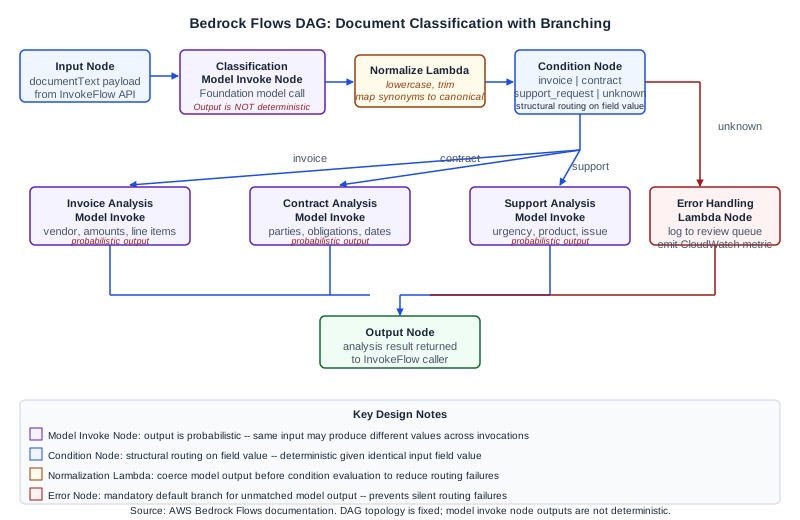
What Bedrock Flows Provides and What It Does Not Guarantee
Amazon Bedrock Flows lets you build directed acyclic graphs (DAGs) that connect input sources, model invocations, condition evaluations, and output targets into a managed orchestration pipeline. The service provides structured execution sequencing, state passing between nodes, and built-in branching on discrete field values.
What Bedrock Flows does not provide is deterministic output from model invoke nodes. A flow's execution graph is a fixed structure: once you define the nodes and connections, the DAG topology is static. But any node that invokes a foundation model produces output that varies with temperature settings, input phrasing, and inherent model behavior. Routing decisions made by condition nodes that evaluate discrete field values extracted from model output can appear repeatable when the model reliably produces the same field value for a given input, but that repeatability is a function of the model's behavior, not a structural guarantee. Engineers who design Flows pipelines should distinguish clearly between structural routing (condition nodes evaluating literal field values) and model-generated routing signals (fields whose values are produced by a model call).
This distinction matters for production design. Build your condition nodes to handle the full range of values a model might realistically produce, including unexpected or malformed output. Plan error branches for cases where the model produces output that does not match any expected condition branch.
How Bedrock Flows Executes a Pipeline
A Flows pipeline is composed of typed nodes connected by named edges. Each edge carries a data payload -- typically a JSON object -- from the output of one node to the input of the next. The service executes nodes in dependency order: a node runs when all its input edges have delivered data.
Input node. Every flow starts with exactly one input node. It receives the external payload from the caller (via the InvokeFlow API) and routes fields to downstream nodes.
Model invoke node. This node calls a Bedrock foundation model. You configure the model ID, inference parameters, and a prompt template that may include variable references to upstream node outputs. The node returns the model's response text, which you can map to named output fields for downstream nodes. The response is not deterministic -- the same input may produce different output across invocations, particularly for generative tasks.
Condition node. This node evaluates a Boolean expression against its input fields and routes execution down one of several named output connectors depending on which condition evaluates to true. Condition nodes are structural: given identical input field values, they will route identically. However, if the input field value comes from a model invoke node, its value may differ across invocations.
Iterator node and collector node. These handle loops over arrays. The iterator node emits one element at a time from an input array, allows downstream processing of each element, and the collector node assembles the results back into an array.
Lambda node. Calls an AWS Lambda function and passes the result downstream. Lambda nodes are useful for data transformation, external API calls, or validation logic that does not require a foundation model.
Knowledge Base retrieve node. Issues a retrieval query against a Bedrock Knowledge Base and returns the matching chunks as a structured list. This node is deterministic for a given query and index state.
Output node. Receives the final payload and returns it to the InvokeFlow caller.
Designing Flows for Document Classification with Branching
Consider a document classification flow that receives a raw document text, determines the document type, and routes the document to a specialized analysis node for each type. The document types handled are: invoice, contract, and support request. Documents that cannot be classified go to an error handling node.
Flow design:
- Input node receives
{"documentText": "..."}. - Classification model invoke node runs a prompt: "Classify the following document into exactly one of these categories: invoice, contract, support_request. Respond with only the category name in lowercase. Document: {{documentText}}". The response is mapped to an output field called
documentType. - Classification condition node evaluates
documentType:
- Branch
invoice: conditiondocumentType == "invoice" - Branch
contract: conditiondocumentType == "contract" - Branch
supportRequest: conditiondocumentType == "support_request" - Branch
unknown: default fallback when no condition matches
- Invoice analysis model invoke node receives the original document text and runs an invoice-specific extraction prompt.
- Contract analysis model invoke node runs a contract review prompt.
- Support request analysis model invoke node extracts urgency, product, and issue summary.
- Error handling Lambda node on the
unknownbranch logs the unclassified document to a review queue. - Output node collects the analysis result from whichever branch executed.
Why the unknown branch is mandatory. The classification model invoke node may produce output that does not match any of the three expected category strings. It might respond with "Invoice" (capitalized), "billing" (synonym), "contract_review" (variation), or multi-word output that includes punctuation. If you define only the three named branches and no default, the flow execution fails when the model produces unexpected output. The error branch catches these cases and routes them to recoverable handling rather than leaving the caller with an unhandled execution failure.
Prompt design for condition-node compatibility. When a model invoke node feeds a condition node, the prompt must strongly constrain the output format. In the classification example, the prompt instructs the model to respond with only the category name in lowercase. Even with this constraint, you should treat compliance as probabilistic and test with adversarial inputs during development. Add a normalization Lambda node between the classification model invoke node and the condition node to trim whitespace, lowercase the value, and map near-synonyms to canonical values before the condition is evaluated.
Configuring Flows via the API
Flows are defined using the CreateFlow and CreateFlowVersion API operations. The flow definition is a JSON structure specifying node configurations and connections.
A simplified node definition for the condition node in the classification example:
{
  "name": "classificationCondition",
  "type": "Condition",
  "configuration": {
    "condition": {
      "conditions": [
        { "name": "invoice", "expression": "documentType == 'invoice'" },
        { "name": "contract", "expression": "documentType == 'contract'" },
        { "name": "supportRequest", "expression": "documentType == 'support_request'" }
      ]
    }
  },
  "inputs": [
    { "name": "documentType", "type": "String", "expression": "$.data.documentType" }
  ]
}
The connection from the classification model invoke node to the condition node specifies the output field mapping:
{
  "name": "classificationToCondition",
  "source": "classificationModelInvoke",
  "target": "classificationCondition",
  "configuration": {
    "data": {
      "sourceOutput": "modelCompletion",
      "targetInput": "documentType"
    }
  }
}
After creating a flow, you must create a flow version and an alias before you can invoke it. The alias maps a name (such as "production" or "staging") to a specific version. This allows you to update the flow definition and promote the new version to the alias without changing the caller's invocation code.
Invoking the flow:
import boto3

client = boto3.client("bedrock-agent-runtime", region_name="us-east-1")

response = client.invoke_flow(
    flowIdentifier="FLOW_ID",
    flowAliasIdentifier="ALIAS_ID",
    inputs=[
        {
            "content": {"document": {"documentText": document_text}},
            "nodeName": "FlowInputNode",
            "nodeOutputName": "document"
        }
    ]
)

for event in response["responseStream"]:
    if "flowOutputEvent" in event:
        print(event["flowOutputEvent"]["content"])
The InvokeFlow API uses an event stream response. Your client must consume the stream to retrieve the output and any execution events. Verify the current event types and stream format in the primary source documentation, as the event schema may be updated.
Error Handling Patterns
Node-level failures. If a model invoke node receives a throttling response from the Bedrock runtime, the flow execution fails at that node. Bedrock Flows does not automatically retry throttled model invoke nodes. Build retry logic at the caller level: catch the execution failure, wait with exponential backoff, and re-invoke the flow. For high-throughput use cases, request a Bedrock on-demand throughput quota increase or attach a Provisioned Throughput commitment to reduce throttling exposure.
Malformed model output. If a model invoke node's output does not match the expected schema for a downstream node's input, the flow execution fails with a data mapping error. Use Lambda nodes as normalization steps between model invoke nodes and condition nodes to validate and coerce model output before it reaches a structural evaluation point.
Timeout. The InvokeFlow API has a maximum execution duration. Flows that include multiple sequential model invoke nodes with long inference times may time out before completing. Break very long sequential chains into separate flows invoked from a Step Functions state machine, which supports longer execution windows and built-in retry semantics.
Partial execution tracing. The flow execution response includes an event stream that surfaces node execution events in order. Logging these events to CloudWatch gives you visibility into which node a failed execution reached and what data was present at that point. This is the primary diagnostic tool for production flow failures.
Failure Modes Specific to Branching Flows
Branching flows have one failure mode that sequential flows do not: unreachable branches. If your condition node defines three branches (invoice, contract, support_request) and the model consistently returns "contract_review" instead of "contract", the contract branch is never reached and all contract documents route to the error branch. This failure is silent from the caller's perspective: the flow completes, the error branch runs, and the caller receives an output. But the contract analysis never executes.
Detect this by emitting a custom CloudWatch metric from your error handling Lambda node that counts documents routed to the unknown branch, broken down by the actual documentType value received. A spike in "contract_review" values in the unknown branch metric tells you that the classification model is using a variant label. You can fix it by updating the normalization Lambda to map "contract_review" to "contract" before the condition node.
Diagnostic Signals
For production Flows deployments, configure these monitoring points:
- CloudWatch metric filter on flow execution failures, broken down by flow alias and node name
- Custom metric from each Lambda node tracking input payload characteristics (document length, source system)
- Error branch invocation count as a percentage of total flow invocations -- a healthy pipeline should route fewer than 5% of documents to the error branch
- Model invoke node latency distribution, to detect when upstream model latency is pushing total flow execution toward the timeout limit
Next Steps
For teams building Bedrock Flows pipelines as part of an agentic workflow architecture, the Ampity Agentic Workflows service [/ai/agentic-workflows] covers flow design, error resilience, and production observability. The service also covers the distinction between Flows-based orchestration and agent-loop patterns, and when each architecture is the right fit.
Primary Sources
- Amazon Bedrock Flows, source checked 2026-11-05
- Amazon Bedrock Agent Runtime API, source checked 2026-11-05
Related resources
Inventory Stored State Before Moving Responses Work to Converse
Separate conversations, items, files and search attachments before moving a document-assisted task to Bedrock Converse. Build an ownership and disposition record without assuming state or deletion transfers.
AI Agents vs Workflow Automation: How to Choose
Compare workflows, copilots and agents using a worked support example, tool permissions, approval gates, failure recovery and an evaluation checklist.