Bedrock Data Automation: Structured Extraction from PDFs and Images
Configure Bedrock Data Automation blueprints to extract structured fields from invoices, forms, and scanned documents into validated JSON.
What Bedrock Data Automation Does and When You Need It
Amazon Bedrock Data Automation provides a managed pipeline for converting unstructured documents -- PDFs, images, and scanned forms -- into structured JSON output. The service handles OCR, layout analysis, and field mapping without requiring you to build and maintain custom parsing logic or fine-tune your own document understanding model.
The direct answer to the common question is: you configure an extraction blueprint that names the fields you want, provide example documents to calibrate confidence thresholds, and then submit documents through the data automation API. Bedrock Data Automation returns a structured payload with extracted values and per-field confidence scores.
The use case boundary matters. Bedrock Data Automation targets extraction of known, recurring field patterns from documents of a consistent type. If you need open-ended document summarization or multi-document reasoning, that is a different workload better served by a retrieval-augmented generation system. Data Automation is optimized for structured extraction with measurable accuracy against a known schema.
How the Extraction Pipeline Works
The pipeline has four distinct stages that run in sequence when you submit a document.
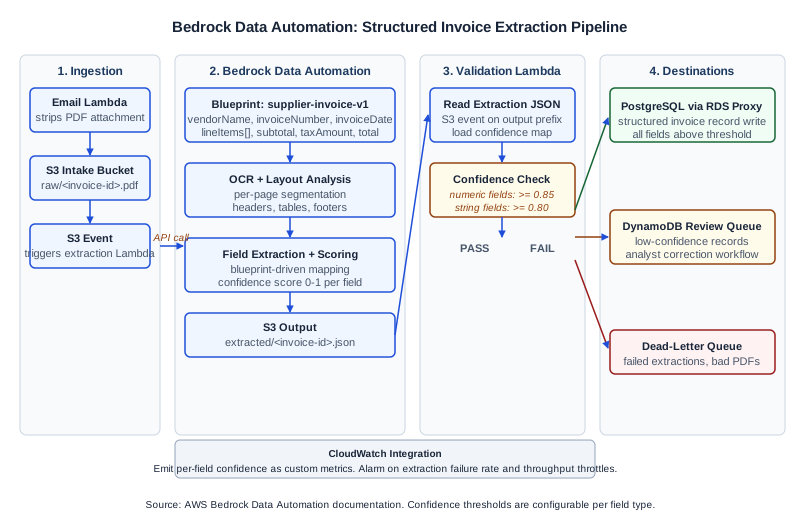
Document ingestion and preprocessing. You upload the source document to an S3 bucket and pass the S3 URI to the data automation API. The service retrieves the document, identifies its format, and runs optical character recognition across each page. For multi-page PDFs, the preprocessing stage also performs layout segmentation so that headers, tables, line items, and footers are identified as distinct regions before field extraction begins.
Blueprint-driven field extraction. A blueprint is a JSON schema that defines the fields you want extracted, their expected data types, and optional extraction hints. The hints can reference document regions, typical labels that appear near the field value, or example values. The extraction model reads the OCR output alongside the blueprint and assigns a candidate value to each defined field.
Confidence scoring. Each extracted field receives a confidence score between 0 and 1. The score reflects the model's certainty about both the value read from the document and the field-to-value mapping. Low-confidence fields are still returned in the response, but your downstream code should route them to a human review queue rather than writing them directly to your database.
Output delivery. The structured JSON is written to a designated output S3 path that you specify in the API call. Your downstream consumer -- a Lambda function, Glue job, or Step Functions state -- polls or subscribes via S3 event notification and processes the output.
Designing an Extraction Blueprint
A blueprint is the most important configuration artifact in a Data Automation workflow. Getting it right determines accuracy more than any other factor.
Each field definition in the blueprint requires at minimum a name and a type. The supported types as of the current API version include string, number, date, and array (for repeating line-item structures). You can optionally add a description hint that helps the model locate the correct region: for example, "total amount due, usually in the bottom-right of the invoice, labeled 'Total' or 'Amount Due'".
For repeating structures such as line items on an invoice, you define an array type field with a nested schema. Each element in the array contains child field definitions for the item columns you need: description, quantity, unit price, and extended amount.
Blueprint calibration requires a sample set of representative documents. The recommended minimum is 20 to 30 documents drawn from the actual distribution your pipeline will process. This is not a training step; Bedrock Data Automation does not retrain a model on your samples. Instead, you use the sample set to run extraction, review the confidence scores and accuracy against known ground truth values, and then adjust your field hints and confidence thresholds to match your acceptable accuracy target.
One common mistake is writing overly generic hints. A hint like "the amount" is too ambiguous for a document that contains subtotal, tax, shipping, and total amounts. Specific hint text such as "invoice total including tax, bottom of document" narrows the extraction region and improves field accuracy.
Worked Example: Invoice Processing Pipeline
Consider a finance team receiving supplier invoices as PDFs via email. The goal is to extract vendor name, invoice number, invoice date, payment terms, line items (description, quantity, unit price, extended amount), subtotal, tax amount, and invoice total into a structured record that is written to a PostgreSQL database table.
Blueprint definition (excerpt):
{
  "blueprintName": "supplier-invoice-v1",
  "schema": {
    "vendorName": { "type": "string", "hint": "supplier or vendor name, usually at top of document" },
    "invoiceNumber": { "type": "string", "hint": "invoice number or invoice ID label" },
    "invoiceDate": { "type": "date", "hint": "invoice date, format varies" },
    "paymentTerms": { "type": "string", "hint": "payment terms such as Net 30 or Due on Receipt" },
    "lineItems": {
      "type": "array",
      "hint": "table of billed items",
      "items": {
        "description": { "type": "string" },
        "quantity": { "type": "number" },
        "unitPrice": { "type": "number" },
        "extendedAmount": { "type": "number" }
      }
    },
    "subtotal": { "type": "number", "hint": "subtotal before tax" },
    "taxAmount": { "type": "number", "hint": "tax or GST/VAT amount" },
    "invoiceTotal": { "type": "number", "hint": "total amount due including tax" }
  }
}
Pipeline flow:
- The email processing Lambda strips the PDF attachment and writes it to
s3://company-invoice-intake/raw/<invoice-id>.pdf. - An S3 event triggers the extraction Lambda, which calls
bedrock-data-automation:InvokeDataAutomationAsyncwith the blueprint ARN and the input S3 URI. - Bedrock Data Automation writes the JSON output to
s3://company-invoice-intake/extracted/<invoice-id>.json. - An S3 event on the output prefix triggers a validation Lambda that reads the JSON, checks that every required field has a confidence score above the configured threshold (0.85 for numeric fields, 0.80 for string fields), and writes passing records to PostgreSQL via RDS Proxy.
- Records with any field below threshold are written to a DynamoDB review queue with the full extraction output and confidence map, so a finance analyst can confirm or correct the low-confidence values before they enter the database.
Accuracy validation against ground truth: To measure accuracy before promoting the pipeline to production, the team selects 50 invoices for which they have manually keyed records. They run the pipeline against those 50 documents and compare each extracted field value against the keyed ground truth. For numeric fields (amounts, quantities) they use a tolerance of 0.01. For string fields they use exact match after lowercasing and trimming whitespace. This gives a per-field accuracy percentage and identifies which field definitions need hint refinement.
A typical first pass yields high accuracy (above 90%) on clearly labeled fields such as invoice number and total, and lower accuracy on fields that vary significantly by vendor format, such as line item descriptions that sometimes span multiple lines. Blueprint hint refinement and adding example documents from low-accuracy vendor formats improves those fields in subsequent validation rounds.
Failure Modes and How to Handle Them
Low confidence on critical fields. If invoice total confidence is consistently below your threshold, the problem is usually a hint that is too generic or a document layout that places the total in an unexpected position. Review the extraction output for the low-confidence documents, identify the actual label text used by that vendor, and add it to the hint.
Array field under-extraction. Line items are the most commonly misextracted field type. The extraction model may miss line items when the table has non-standard column ordering, merged cells, or rows that span a page break. If you observe consistent under-extraction on certain vendors, consider splitting those documents into vendor-specific blueprints.
Date parsing mismatches. Invoice dates appear in many formats: DD/MM/YYYY, Month DD YYYY, YYYY-MM-DD, and mixed abbreviations. The extraction output returns the date as a string; your validation Lambda should normalize all date strings to ISO 8601 before writing to the database, and reject values that cannot be parsed.
Partial document extraction. If the input PDF is password-protected or uses a non-standard encoding, the preprocessing stage may return a partial or empty OCR result. The API response includes an extraction status field. Your orchestration code should check status before processing the output JSON and route failed documents to a dead-letter queue.
Throughput limits. Bedrock Data Automation operates within service quotas for concurrent extractions per account per region. For high-volume batches (thousands of invoices per hour), you need to implement a rate-aware submission loop with exponential backoff on ThrottlingException responses. Verify current quota values in the AWS Service Quotas console for your deployment region, as these limits are subject to change.
Diagnostic Signals
The extraction response includes a processingDetails block that surfaces the extraction status, page count processed, and any per-page warnings. When accuracy is low, the most useful diagnostic is the raw OCR transcript returned alongside the structured output. Comparing the OCR text with the original PDF reveals whether errors originate in OCR (bad scan quality, low-resolution image) or in field mapping (the OCR text is correct but the blueprint hint is not matching the right region).
CloudWatch Logs integration is enabled by default for the Data Automation invocation API. Each invocation writes a log entry with the blueprint ARN, input document key, output key, processing duration, and extraction status. Setting a CloudWatch metric filter on extraction status values allows you to build an alarm for elevated failure rates without instrumenting your application code separately.
For per-field confidence trends, emit the confidence values from your validation Lambda as CloudWatch custom metrics using the field name as a metric dimension. A declining P10 confidence on a specific field (such as invoice total) is an early signal that a new document format has entered your pipeline that the current blueprint handles poorly.
Next Steps
Before deploying to production, complete the following checks: register the blueprint in a version-controlled resource configuration, validate accuracy against a representative ground truth sample of at least 50 documents, implement the confidence-threshold routing to a human review queue, and configure CloudWatch alarms on extraction failure rate and throughput throttles.
For teams building extraction pipelines as part of a broader document intake and RAG architecture, the Ampity LLM and RAG Systems service [/ai/llm-rag-systems] covers the full stack from document ingestion to retrieval-augmented generation and production monitoring.
Primary Sources
- Amazon Bedrock Data Automation, source checked 2026-11-05
- Amazon Bedrock API Reference, source checked 2026-11-05
Related resources
AI Document Intake: Evidence, Exceptions and the Decision to Automate
Decide which document fields can proceed automatically and which need review. Design provenance, confidence evaluation, exception ownership, queue capacity and a controlled boundary between extracted data and business action.
Why Document Confidence Scores Need Field-Level Review
Decide which extracted fields can proceed, which need review and how to test a confidence policy against errors, coverage and reviewer capacity.