Is This Savings Plans Recommendation Still Valid After the Migration?
Check migration cutover, historical lookback, current commitment inventory and excluded queued purchases before treating a Savings Plans recommendation as a usable...
After a migration, check a Savings Plans recommendation's usage window and commitment inventory before using its purchase amount. A recent generation timestamp does not remove old infrastructure or temporary double-running from the selected history. A clean post-cutover window still describes the past, not the demand the organization will have throughout a commitment term.
This article helps platform and FinOps owners decide whether a recommendation is a usable input, needs regeneration or must wait for missing evidence. It focuses on Compute and EC2 Instance Savings Plans recommendation inputs. It does not select a purchase amount, compare every plan type or authorize a purchase. The worksheet is hypothetical; no AWS account was queried and no savings were achieved or estimated for a real workload.
1. Identify the recommendation before interpreting its amount
Save the recommendation identity, generation time, requested plan type, term, payment option, account scope and lookback setting. Include the exact usage interval when available, its source and the capture time. A dashboard screenshot showing a suggested hourly commitment without these fields is not a reproducible decision packet.
The recommendation metadata schema exposes GenerationTimestamp and RecommendationId. These fields identify a generated set; they do not independently prove that every desired usage record or subsequent inventory change was included. If identity or timing is unavailable in the retained evidence, record that gap rather than substituting the screenshot's file date.
The recommendation API separates request parameters, metadata, summary and individual recommendations. It also exposes pagination. Preserve the complete authorized result or clearly identify the selected detail. Do not combine a total from one set with a chart or detail from another generation.
Keep three times distinct: the migration's actual operating change, the usage interval represented by the tool, and generation/capture time. A recommendation generated yesterday can still use a window containing several weeks of retired capacity. Conversely, a migration completed yesterday may not yet have enough representative post-change history to answer the next financial question.
2. Locate cutover and double-running inside the lookback
A migration often has more than one milestone. New capacity may start before traffic moves. Old workers may stop later, while validation jobs, rollback capacity or duplicate processing remain. Record actual resource and workload evidence for those boundaries, not just the release ticket's planned completion date.
Mark each historical interval as old operation, transitional overlap or accepted post-cutover operation. Include temporary components that were intentionally retained. Their charges are real, but their history may not represent the demand the new steady-state design will create. Deleting that history from an explanation would hide migration cost; using it unqualified to justify recurring capacity would answer the wrong question.
Ordinary recommendations expose 7-, 30- and 60-day lookback options in the recommendation API. Purchase Analyzer separately supports choosing a lookback within the last 60 days. Do not invent a custom 12-day ordinary-recommendation parameter merely because a spreadsheet can isolate that interval.
Choose an available window that matches the question, and record its limitations. A shorter post-cutover slice may exclude overlap but miss monthly jobs, seasonal demand or recovery activity. A longer slice may include those cycles while mixing obsolete capacity. Neither duration is universally correct. If no available window represents the accepted workload, the output is an evidence hold, not an instruction to purchase from the least inconvenient chart.
3. Compare historical windows without turning averages into commitments
Consider a fictional 30-day migration history. Day numbers are relative, with half-open intervals: Day 30 is excluded. Assume one consistently defined workload unit, complete hourly records and no changes in its counting rule. These units are not dollars, discounts or AWS billing quantities.
- Days 0–18: old operation produces 10 units per hour.
- Days 18–23: double-running produces 16 units per hour.
- Days 23–30: accepted post-cutover operation produces 6 units per hour.
The values are stipulated to reveal window composition. They are not AWS recommendation output, proof of eligible coverage or a claim that migration reduced equivalent-work cost. The later workload's accepted function and demand would need separate evidence in a real comparison.
| Historical slice | Hours | Workload units | Mean units/hour | Input interpretation |
|---|---|---|---|---|
Whole 30 days, [0,30) | 720 | 7,248 | 10.07 | Mixes old, overlap and post-cutover operation |
Last 12 days, [18,30) | 288 | 2,928 | 10.17 | Still includes five days of double-running |
Last 7 days, [23,30) | 168 | 1,008 | 6.00 | Excludes old/overlap; representativeness still unresolved |
The whole-window total is 18 × 24 × 10 + 5 × 24 × 16 + 7 × 24 × 6 = 7,248. The last-12-day total is 5 × 24 × 16 + 7 × 24 × 6 = 2,928. Dividing by each window's hours produces the means above. The 12-day row is a local comparison, not a request accepted by the ordinary recommendation API.
Notice that shortening the window from 30 to 12 days increases its mean because it concentrates the overlap. “More recent” is not the same as “steady state.” The 7-day slice avoids that problem but does not prove the next month or year. Do not translate its six units into six currency units of hourly commitment.
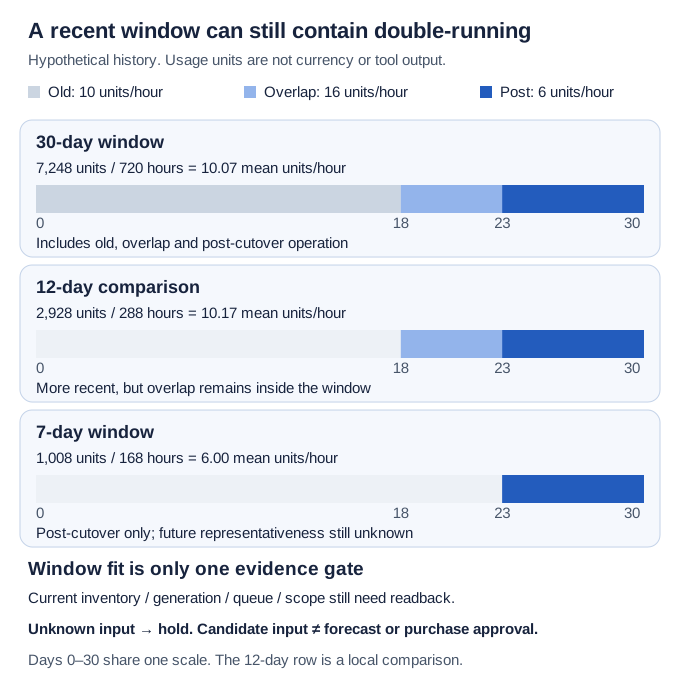
*Stipulated migration history, not tool output. A window selects history; it does not establish future demand, current inventory completeness or a purchase amount.*
4. Reconcile current inventory and purchases outside the model
Treat inventory as another dated input, not an invisible dashboard assumption. Record applicable existing commitments, their owning accounts, types, start/end times, states and the latest material change. The SavingsPlan schema provides those identity/state fields alongside commitment and currency. Keep a queued plan distinct from an active one; do not merge their amounts as though both already cover today's usage.
AWS's recommendation calculation guide calls for refreshing recommendations after a purchase, return or expiry so current inventory and latest usage can be considered. Record evidence of the refreshed result, not merely that someone clicked refresh. A changed generation time is one input to that readback, not proof that every worksheet assumption was reconciled.
Queued or scheduled purchases remain outside the recommendation calculation. They can exist in a real purchase inventory without being represented by the tool's recommended additional amount. Ask the finance or procurement owner for the approved queue and effective dates, including scheduled decisions outside the retrieved account scope. If that evidence is unavailable, mark it UNKNOWN. Do not treat “not present in this recommendation” as “no purchase is scheduled.”
Purchase Analyzer has its own historical-calculation limitations, including excluded queued/scheduled purchases and immediate rather than future purchase analysis. Its option to exclude selected plans expiring within the next 90 days is an analysis setting, not a cancellation or an automatic forecast of the replacement portfolio. Record that setting beside the result before comparing scenarios.
This separation matters around a renewal or migration: historical usage, today's active inventory and a future scheduled purchase can each be accurate while describing different times. Reconcile them in the evidence packet before asking finance to interpret an incremental recommendation. This article does not simulate future application of a queued plan.
5. Keep scope and alternative recommendations consistent
Capture payer versus linked-account scope and the applicable sharing preferences. A workload migration between accounts may change which historical population a result represents. Compare like with like; a lower linked-account recommendation is not a demonstrated reduction in the organization's requirement.
The recommendation calculation guide explains that sharing preferences affect calculations and that management/member-account recommendations have different scopes. It also warns that Compute and EC2 Instance recommendation sets use the same usage and should not be taken together simultaneously. Do not add two alternative recommended amounts into a combined shopping list.
If comparing those alternatives, preserve the same generation context, history, account population, term and payment assumptions where comparable, while retaining each plan's distinct eligibility. A configuration difference can be the reason the output changes, rather than evidence that the migration itself changed demand. Write down what differs before attributing a chart movement to one cause.
The recommendation-details page presents simulated On-Demand cost, coverage and utilization charts. Keep all three together when handing off the result. Those charts are modeled views of the selected history; none is observed utilization of a plan that has not been purchased. A favorable coverage picture does not repair unknown inventory or an inappropriate lookback.
6. Complete the input-validity worksheet
The following rows are hypothetical and NOT EXECUTED. Assume the same selected account population and plan parameters unless a row states otherwise. The question is whether each packet may enter the economic decision process, not whether a purchase should occur.
| Packet | Retained evidence | Disposition | Next owner/action |
|---|---|---|---|
| A: mixed 30-day history | Generation known; [0,30) includes obsolete and overlap operation | Historical replay only; not accepted as steady-state input | Platform owner supplies cutover labels and explains retained cycles |
| B: post-cutover 7-day history | [23,30) complete; current inventory reconciled; queue confirmed empty; scope known | Candidate input, with short-window limitation | Service owner checks periodic/recovery demand; finance owns later economics |
| C: inventory changed | Same history; plan purchase occurred after retained generation | Refresh needed; retain old set for traceability | FinOps owner obtains authorized refreshed result and reconciles inventory |
| D: queued purchase exists | Current active inventory known; scheduled plan effective later | Tool result excludes that future purchase; handoff held | Finance resolves the intended decision date and separate portfolio assumptions |
| E: evidence missing | Generation or queue/sharing evidence unavailable | UNKNOWN; input not accepted | Named evidence owner resolves missing fields without guessing |
Packet B passes a bounded input check, not a forecast or approval. Its stipulated empty queue must have a source in real use. Packet D does not automatically mean the recommendation is wrong for an immediate purchase; it means it cannot alone answer the intended future-portfolio question. Changing the question requires an explicit owner decision.
Retain the original export, parameter record and migration boundaries together. Label observations, synthetic assumptions, calculations and owner judgments separately. Another reviewer should be able to explain why a packet was accepted, refreshed or held without reconstructing the analyst's memory.
Copy this blank record for one real recommendation set. Leave unavailable fields UNKNOWN and assign an evidence owner; do not inherit the fictional packet's assumptions.
Record ID / intended decision date / evidence owner:
Recommendation ID / generation time / capture time / export reference:
Tool / plan type / term / payment option / lookback parameter:
Represented usage interval / timestamp source / completeness gaps:
Actual cutover / overlap start and end / supporting workload references:
Missing periodic, recovery or seasonal demand / service owner:
Payer or linked scope / included accounts / sharing evidence:
Current inventory reference / capture time / states / pagination complete:
Latest purchase, return or expiry / refreshed recommendation reference:
Queued or scheduled purchases / effective dates / finance source or UNKNOWN:
Purchase Analyzer expiry exclusions or other differing settings:
Observed facts / synthetic assumptions / unresolved fields:
Disposition: historical replay / refresh needed / candidate input / HELD:
Reason / next owner and action / limitation carried into economic review:
7. Collect evidence without making a purchase or changing sharing
Use approved billing/usage read access and restrict the exported packet. Account IDs, plan identities, resource names and workload schedules can reveal commercial or operational information. Use aliases in a broadly shared worksheet and keep exact identifiers in its restricted source record. Payload data and customer identifiers are unnecessary for this input check.
Follow pagination when collecting recommendations and the relevant inventory; a first page is not proof of an empty remainder. The DescribeSavingsPlans API supports state filters and a continuation token. Record which states and account context were inspected. Filtering to active plans cannot establish that no queued plan exists.
A denied read, missing generation or uncertain sharing preference is a gap, not zero eligible usage. Do not grant broader privileges, change sharing, alter a scheduled purchase or buy a plan to make the worksheet complete. Request the needed evidence from its authorized owner. Refreshing or running an analysis also needs the appropriate organizational authority; no tool invocation is supplied or performed here.
The local arithmetic fixture checks window totals and hold dispositions only. It cannot reproduce AWS rate application, model eligibility, certify an account inventory or validate the console. A future authorized exercise would need actual retained parameters and results, complete scope, and a comparison that does not claim savings from a hypothetical replay.
8. Hand off a valid input, not a purchase verdict
Close this diagnosis with one of four states: historical replay unsuitable for the intended workload, regeneration required after inventory change, candidate input with declared limitations, or held for missing/out-of-model evidence. Keep the old result and the replacement linked rather than silently overwriting the record.
Start with one recommendation set. Place its history against the migration boundaries, reconcile current and queued inventory, confirm scope and record unresolved fields. That bounded packet is the useful output. A lower suggested amount is not achieved savings, and a recent recommendation is not a demand forecast.
For term, downside, break-even and actual purchase approval, use the compute purchase decision playbook. It owns the economic and operating choice. This article owns whether the tool's inputs are fit to enter that choice.