What an Empty AWS Health Organization View Can Actually Establish
Bound an AWS Health organization search by readiness, account membership, history availability and query evidence before treating an empty result as a complete history.
An empty AWS Health organization search establishes only that no matching record was returned through the inspected path. Before calling it a complete event history, establish feature readiness, account membership, available history, filters and pagination. A central dashboard is not a retrospective guarantee that no relevant event occurred.
There is an important current-source conflict. The viewing guide says organizational view does not record events from before enablement. The enabling guide says historical events created before enablement may take up to 24 hours to appear. Checked October 7, 2026, these statements do not support one universal backfill rule. Treat the disputed historical interval as unresolved until applicable evidence or AWS clarification supports a narrower conclusion.
This article supplies a coverage worksheet for platform and account owners, not an enablement runbook or a monitoring design. All account aliases, relative days and query results in the example are stipulated. No organization was enabled, AWS API called or customer history reconstructed for this article. The method limits a claim about a search; it cannot prove absence of every operational incident.
1. Define the history question before selecting a tab
Write down the account population, event class and period the review needs. “Were any of our resources affected?” is broader than “did the selected account have an open EC2 maintenance event in the requested Region?” A search with open-status filters cannot settle a question that also includes closed events.
Decide which time field the question concerns. The organization event API provides start, end and last-updated time filters, and sorts returned summaries by modification time. Those are not interchangeable with the moment your team first received a notice. Save the actual field/filter rather than inferring it from the display order.
Record public and account-specific events separately. Public service information is not evidence that a particular resource in your account was affected. Likewise, a lack of affected accounts on a public event is not a negative result for a resource test. The worksheet should identify which kind of evidence the reviewer intended to collect.
Keep enablement, event collection and the query as separate observations. A screenshot taken today may show the feature is available, but it does not establish when it first became usable or which historical records were loaded. Do not replace missing configuration history with the date of the screenshot.
2. Check console access and API entitlement independently
Organizational view in the console is available for all AWS Support plans at no additional cost, subject to the required account and permissions. That does not mean every console reader can run the Health API. See the organizational viewing guide.
The current API integration guide names Business Support+, Enterprise Support and Unified Operations. It permits Business, Enterprise On-Ramp or Enterprise Support where the newer plans are unavailable in the Region or the account has not transitioned. An account without an eligible plan receives SubscriptionRequiredException. Preserve the actual account's entitlement; do not generalize a legacy CLI example into a universal access rule.
Permission and entitlement failures are different from a valid empty result. A failed call must stay in the evidence record as a failure. Do not record “zero events” because a wrapper returned an empty list after swallowing an exception. If an approved console inspection is sufficient for the review, use that path rather than buying or enabling an API capability solely to fill this worksheet.
Feature enablement is an organization-level change, not a harmless query prerequisite. This article does not authorize it. An authorized owner must separately assess access, organizational impact and implementation. For API inspection, retain the selected endpoint/signing configuration and response time; the API guide distinguishes current active data from eventually consistent passive data.
3. Separate enabled state from loaded history
AWS documents enablement as asynchronous. Initial account loading can take time, and the enabling page's historical-loading note does not promise an instantly complete event set. A pending or just-enabled view is therefore a poor basis for a broad absence statement.
The organization service-status API returns ENABLED, DISABLED or PENDING and requires the management account. An ENABLED response establishes that reported state, not that every event relevant to your review has been returned or retained. No call is executed by this article.
Record the best available enablement and readiness evidence with its source. A configuration change receipt, later status readback and observed query are three different records. If a historical interval is important, inspect its actual coverage through an approved path and keep the documentation conflict visible. Waiting 24 hours cannot, by itself, certify that the missing history exists or is complete.
For the prospective worksheet, choose a conservatively admitted interval supported by the review packet. That is an operational assumption to be defended, not an AWS default. Keep earlier history outside that admitted interval marked unresolved rather than declaring it absent or unrecoverable.
4. Map each account's membership interval
Accounts do not all share one organization history. The viewing guide says a joining account is added automatically; after an account leaves, new events from it are no longer logged centrally. Existing events remain queryable subject to the documented 90-day limit. Do not turn that limit into a fresh 90-day retention period starting at departure. See AWS's account-boundary description.
For each account alias, collect the join/leave evidence relevant to the requested period. Current membership alone cannot establish that the account was present throughout last month's review. Rejoining, disablement or missing historical configuration requires more than the single uninterrupted interval used in this example.
Inspect available retained history separately. A period inside the membership interval can still lie outside available central history, while a departed account's already-recorded event may remain visible. Do not use “not a member today” as proof that every old event has disappeared.
Missing boundaries should block a complete interval claim. Assign the organization owner the membership/configuration gap and the account owner the account-local evidence gap. Another authorized source may help, such as a previously retained notice or approved event export, but its existence and coverage must be observed. There is no guaranteed fallback that reconstructs every missing event.
5. Use the completed coverage worksheet
Consider a fictional review at Day 60. The requested prospective period is Day 0 through Day 60. Enablement was requested at Day 0, and the review packet admits Day 2 through Day 60 for the selected event class after readiness checks. This is stipulated coverage, not a rule that AWS always needs two days. Day 0 through Day 2 remains unresolved. Assume the chosen short interval is within available history and that the search identity, filters and pagination are independently accepted.
Use half-open intervals for the local worksheet: a join/leave boundary belongs to the new interval, and [10, 60) includes Day 10 but not Day 60. This is a modeling convention, not the AWS API's exact timestamp-boundary contract. Real exports must preserve the service's timestamp semantics.
| Account alias | Stipulated membership | Admitted prospective search interval | Remaining gap / owner |
|---|---|---|---|
| Atlas | Before Day 0 through Day 60 | [2, 60) | [0, 2) readiness/history unresolved; organization owner |
| Birch | Joined Day 10, remains present | [10, 60) | Earlier account history not established centrally; account owner |
| Cedar | Present at Day 0, left Day 45 | [2, 45) | [0, 2) unresolved; later new events need an authorized other source |
| Dune | Join time unknown | No complete interval admitted | Membership evidence missing; organization owner |
| Elm | Present throughout; query stopped on a pagination token | No completed search result accepted | Query evidence incomplete; inspection owner |
Suppose the accepted searches for Atlas, Birch and Cedar return no matches. The supported statement is “no matching record returned for the admitted interval and selected event scope.” It is not “these accounts had no AWS incidents during all 60 days.” Dune and Elm cannot even support that bounded completed-search statement yet.
The arithmetic only intersects stipulated intervals. It does not simulate AWS's event collection, prove the loaded history or create missing records. Repeat the worksheet when the account population, query field, entitlement, retention availability or feature state changes.
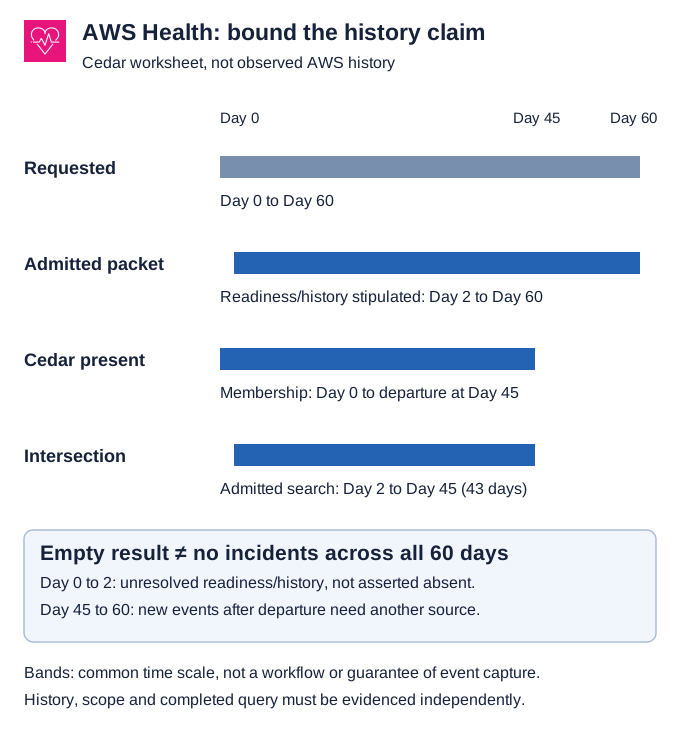
*Coverage intersection for Cedar, not an AWS query result. Historical backfill is unresolved, not asserted absent. A complete query and applicable history must still be evidenced.*
6. Complete the query, then resolve account and entity evidence
The organization events call returns summaries, not the full affected-account or resource inventory. Its nextToken must be followed until the result is complete. Preserve errors and the accepted filter with the observation. A successful first page is not a complete search.
For a returned event, DescribeAffectedAccountsForOrganization distinguishes PUBLIC, whose affected-account list is empty, from ACCOUNT_SPECIFIC; NONE indicates an invalid or nonexistent event. An empty list therefore needs its scope code before interpretation. It is not a universal “no account affected” receipt.
To identify the relevant entities, use the approved event/account scope. The affected-entities API exposes pagination and a failedSet; keep failed branches unresolved. An entity may represent a resource group or another service construct. Do not manufacture an exact instance list from a summary alone.
Query filters minimize the selected records, not the IAM authorization boundary: this operation does not support resource-level permissions for individual Health events. The permission owner must verify the supported action/account context separately; minimize returned/exported data without broadening access to resolve a denied read.
Route evidence to the actual account/service owner, with a minimal event reference and the affected scope. Account identifiers and notice text can reveal operational information. Keep full exports restricted and use aliases in shared planning material. A notice becomes an owned investigation or action only after the relevant resource and response authority are established.
7. Challenge the interpretation without enabling a real organization
A local synthetic packet can test the worksheet logic safely. Include a join after the requested start, a departure before the requested end, an unknown join, a pending readiness record, a query with an unconsumed token, and a public event with an empty affected-account list. Specify the expected disposition before asking a reviewer to interpret it.
The checker should reject the unknown or incomplete cases as complete histories, retain the public/account-specific distinction, and calculate the three known intersections above. It should not generate a missing event to make the timeline look complete. These are proposed interpretation controls, not tested AWS account behavior.
If operational verification requires actual inspection, obtain approved read access and scope it to the intended records. Do not enable trusted service access, grant broader privileges or change Support plans as an incidental “test.” Keep provider-state verification, query execution and local interpretation checks separate in the final report.
8. Finish with an interval claim, not a reconstructed story
The final record should state the requested population and period, admitted interval per account, source/field/filter, feature/readiness evidence, membership evidence, available history, query completion and unresolved gaps. An empty result without that packet is a lead to investigate, not proof of complete absence.
Start with one account and one event question. Fill the missing boundary fields before expanding the conclusion or commissioning automation. Lifecycle funding and response decisions need a separate operating model: this worksheet establishes evidence scope rather than deciding which upgrade or deferral to fund.
No worksheet can guarantee historical reconstruction from records that are unavailable or whose coverage is unknown. The useful result is a bounded search statement, a visible gap and an accountable next evidence request.